DevOps on AWS: Architecture, Tooling, and Best Practices for Scaling Teams
Table of Contents
- What Problems Does DevOps on AWS Actually Solve?
- How Should You Architect DevOps on AWS for Scale?
- Which AWS DevOps Tools and Principles Should You Follow?
- How Do You Know If Your DevOps on AWS Setup Is Working?
- What Small Teams Can Accomplish
- Final Thoughts
- FAQ
Modern engineering teams rarely struggle because they lack AWS services. They struggle because their DevOps setup no longer fits their stage, scale, or risk profile.
What worked when the product was young and the team was small often starts to crack quietly as the organization grows. CI/CD pipelines become fragile. Security reviews slow releases. Infrastructure changes feel risky instead of routine.
Often referred to as AWS DevOps or DevOps on AWS, this operating model focuses on aligning delivery pipelines, infrastructure, and security practices so teams can move faster without increasing operational risk.
In this article, we’ll break down how DevOps on AWS really works in practice — beyond tool lists and buzzwords. You’ll learn:
- Where DevOps on AWS setups commonly fail as teams scale
- How architecture, tooling, and culture reinforce (or undermine) each other
- Which DevOps patterns actually hold up in real AWS environments
- How experienced AWS partners think about DevOps modernization without overengineering
We’ll assume you’re familiar with AWS basics and focus on how DevOps practices help you operate and scale effectively.
What Problems Does DevOps on AWS Actually Solve?
At its core, DevOps on AWS exists to answer a simple but critical question: How do we deliver changes faster without increasing security, reliability, or operational risk?
Most teams don’t fail because they lack automation. They fail because automation grows unevenly. CI/CD pipelines get built organically with no shared standards. Manual steps hide in “temporary” scripts that become permanent. Infrastructure changes are handled differently by each team. Security controls get applied late or enforced manually. Engineers become hesitant to deploy frequently — or at all.
AWS provides powerful building blocks, but AWS does not design your operating model for you. That responsibility sits squarely with the team.
DevOps on AWS is not a single service or framework. It’s an operating model where:
- Infrastructure is defined, versioned, and reviewed as code
- Application delivery is automated end to end
- Security and compliance are embedded into pipelines
- Teams receive fast feedback from monitoring and tracing
- Failure is expected — and designed for safety
The key shift is this: DevOps on AWS treats delivery, reliability, and security as engineering problems — not process problems.
Before going further, it’s worth clearing up what DevOps on AWS is not. It’s not just using AWS DevOps services. While CodePipeline, CodeBuild, and CodeDeploy are valuable, the operating model matters more than the tool stack. Teams can practice strong DevOps principles using GitHub Actions, GitLab CI/CD, or Jenkins integrated with AWS.
DevOps on AWS is also not only for large enterprises. In fact, startups and SMBs often benefit most because automation and Infrastructure as Code let small teams operate like much larger ones without hiring an ops army. And it’s not a one-time migration project — it’s a continuous evolution of practices, tooling, and architecture as the business scales and risk profiles change.
The difference between teams that scale smoothly and teams that struggle isn’t AWS knowledge. It’s operational discipline.
How Should You Architect DevOps on AWS for Scale?
Rather than listing every AWS service, it’s more useful to understand the roles they play in a DevOps-ready architecture — an approach closely aligned with the AWS Well-Architected Framework.
Strong DevOps architectures share common patterns: they treat infrastructure changes like code changes, automate deployment decisions, and provide fast feedback when something goes wrong. Let’s break down the four building blocks that matter most.
Traffic Management and Availability
Services like Elastic Load Balancing, Auto Scaling, and CloudFront are risk buffers. If deployments require manual traffic shifts or late-night scaling decisions, DevOps has already failed.
The goal is making deployments boring enough that engineers deploy during business hours without fear. Mature architectures handle blue/green deployments, auto-scaling, and health-check rollbacks automatically.
Compute and Deployment Targets
Whether workloads run on EC2, ECS, EKS, Lambda, or a mix, the questions remain the same: Can deployments be executed predictably? Can rollbacks happen safely? Can environments be recreated from code alone?
Strong DevOps setups standardize deployment patterns across different compute types. Infrastructure as Code ensures that whether you’re deploying containers or serverless functions, the process is versioned, tested, and repeatable.
We recently helped a B2B tech company migrate to AWS with SOC 2-compliant DevOps. They had fragmented CI/CD workflows causing deployment bottlenecks and compliance pressure. After implementing a multi-account AWS setup with Terraform IaC and automated pipelines, they achieved SOC 2-ready architecture and improved developer velocity.
Data and State Management
Databases and storage systems often become DevOps bottlenecks — not because of performance, but because state is harder to change than code.
Mature setups automate schema migrations, treat backups as tested workflows, and minimize environment-specific drift. The difference between teams that deploy confidently and teams that fear database changes is whether migrations are automated and tested like application code.
Observability as a First-Class Requirement
CloudWatch, X-Ray, and CloudTrail are often enabled but underused. Effective DevOps environments use observability to answer: Did the last deployment improve or degrade performance? Where did errors increase? Who changed what?
Without this feedback loop, CI/CD becomes blind speed.
Teams with mature pipelines embed observability early — deployments trigger dashboards comparing before/after metrics, distributed tracing identifies bottlenecks, and custom metrics track business outcomes. The mistake is treating observability as something to “add later.” By then, it’s nearly impossible to connect deployments to operational impact.
Which AWS DevOps Tools and Principles Should You Follow?
AWS offers a full CI/CD ecosystem — including CodePipeline, CodeBuild, CodeDeploy, CDK, and deep integrations with tools like GitHub Actions, GitLab, and Jenkins. The mistake teams make is debating tools instead of constraints.
Tool selection should follow from your actual operating constraints, not from what’s popular. Better questions: Do we need deep AWS-native IAM integration? How complex are our deployment strategies? Are we in regulated environments? How much operational overhead can we maintain?
In practice, many teams adopt hybrid toolchains — combining AWS-native services where tight integration matters and third-party tools where flexibility is critical.
Decision Framework: Choosing Your Toolchain
Rather than prescribing specific tools, here’s a decision framework based on what matters most to your situation:
| If your priority is… | Consider… | Trade-off |
|---|---|---|
| Deep AWS IAM/security integration | CodePipeline + CodeBuild + CodeDeploy | Less flexibility, tighter AWS coupling |
| Developer experience & ecosystem | GitHub Actions or GitLab CI/CD + AWS integrations | More tooling overhead, better dev familiarity |
| Multi-cloud or hybrid environments | GitLab CI/CD or Jenkins + Terraform | Added complexity, cloud portability |
| Regulated environments with audit requirements | AWS-native stack (CodePipeline, CloudFormation) | Full CloudTrail integration, limited third-party |
| Rapid experimentation and iteration | GitHub Actions + AWS CDK | Flexible but requires discipline to avoid drift |
Core Principles That Make DevOps on AWS Work
Regardless of which tools you choose, successful teams consistently follow a small set of core principles that separate effective DevOps implementations from fragile ones.
Infrastructure as Code is non-negotiable. Whether using CloudFormation, Terraform, or CDK, infrastructure changes must be versioned, reviewed, and reproducible. Manual changes — even “just this once” — create drift that accumulates silently. Strong Infrastructure as Code discipline means all infrastructure lives in version control, changes go through code review, and environments can be destroyed and recreated identically.
Security must be embedded, not added later. IAM policies, secrets management, and vulnerability scanning belong inside delivery pipelines, not in manual approval processes. This DevSecOps approach is standard for teams in regulated or high-risk environments. Security that lives outside pipelines becomes a bottleneck. Security inside pipelines becomes automatic.
Small, reversible changes beat perfect releases. Frequent, low-risk deployments reduce blast radius and make failures survivable. Large, infrequent releases feel safer but are actually riskier — more changes mean more variables when something breaks. Teams that deploy multiple times per day aren’t reckless. They’ve designed systems where small changes can be reverted instantly.
Feedback loops matter as much as automation. Automation helps teams deploy faster, but without clear feedback it can also accelerate mistakes. Strong feedback loops mean dashboards that show deployment impact in real time, alerts tied to business metrics, and deployment gates based on actual system behavior rather than arbitrary wait times.
We recently worked with a fintech company that had accumulated serious security debt through credential and runtime neglect. They had an IAM key active for 1,198 days, deprecated Lambda runtimes creating vulnerabilities, and 20+ critical CVEs including remote code execution flaws. After implementing an AWS Well-Architected Framework Review with automated credential rotation, vulnerability scanning via Amazon Inspector, and quarterly runtime upgrades, they eliminated critical vulnerabilities and achieved compliance alignment.
Security debt compounds like technical debt — except the interest rate is measured in incidents, not developer hours.
How Do You Know If Your DevOps on AWS Setup Is Working?
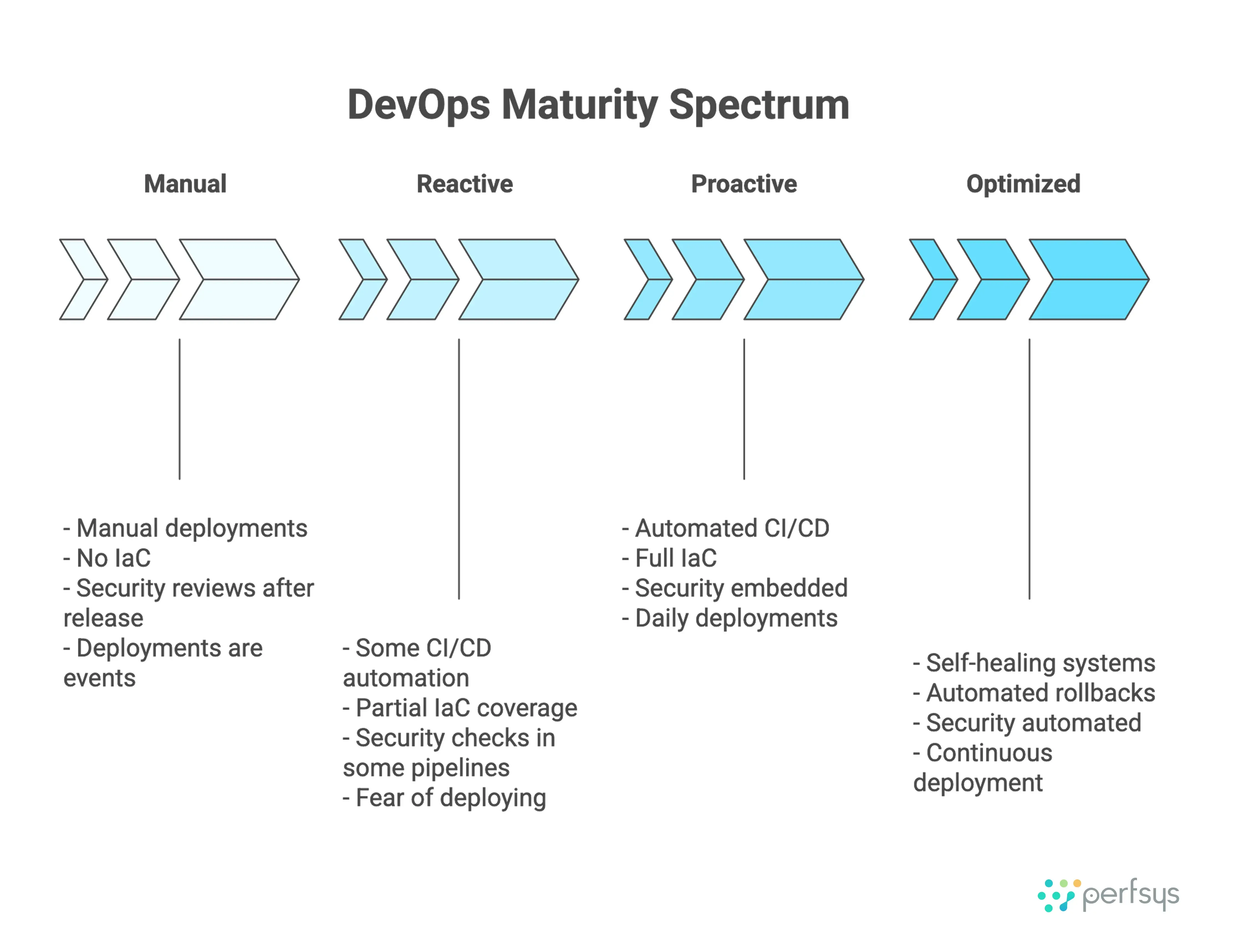
You don’t need a formal maturity model to identify risk. A handful of critical questions reveal whether your DevOps on AWS setup supports your current scale — or whether it’s quietly becoming a bottleneck.
The following questions focus on operational reality rather than theoretical best practices. If your honest answers reveal gaps, you’re not alone. Most teams discover these issues only after they’ve become painful enough to address.
Five Critical Questions That Reveal Your Deployment Maturity
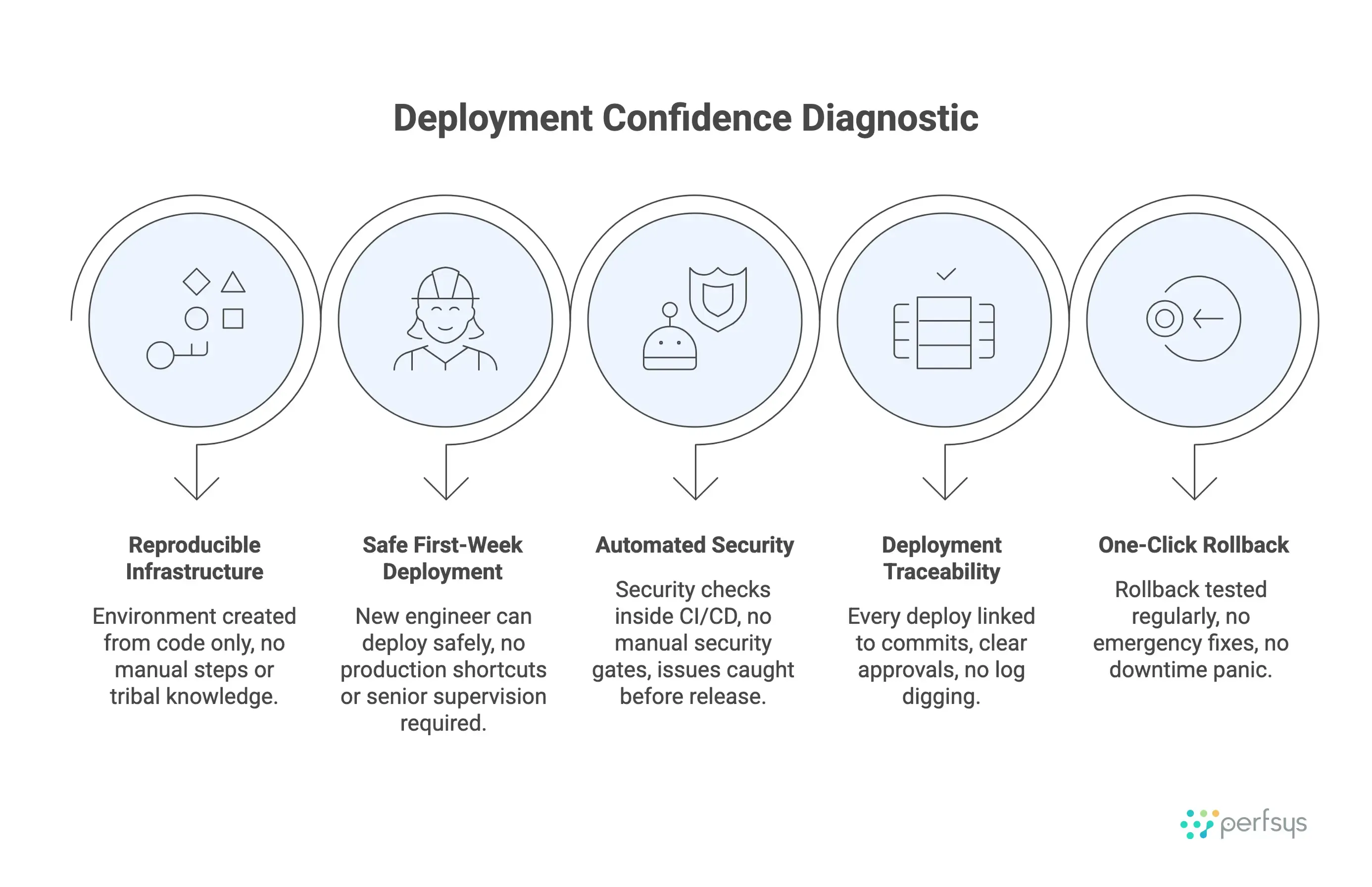
1. Can we recreate any environment from code alone? If the answer involves undocumented knowledge, manual steps, or “it depends,” your Infrastructure as Code isn’t complete. Environments should be reproducible by running a script or pipeline — nothing more. This is the foundation of everything else. Without it, scaling becomes exponentially harder.
2. Can a new engineer deploy safely in their first week? If deployments require deep AWS knowledge, access to production, or a seasoned engineer supervising, your automation isn’t truly automated. New hires should be able to deploy to staging (or even production with approvals) within days, not months. This question reveals whether your deployment process is documented in runbooks or encoded in systems.
3. Are security checks automated or manual? If security reviews happen after code is written or require manual audits before deployments, security is slowing delivery. Automated checks inside pipelines catch issues early without blocking engineers. Manual security gates might feel thorough, but they don’t scale with velocity.
4. Do we know exactly what changed in the last deployment? If answering this question requires asking around, digging through logs, or guessing, your pipeline lacks traceability. Every deployment should tie back to commits, pull requests, and approvals automatically. When something breaks, you need to know what changed immediately — not eventually.
5. Can we roll back without panic? If rollbacks involve emergency meetings, manual database changes, or extended downtime, your deployments aren’t truly reversible. Rollbacks should be one-click (or automatic) and tested regularly. The teams that deploy most confidently are the ones that have proven they can undo changes easily.
If you answered yes to 4-5 questions above, you’re likely experiencing:
- Deployment confidence — engineers deploy during business hours without fear
- Faster feature delivery without increased incidents
- Security and compliance built into workflows, not blocking them
- New engineers are productive within their first sprint
If you answered yes to 1-2, you’re likely experiencing:
- Longer deployment windows than you’d like
- Fear of “breaking things” in production
- Security or compliance slowing releases
- Difficulty onboarding new engineers to deployment processes
The gap isn’t AWS knowledge — it’s operational architecture.
Not sure where to start improving?
We’d be happy to review your current setup in a focused 30-minute conversation — no sales pitch, just honest feedback on what to prioritize first.
What Small Teams Can Accomplish
What small teams can accomplish with strong DevOps principles is often surprising. Infrastructure as Code, automated deployments, and observability aren’t just enterprise capabilities — they’re how small teams punch above their weight.
A small SaaS team at a post-launch virtual assistant platform serving the DACH region automated centralized IAM and SSO across their web platform, ownCloud file system, and Matrix communication tools via Keycloak on AWS EKS in 5 weeks. This let them run 5+ years in continuous production, scale 10× user growth with zero downtime, handle version upgrades from Keycloak v3.1 to v23, eliminate per-user SaaS fees saving hundreds monthly, and maintain sub-second authentication response times without hiring additional ops staff.
The team didn’t have deep AWS expertise when they started. What made the difference was consistency: every environment defined in code, every deployment automated, every change monitored. This let a 2-3 person team handle production operations that would typically require dedicated ops staff — 5+ years of uptime, 10× user growth, and version upgrades from Keycloak v3.1 to v23, all without production incidents.
Final Thoughts
DevOps on AWS is not about chasing best practices for their own sake. It’s about making delivery boring, predictable, and safe — even as systems grow more complex.
When DevOps on AWS is working, the outcomes are clear:
Teams scale without adding ops headcount. Small teams operate infrastructure that would traditionally require dedicated engineers because automation absorbs operational complexity.
Release-related outages decrease significantly. Frequent, small deployments with automated rollbacks mean teams stop fearing deployments and start treating them as routine.
Environments stay synchronized automatically because they’re created from the same code.
Security becomes automatic, not a bottleneck — compliance checks happen inside pipelines, not in manual reviews.
Work becomes sustainable instead of exhausting — deployments happen during business hours, and teams don’t need hero engineers on call to “fix production.”
Teams that get this right don’t move faster because they rush. They move faster because their platforms absorb change instead of resisting it.
If you’re unsure whether your current setup supports where your product and team are headed — or if you’re seeing the warning signs outlined above — getting a second opinion early is often far cheaper than fixing things under pressure later.
We’d be happy to review your DevOps on AWS architecture in a focused 45-minute conversation. No sales pitch, just honest feedback on pipelines, architecture, and security posture. Often, a short conversation surfaces risks and opportunities long before they turn into incidents.
Talk to our team about your DevOps on AWS setup
FAQ
What is the difference between DevOps on AWS and AWS DevOps?
There is no functional difference. DevOps on AWS and AWS DevOps refer to the same operating model — applying DevOps principles using AWS services and tooling. “DevOps on AWS” is often used to emphasize the practice, while “AWS DevOps” is a more common shorthand term.
What problems does DevOps on AWS help solve?
DevOps on AWS helps teams reduce deployment risk, improve delivery speed, and scale infrastructure and processes consistently. It addresses common issues such as fragile CI/CD pipelines, manual infrastructure changes, slow releases, and security controls that don’t scale with the organization.
Which AWS services are most commonly used for DevOps on AWS?
Common services include AWS CodePipeline, CodeBuild, CodeDeploy, CloudFormation or CDK for Infrastructure as Code, and CloudWatch, X-Ray, and CloudTrail for observability. Many teams also integrate third-party tools like GitHub Actions or GitLab alongside AWS-native services.
Is DevOps on AWS suitable for startups and small teams?
Yes. DevOps on AWS is especially valuable for startups and SMBs because it enables automation and reliability without large operations teams. The key is right-sizing the approach — focusing on sustainable automation rather than enterprise-level complexity too early.
When should a team consider AWS DevOps services?
Teams often consider AWS DevOps services when delivery slows down, deployments feel risky, or security and compliance requirements increase. External support can help assess current maturity, standardize pipelines, and design an approach that scales with business growth.
How does DevOps on AWS support security and compliance?
DevOps on AWS embeds security directly into delivery workflows through Infrastructure as Code, IAM policy management, automated checks, and audit logging. This DevSecOps approach reduces manual enforcement and makes security controls repeatable, testable, and scalable. Common implementations include automated vulnerability scanning with Amazon Inspector, secrets management via AWS Secrets Manager, and compliance monitoring through AWS Config and Security Hub.
How much does implementing DevOps on AWS cost?
Costs vary widely depending on team size, workload complexity, and existing infrastructure. AWS DevOps services like CodePipeline and CodeBuild charge based on usage (e.g., per pipeline execution or build minute), often making them cost-effective for startups. The bigger question isn’t tooling cost — it’s ROI. Teams that implement DevOps on AWS typically see faster delivery, fewer outages, and reduced operational overhead, often saving far more than they spend on automation.
Can we implement DevOps on AWS with a small team?
Absolutely. In fact, DevOps on AWS is often most valuable for small teams because automation lets 2-3 engineers operate infrastructure that would traditionally require 10+. The key is starting with the fundamentals: Infrastructure as Code for all environments, automated deployments with rollback capability, and basic observability through CloudWatch dashboards and alerts. You don’t need enterprise-grade complexity on day one. Many successful startups begin with GitHub Actions + AWS CDK + CloudWatch, then expand as they scale.
Cut AWS costs without compromising quality
Up to 40% savings with serverless solutions, audits, and Well-Architected Reviews.