

What Is AWS Free Tier? A 2026 Guide for New Cloud Users
Published on Feb 2, 2026

Creating an AWS Free Tier account takes about ten minutes, but the choices you make right after signup — which email you use, whether you set up billing alerts, whether you lock down the root account — can save you from a surprise invoice weeks later.
This guide walks through the entire process: what you need before you start, the exact account creation steps, and the first things to do once you're logged in. If you are setting up AWS for a company rather than just learning, our AWS consulting team can help you set it up properly from the start.
What Is AWS Free Tier?
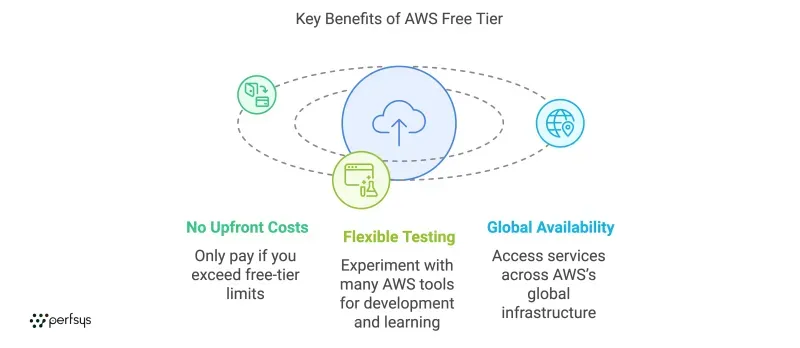
AWS Free Tier is Amazon's program that lets you use cloud services within set limits at no cost. It's not a single offer — it's three distinct programs, and knowing which one covers a service tells you how long your free access lasts.
The Three Types of AWS Free Tier
12-Month Free Trial
When you create a new AWS account, certain services are free for the first 12 months. EC2 gives you 750 hours per month of t2.micro or t3.micro compute. RDS adds 750 hours per month of a db.t3.micro database. S3 provides 5 GB of standard storage. These expire 12 months after account creation, after which you'll pay standard rates unless you stop or delete the resources.
Always Free Services
Some services stay free indefinitely, within usage limits. AWS Lambda gives you 1 million requests and 400,000 GB-seconds of compute time per month. Amazon DynamoDB provides 25 GB of storage and 25 read/write capacity units per month. These don't expire when the 12-month trial ends.
Short-Term Trials
AWS occasionally offers 30-to-90-day trials for newer or specialized services. Check the AWS Free Tier page to see what's currently available in your region.
What You Need Before Creating an AWS Account
You need four things before you start:
- An email address. AWS uses email to verify your identity and send billing alerts. Use a dedicated address — not a personal inbox that gets buried. For team accounts, a shared inbox or alias works well.
- A phone number. AWS sends a verification code during signup. A mobile number works reliably. VoIP numbers sometimes fail.
- A credit or debit card. AWS places a $1 authorization hold to verify the card. This is reversed within a few days. Prepaid cards sometimes fail this step.
- A name and address. Required for the account profile. For business accounts, use the company name and billing address.
That's all. No prior technical experience or existing infrastructure required.
How to Create an AWS Free Tier Account
- Go to aws.amazon.com/free and click Create a Free Account.
- Enter your email address and choose an AWS account name. The name appears in billing statements and IAM policies — pick something recognizable, like your company name or project name.
- Verify your email. AWS sends a six-digit code to the address you entered. Check your spam folder if it doesn't arrive within two minutes.
- Set your root account password. The root account has unrestricted access to every service, billing setting, and configuration in AWS. Use a strong password stored in a password manager. You won't use this account for daily work.
- Choose your account type and enter contact information. Select Personal or Professional. Enter your name, address, and phone number.
- Add payment information. Enter a credit or debit card. The $1 authorization hold is placed here. If it fails, try a different card or contact your bank.
- Verify your phone number. Enter your number and choose voice call or text message. AWS calls or texts a four-digit code. Enter it to confirm.
- Choose a support plan. Basic (free), Developer ($29/month), and Business ($100/month and up) are the options. Select Basic — you can upgrade at any time.
- Sign in to the AWS Management Console. Click Go to the AWS Management Console and sign in with your email and root password. Your account is active.
What to Do Right After Creating Your Account
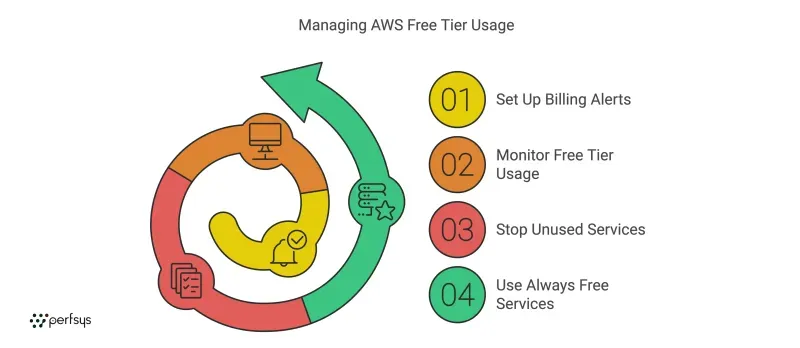
The account exists. Spend 15 minutes on these four steps before you start building anything.
Enable MFA on the Root Account
Multi-factor authentication prevents anyone with only your password from accessing the root account. In the console, go to IAM → Dashboard → Add MFA for root user. Use an authenticator app (Google Authenticator, Authy, or 1Password) rather than SMS — phone-based SIM-swap attacks are a real threat to AWS accounts.
Create an IAM User for Daily Work
Never use the root account for day-to-day tasks. Go to IAM → Users → Add users. Create a user with AdministratorAccess permissions and set up MFA for that user too. Sign out of root and use the IAM user from now on. Root credentials should stay locked away until you need them for account-level operations.
Set Up Billing Alerts
Go to Billing Dashboard → Billing Preferences. Enable Free Tier usage alerts and Receive billing alerts. Then open CloudWatch → Alarms → Create Alarm. Set thresholds at $1, $5, and $10 so you catch overages before they compound.
💡 Pro tip: A $1 alert catches problems within hours. Most accidental runaway costs hit that threshold before anyone notices.
Bookmark the Free Tier Usage Dashboard
The Free Tier Usage Dashboard shows how much of each service you've consumed against the monthly limit. Find it under Billing Dashboard → Free Tier. Check it weekly when you're first experimenting — it's your earliest warning system.
What's Available on AWS Free Tier?
Here are the most commonly used services, along with what the limits actually mean in practice.
EC2: Compute
750 hours per month of t2.micro or t3.micro instances for 12 months. That's enough for one instance running continuously. Run two instances simultaneously and you'll exhaust the allowance in 15 days. Stop instances when you're not actively using them.
S3: Object Storage
5 GB of standard storage, 20,000 GET requests, and 2,000 PUT requests per month for 12 months. Good for static files and learning storage concepts. Note that data transfer out of S3 to the internet counts against the shared 100 GB per month free outbound bandwidth allowance.
RDS: Relational Databases
750 hours per month of a db.t3.micro database for 12 months. MySQL, PostgreSQL, and MariaDB are all covered. Running two databases simultaneously exceeds the allowance by mid-month.
Lambda: Serverless Functions
1 million requests and 400,000 GB-seconds of compute per month, always free. This is the most generous Free Tier allocation relative to what development workloads and small production APIs actually use. Most teams never exceed it.
DynamoDB: NoSQL Database
25 GB of storage and 25 read/write capacity units per month, always free. Suitable for lightweight applications and prototypes that don't require a relational database. Read more how Perfsys became certified in Amazon DynamoDB delivery.
CloudFront: Content Delivery
1 TB of data transfer out and 10 million HTTP requests per month for 12 months. This covers most small websites and APIs comfortably. For a full look at CloudFront costs after the trial, see our CloudFront pricing guide.
What to Watch Out For
Data Transfer Out Costs Money From the First Byte
You get 100 GB per month of free data transfer out across all services combined. After that, it's roughly $0.09 per GB. Downloading files from S3 to your laptop or serving traffic from EC2 both count toward this. It catches people who assume compute or storage free tiers cover bandwidth too.
Elastic IP Addresses Charge When Unused
Elastic IPs (static public addresses) are free while attached to a running instance. If you allocate one and don't attach it — or stop the instance it's attached to — AWS charges $0.005 per hour. That's $3.60 per month for a forgotten IP address.
Some Services Have No Free Tier
SageMaker, Elastic MapReduce (EMR), and AWS Glue charge from the first use. Before enabling a service you haven't used before, check the AWS Free Tier page to confirm whether it's covered.
The 12-Month Clock Starts at Account Creation
The 12-month free trial starts the moment your account is created, not when you first use a service. Create the account today and don't touch it for three months, and you have nine months left when you start building.
When the free tier ends, the question becomes what the same workloads will cost. Perfsys is an authorized AWS reseller, and you can see what that can mean for your bill on our AWS discount page.

Once you understand the basics, planning your cloud architecture becomes critical. Perfsys offers AWS consulting and development services to help teams design scalable, cost-efficient infrastructure.

FAQ
AWS Free Tier is Amazon's program that gives you access to cloud services within usage limits at no cost. It includes three offer types: a 12-month free trial for new accounts covering EC2, S3, and RDS; always free services with no expiry such as Lambda and DynamoDB; and short-term trials for specific features.
Yes. AWS requires a credit or debit card to verify your identity when you sign up. A $1 authorization charge is placed on the card and reversed within a few days. You won't be charged for Free Tier usage as long as you stay within the service limits.
It depends on the offer type. The 12-month free trial runs for 12 months from the date you create your account — not from when you first use a service. Always free services such as Lambda and DynamoDB have no expiry but have monthly usage limits. Short-term trials run for 30 to 90 days depending on the service.
Enable MFA on the root account and set up billing alerts. Root account compromise is one of the most serious AWS security issues, and billing alerts are the only reliable way to catch unexpected charges early. Both steps take under five minutes.
Technically yes, but AWS's terms of service limit Free Tier to one account per customer. Creating multiple accounts to extend the trial violates these terms and AWS can identify and close accounts that appear to be gaming the program.

Quality Assurance Engineer and Project Manager at Perfsys with 3+ years of experience ensuring software reliability and coordinating delivery across cloud-based systems. She works closely with engineering teams on real-world projects, bringing both hands-on testing expertise and project management insight to every topic she covers.
AWS Experts, On-Demand
Need to move fast? Our cloud team is ready to scale, secure, and optimize your systems. Get serverless expertise, 24/7 support, and seamless CI/CD pipelines when you need it most.
Please accept cookies to load the booking widget.