

Amazon CloudFront Pricing 2026: Flat-Rate vs Pay-As-You-Go
Published on Jul 23, 2026

Amazon CloudFront now gives you two ways to pay for content delivery: a flat monthly price with no overage charges, or the traditional pay-as-you-go model. Since the flat-rate plans launched in November 2025, AWS has added Lambda@Edge support, CAPTCHA, mutual TLS and configurable usage tiers on Premium. This guide covers both models with full rate tables, regional breakdowns and the tactics we use to cut CloudFront bills during Perfsys cost audits.
CloudFront cost surprises are one of the most common issues we find during AWS infrastructure audits. Usually the cause is a misconfigured Price Class, an unreviewed pay-as-you-go feature or missing cache optimization.
What is Amazon CloudFront?
Amazon CloudFront is AWS's content delivery network. It routes requests to the nearest of 750+ global edge locations and serves cached content from the edge instead of round-tripping to your origin server. If you're new to CloudFront, our beginner's guide to Amazon CloudFront covers how it works and basic setup before you get into pricing.
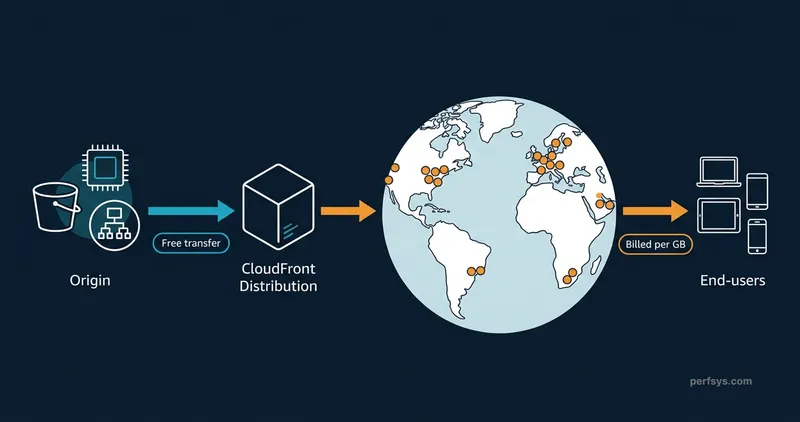
This reduces latency for static assets like images and JavaScript. It also speeds up dynamic content and APIs, since CloudFront keeps persistent connections to your origin over AWS's private network, which is consistently faster than the public internet.
CloudFront integrates natively with S3, EC2, ALB and API Gateway. Data transferred from any of those AWS origins to CloudFront is free. That makes it one of the most cost-efficient CDN setups available once you're already on AWS. If you're still evaluating whether AWS makes sense for your business, our guide to Amazon Web Services for small businesses covers the core services and when they're worth it.
Beyond performance, CloudFront handles SSL/TLS termination at the edge, geo-restriction, DDoS absorption and WAF rule enforcement. All of these now come bundled into flat-rate plans by default.
For a complete look at CloudFront's capabilities beyond pricing, our Amazon CloudFront ultimate guide covers distributions, behaviors, caching, and security in depth.
CloudFront Pricing Models: Three Options
As of 2026, Amazon CloudFront offers three pricing models.
Flat-rate plans. A fixed monthly price that bundles the CloudFront CDN, AWS WAF, DDoS protection, bot management, Route 53 DNS, CloudWatch Logs ingestion, a TLS certificate, serverless edge compute and S3 storage credits. No overage charges, even during traffic spikes or DDoS attacks. Available in four tiers, with Premium now offering configurable usage levels.
Pay-as-you-go. The original model. You pay per GB of data transferred out, per 10,000 requests and separately for each additional feature you enable. More flexible and still the right choice for workloads that need features flat-rate plans don't cover.
Private Pricing Agreements (PPA). Custom rates negotiated directly with AWS for customers committing to 10 TB per month or more over a 12-month term. Best economics at high volume.
CloudFront Flat-Rate Pricing Plans (2026)
Flat-rate plans launched in November 2025 and remain the right starting point for most new distributions. Each plan covers one CloudFront distribution with up to one apex domain.
Plan | Monthly Price | Requests / mo | Data Transfer / mo | WAF Rules | S3 Storage Credits |
|---|---|---|---|---|---|
Free | $0 | 1M | 100 GB | 5 | 5 GB |
Pro | $15 | 10M | 50 TB | 25 | 50 GB |
Business | $200 | 125M | 50 TB | 50 | 1 TB |
Premium | $1,000 | 500M | 50 TB | 75 | 5 TB |
All plans include always-on DDoS protection, a free TLS certificate, CloudFront Functions and Route 53 DNS. Blocked DDoS traffic and WAF-blocked requests never count against your usage allowance. Usage allowances aren't hard limits either. Your first traffic spike, up to 3 times your monthly allowance, is fully accommodated that month with no overage charge. Only sustained excess usage over several months prompts AWS to adjust delivery, and you'll get notified at 50%, 80% and 100% of your allowance well before that happens.
Free Tier vs Flat-Rate Free Plan
These are two separate things and they're easy to mix up. Every AWS account gets a permanent always-free tier: 1 TB of data transfer out, 10 million HTTP/HTTPS requests and 2 million CloudFront Function invocations per month, indefinitely, with no 12-month expiration. The flat-rate Free plan ($0/month) is a different product — it covers one distribution with WAF, DDoS protection, Route 53 DNS, a TLS certificate and 100 GB of plan allowance at no monthly fee. The always-free tier applies across your entire AWS account regardless of which pricing model you use. The Free plan adds the security bundle for a specific distribution on top of that.
What's new since launch
Three rounds of updates have expanded what flat-rate plans support:
- Lambda@Edge and CAPTCHA are no longer blockers. As of March 2026, distributions using Lambda@Edge or AWS WAF CAPTCHA can subscribe to any flat-rate tier. Lambda@Edge invocations are billed at standard pay-as-you-go rates on top of your plan price. CAPTCHA responses configured in your WAF rules are included at no extra charge.
- Mutual TLS is supported. Origin mTLS is available from the Business tier up, letting only your authorized CloudFront distributions connect to your application. Viewer mTLS, which requires clients to present a valid certificate, is available on Premium.
- AI bot visibility is built in. An AI activity dashboard in AWS WAF shows traffic trends, active bots and frequently accessed paths starting at the Pro tier. Bot management controls to block or challenge that traffic are available from Business up through AWS WAF Bot Control.
- Premium scales further. As of May 2026, Premium plan usage allowances are configurable, not fixed. You can choose a usage level from 500M requests / 50 TB at $1,000/month up to 6 billion requests / 600 TB at $10,000/month, all within the same self-service console flow.
See the full feature comparison on the official AWS CloudFront pricing page.
Flat-rate plans still don't support real-time logs (Kinesis-based), Dedicated IP SSL or field-level encryption. If your architecture depends on any of these, stay on pay-as-you-go for that distribution.
In most greenfield projects we set up for clients, the Pro plan at $15 covers everything needed for the first 6 to 12 months of growth. The bundled WAF alone typically justifies the cost compared to enabling it separately on pay-as-you-go.
Which Pricing Model Should You Choose?
Your situation | Best choice |
|---|---|
New distribution, predictable traffic, need CDN and security bundled | Flat-rate plan |
Traffic fits within the always-free tier (under 1 TB and 10M requests/mo) | Pay-as-you-go, free tier covers it |
Need real-time logs or Dedicated IP SSL | Pay-as-you-go |
Need Lambda@Edge or CAPTCHA | Either. Both now work on flat-rate plans |
High-volume workload, committing 10 TB+/mo for 12 months | Private Pricing Agreement |
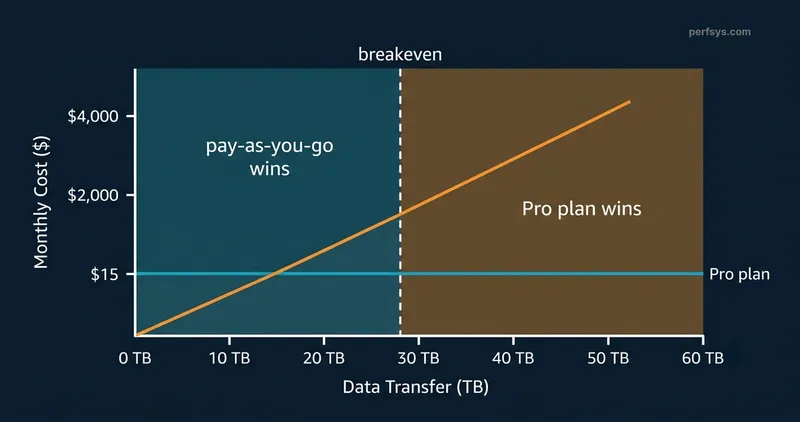
Bandwidth-heavy workload, around 50 TB/mo | Pro plan at $15 saves roughly $4,250 vs pay-as-you-go |
The chart below shows how pay-as-you-go costs scale with data volume while flat-rate plans stay fixed. Use it as a rough visual guide — your actual crossover point depends on your specific mix of data transfer, request volume and add-on features.
CloudFront Pay-As-You-Go Pricing: Full Rate Tables
Pay-as-you-go is CloudFront's traditional model and still the right choice for workloads that need advanced features or have highly variable traffic. Rates below are for the US region unless noted. See the regional breakdown section for other regions, since request pricing in particular varies more than most guides mention.
Cost Component | US Rate | Free Tier | Notes |
|---|---|---|---|
Data Transfer Out | $0.085/GB (next 9 TB), down to $0.020/GB at 5 PB+ | First 1 TB/mo | Largest cost driver for most workloads |
Data Transfer In | Free | Yes | All AWS origin fetches (S3, EC2, ALB) are free |
Requests, HTTP | $0.0075 / 10,000 | First 10M/mo | Europe is $0.0090/10k, not the same as US |
Requests, HTTPS | $0.0100 / 10,000 | First 10M/mo | Europe is $0.0120/10k. About 33% higher than HTTP in every region |
Invalidation Requests | First 1,000 paths/mo free, then $0.005/path | Partial | Plan content updates to stay within the free threshold |
Field-Level Encryption | $0.02 / 10,000 requests | No | On top of standard HTTPS fee. Pay-as-you-go only |
Data Transfer Out to Origin | $0.020/GB (US/EU), up to $0.160/GB (India) | No | Applies to POST/PUT and WebSocket traffic back to origin |
CloudFront Functions | $0.10 / 1M invocations | First 2M/mo | Lightweight JS at edge, best for URL rewrites and header manipulation |
Lambda@Edge | $0.60 / 1M requests plus duration charges | No free tier | Now usable on flat-rate plans too, billed on top of the plan price |
Real-Time Logs | $0.01 / 1M log lines | No | Standard access logs to S3 are free |
Dedicated IP SSL | $600/mo per certificate | No | SNI SSL is free. Pay-as-you-go only |
Origin Shield | $0.0075 / 10,000 requests (US) | No | Centralized caching layer between edge and origin |
Data Transfer Out
Data transfer out is what CloudFront sends from edge locations to your end users. It's typically the largest line item on a CloudFront bill. Pricing is tiered: the more you transfer, the lower the per-GB rate. The first 1 TB per month is always free. After that, US and Europe rates start at $0.085/GB and drop to $0.020/GB at petabyte scale.
Data Transfer In
Data transferred into CloudFront and from any AWS origin (S3, EC2, ALB, API Gateway) to CloudFront edge locations is free. This makes the CloudFront and S3 combination particularly cost-efficient. You pay only for the outbound delivery to your users, not for the origin leg.
HTTP and HTTPS Requests
Every request CloudFront processes incurs a charge, billed per 10,000 requests. This is one spot where treating US and Europe as a single pricing bucket is misleading: data transfer out is priced the same for both regions, but request pricing isn't. In the US, HTTP runs $0.0075/10k and HTTPS runs $0.0100/10k. In Europe, the same requests cost $0.0090/10k and $0.0120/10k. HTTPS costs roughly 33% more than HTTP in every region because of TLS overhead. The first 10 million requests per month are free under the always-free tier.
CloudFront Regional Pricing: Data Transfer Out Rates
CloudFront data transfer costs vary by the region serving your end users. The first 1 TB per month is free everywhere. Rates below are for the next 9 TB tier, the first paid tier most customers hit.
Region | $/GB (next 9 TB) | Notes |
|---|---|---|
US, Mexico, Canada | $0.085 | Cheapest region |
Europe, Israel, Türkiye | $0.085 | Same data transfer rate as US, but requests cost more |
India | $0.109 | |
South Africa, Middle East | $0.110 | |
South America | $0.110 | |
Japan | $0.114 | |
Australia, New Zealand | $0.114 | Most expensive region |
Hong Kong, SE Asia, South Korea | $0.120 |
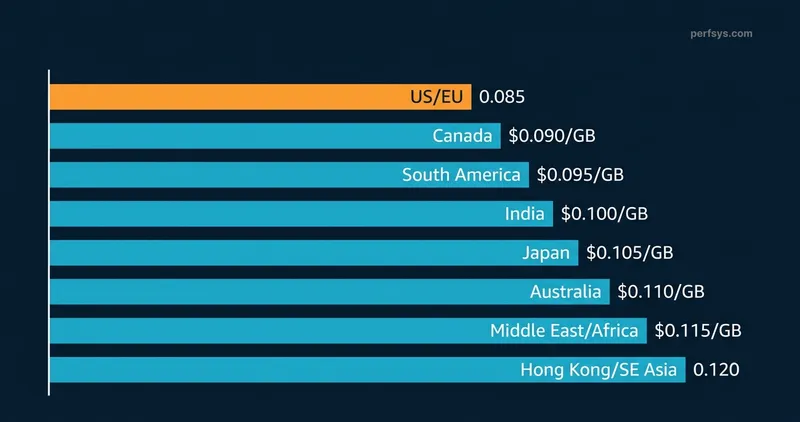
Always verify current rates on the AWS CloudFront pay-as-you-go pricing page, since regional rates are updated periodically.

Grab a free 20-minute call with our AWS team. We'll look at your actual CloudFront traffic and tell you which plan saves you the most, no generic advice, just your numbers.

CloudFront Price Classes: How to Reduce Regional Costs
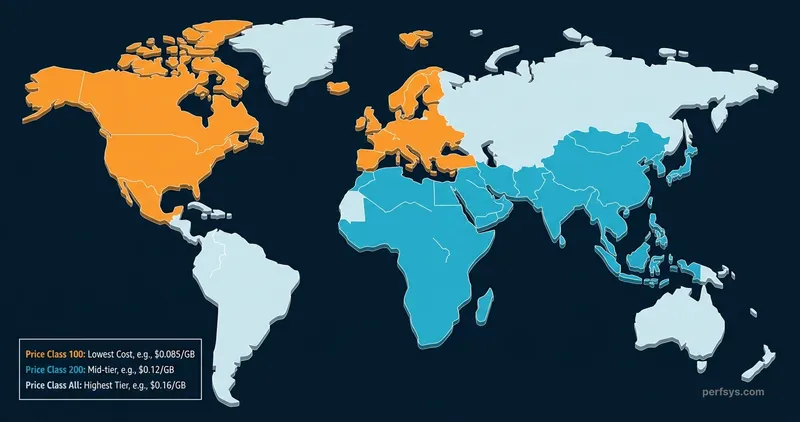
Price Classes let you limit which edge locations CloudFront uses, trading a small amount of latency for lower costs. There are three options.
Price Class All. All global edge locations. Best performance, highest potential cost.
Price Class 200. US, Europe, Middle East, Africa and Asia-Pacific, excluding South America. Useful if you have no meaningful traffic from South America.
Price Class 100. US, Canada, Mexico and Europe only. Caps your per-GB rate at $0.085 regardless of where a request occasionally gets served from.
Price Class misconfiguration is one of the most consistent findings in our AWS Cloud Assessment. We regularly see clients paying Asia-Pacific or South American edge rates for traffic that is 90% or more US and European. It's a one-click fix in the console that can cut a meaningful percentage off a monthly bill right away.
If your analytics show 90% or more of traffic from North America and Europe, Price Class 100 is an easy, low-risk cost reduction. Configure it in the CloudFront console under your distribution settings.
Additional Cost Considerations
Invalidation Requests
When content needs updating or removal from cache, you submit invalidation requests. The first 1,000 invalidation paths per month are free. After that, each path costs $0.005. Batch your invalidations around deployments instead of triggering them individually. A single wildcard path like /images/* counts as one path regardless of how many files it matches.
Field-Level Encryption
Field-level encryption lets you encrypt sensitive data, such as payment details or personal identifiers, at the edge before it reaches your origin. It costs $0.02 per 10,000 requests on top of the standard HTTPS fee. This is a pay-as-you-go-only feature, and it's particularly relevant for workloads subject to GDPR or HIPAA requirements.
Mutual TLS
Origin mTLS restricts your application so only your authorized CloudFront distributions can connect to it. It's included on flat-rate plans from the Business tier up, and it's also available on pay-as-you-go. Viewer mTLS, which requires clients to present a valid certificate before connecting, is available on the Premium flat-rate tier.
Origin Shield
Origin Shield adds a centralized caching layer between CloudFront's regional edge caches and your origin. It reduces duplicate origin fetches, which lowers load on your origin infrastructure. The cost is $0.0075 per 10,000 requests in the US region. As a rough rule of thumb, expect around 10% of your HTTPS requests to reach Origin Shield. At 200M requests per month, that's roughly $15/month in Origin Shield fees.
Lambda@Edge vs. CloudFront Functions
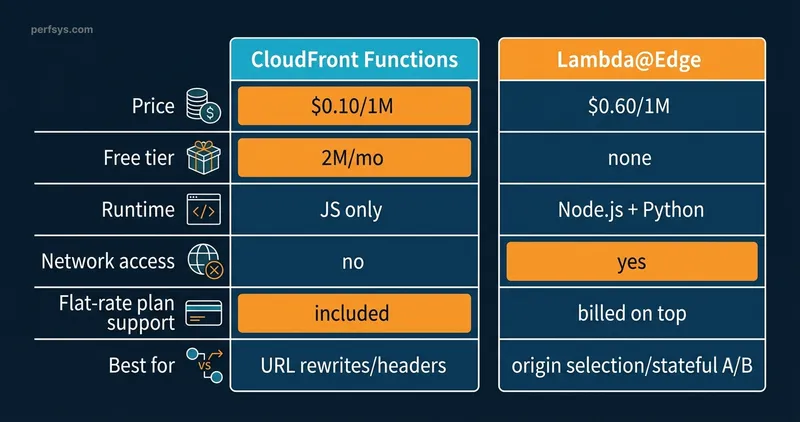
Both let you run code at the edge, but they serve different use cases, and there's a real price gap between them.
CloudFront Functions. $0.10 per 1M invocations. Lightweight JavaScript only. Best for URL rewrites, cache-key normalization and header manipulation. 2M invocations per month are free, and it's included on every flat-rate tier at no extra charge.
Lambda@Edge. $0.60 per 1M requests plus duration charges ($0.00000625125 per 128 MB-second). A full Node.js or Python environment with network access and AWS SDK support. Use it when CloudFront Functions can't handle your logic, such as origin selection or complex request transformation with external state. No free tier. As of March 2026, Lambda@Edge works on every flat-rate plan tier too, with invocations billed at standard pay-as-you-go rates on top of whatever plan price you're paying.
The cost difference is 6 times on requests alone, and it widens further once you add Lambda@Edge duration charges. In our experience, most edge logic that clients initially scope for Lambda@Edge can be handled by CloudFront Functions once the use case is properly defined. Origin selection and complex A/B testing with external state are the main exceptions. If CloudFront Functions can handle your use case, it should.
If you're evaluating Lambda@Edge primarily for HTTP endpoints, AWS Lambda URLs offer a simpler and lower-cost way to invoke Lambda directly — worth comparing before committing to edge compute.
Estimating Costs with the AWS Pricing Calculator
The AWS Pricing Calculator lets you input expected data transfer volumes, request counts, edge compute usage and region distribution to get an estimated monthly cost. It supports both flat-rate and pay-as-you-go scenarios.
Run multiple scenarios. Model your average month, your peak month and a DDoS-spike scenario. The difference between flat-rate and pay-as-you-go often becomes clear around 5 to 10 TB per month of data transfer.
Best Practices for Cost Optimization
CloudFront Security Savings Bundle
If you're on pay-as-you-go with consistent month-to-month usage, the CloudFront Security Savings Bundle gives you up to 30% off your entire CloudFront bill in exchange for a one-year monthly spend commitment. The discount applies to all usage types: data transfer, requests, CloudFront Functions and Lambda@Edge. It also includes free AWS WAF usage up to 10% of your committed amount. For teams with predictable traffic who aren't ready to switch to flat-rate plans, this is typically the first recommendation we make after a CloudFront cost audit. It requires no architecture changes and no migration risk, just a spend commitment you'd likely make anyway.
Cache Optimization
Proper cache configuration is the highest-leverage cost lever on pay-as-you-go. Every cache hit means one fewer origin fetch and one fewer billable request to your backend. Set appropriate TTLs on your objects: long TTLs for versioned assets like images and JS bundles with hashed filenames, shorter TTLs for HTML. Use cache control headers rather than relying on CloudFront defaults. Monitor your cache hit ratio in the CloudFront console under Reports & Analytics → Cache Statistics. A ratio below 80% usually means objects are missing a cache key setting, Vary headers are too broad or TTLs are too short. Each percentage point of improvement in cache hit ratio reduces origin fetches and billable request counts proportionally.
Use Price Classes Strategically
If your audience is concentrated in the US and Europe, switching to Price Class 100 immediately caps your data transfer rate at $0.085/GB. Check your CloudFront access logs or analytics for the geographic distribution of your traffic before making this change.
Enable Compression
Enable Gzip and Brotli compression in your CloudFront distribution under the behavior settings — there is no per-compression charge. CloudFront compresses objects before delivering them to end users, which reduces the volume of data transferred and directly lowers your data transfer bill. Brotli achieves roughly 15–25% better compression than Gzip on text-based content like HTML, CSS and JavaScript. Compression works on any object that CloudFront can compress and the viewer's Accept-Encoding header supports.
Use Versioned URLs Instead of Invalidations
Instead of invalidating /images/logo.png when you update a file, use versioned or content-hashed filenames such as /images/logo-v2.png or /images/logo.a3f9b2.png. CloudFront treats it as a new object and serves it immediately from the next cache fill — no invalidation request needed. This eliminates invalidation costs beyond the free 1,000 paths per month and is particularly valuable for CI/CD pipelines that deploy frequently. Reserve manual invalidations for emergency removals where you can't rename the file.
Monitoring and Budget Alerts
Set up AWS Budgets with alerts at 80% and 100% of your expected monthly CloudFront spend. If you're on a flat-rate plan, keep an eye on the usage notifications AWS sends at 50%, 80%, and 100% of your allowance too. They won't trigger a charge, but they're the earliest signal that it's time to consider upgrading a tier. For deeper spend analysis, AWS Cost Explorer lets you break down CloudFront costs by distribution, region and usage type — filter by the CloudFront service and group by Usage Type to see exactly which components (data transfer, HTTPS requests, invalidations) are driving your bill across multiple distributions.
Conclusion
Amazon CloudFront pricing in 2026 offers more flexibility than when flat-rate plans first launched. A $0/month Free plan includes WAF and DDoS protection for small workloads. A $15/month Pro plan provides 50 TB of data transfer, worth roughly $4,250 at pay-as-you-go rates. And Premium now scales all the way to 6 billion requests and 600 TB per month for a self-service price, closing the gap that used to send larger customers straight to custom pricing conversations. Pay-as-you-go remains fully available for workloads that need real-time logs, Dedicated IP SSL or field-level encryption.
The right choice depends on your traffic volume, feature requirements and tolerance for billing variability. Use the AWS Pricing Calculator to model your specific workload before committing to a model.
If you need help architecting a cost-efficient CloudFront setup as part of a broader AWS infrastructure, the Perfsys team can help.
TL;DR
- The always-free tier — 1 TB of data out and 10M requests per month — applies to every AWS account indefinitely, regardless of which pricing model you use.
- The flat-rate Free plan ($0/month) is a separate product that adds WAF, DDoS protection and Route 53 DNS for one distribution. Both can be active at the same time.
- The Pro plan at $15/month covers 50 TB of data transfer, worth roughly $4,250 at pay-as-you-go rates. It's the right starting point for most new distributions.
- Flat-rate plans now support Lambda@Edge, CAPTCHA and mutual TLS as of March 2026. They still don't support real-time logs, Dedicated IP SSL or field-level encryption.
- Price Class 100 is the fastest cost reduction available if your audience is US and Europe-focused — one console change, no architecture work.
- Enable Brotli compression, use content-hashed filenames instead of invalidations and monitor your cache hit ratio in CloudFront console to cut pay-as-you-go costs without any infrastructure changes.
Our AWS Cloud Assessment finds the misconfigured Price Classes, unreviewed features and missing cache rules that are driving your costs up.
FAQ
Amazon CloudFront is AWS's content delivery network. It securely delivers data, videos, applications and APIs to end users globally by routing requests to the nearest edge location, reducing latency and offloading traffic from your origin servers. At Perfsys, CloudFront is one of the most frequently recommended services when we help startups reduce origin load and improve time to first byte on their AWS-hosted applications.
Yes. CloudFront has a permanent always-free tier: 1 TB of data transfer out, 10 million HTTP/HTTPS requests and 2 million CloudFront Function invocations per month, every month, with no 12-month expiration. There's also a flat-rate Free plan ($0/month) that adds WAF, DDoS protection, Route 53 DNS, and 100 GB of data transfer for a single distribution. For most early-stage startups we work with, this covers CloudFront costs entirely until they reach meaningful traffic scale.
US/Canada/Mexico and Europe/Israel/Türkiye are the cheapest for data transfer out, both at $0.085/GB. Requests are a different story: US request pricing ($0.0075 HTTP / $0.0100 HTTPS) is actually cheaper than Europe ($0.0090 / $0.0120). Australia and New Zealand are the most expensive for data transfer at $0.114/GB. Use Price Class 100 to limit serving to US and Europe if that's where your audience is concentrated.
On pay-as-you-go, pricing is based on data transfer out (per GB, tiered by volume and region), HTTP/HTTPS requests (per 10,000), and additional features like edge compute, real-time logs and Origin Shield. On flat-rate, you pay a fixed monthly price per distribution regardless of traffic volume, with Premium letting you choose a specific usage level. If you're unsure which model fits your workload, our team can run the numbers for you.
Flat-rate plans bundle CDN, WAF, DDoS protection, DNS, and edge compute into one monthly price with no overage charges. Since March 2026, they also support Lambda@Edge, CAPTCHA and mutual TLS. They still don't support real-time logs, Dedicated IP SSL or field-level encryption. Pay-as-you-go gives you access to every CloudFront feature, but costs vary month to month based on usage. We recommend flat-rate for most client projects where predictable billing matters, which now covers a wider range of workloads than it did at launch.
The highest-impact tactics are switching to a flat-rate plan if it fits your workload, enabling the CloudFront Security Savings Bundle for up to 30% off pay-as-you-go, using Price Class 100 if your traffic is US/Europe-focused, enabling Gzip/Brotli compression to reduce data transfer volume and maximizing cache hit ratios to reduce origin fetches and billable requests.
No. Data transfer into CloudFront is free. Data transferred from any AWS origin (S3, EC2, ALB, API Gateway) to CloudFront is also free.
Yes. HTTPS requests cost roughly 33% more than HTTP in every region due to TLS processing overhead. Since virtually all modern web traffic is HTTPS, use the HTTPS rate as your default when estimating costs.
No, and this changed in May 2026. Premium now offers configurable usage levels starting at 500M requests and 50 TB per month for $1,000, scaling up to 6 billion requests and 600 TB for $10,000 per month. You choose your level in the CloudFront console and can change it at any time.

CEO & Founder @ Perfsys | Serverless architect with 10+ years of hands-on experience designing cloud-native architectures on AWS, backed by multiple AWS certifications. His writing bridges deep technical expertise with real-world business strategy, covering topics from AWS best practices to scaling tech-driven organizations.
AWS Experts, On-Demand
Need to move fast? Our cloud team is ready to scale, secure, and optimize your systems. Get serverless expertise, 24/7 support, and seamless CI/CD pipelines when you need it most.
Please accept cookies to load the booking widget.