

What is Amazon CloudFront? A Beginner's Guide to AWS CDN
Published on May 21, 2025

Amazon CloudFront is a Content Delivery Network (CDN) service from Amazon Web Services (AWS). It delivers your website's content (images, videos, APIs and files) faster to users around the world by caching that content at servers physically close to them.
If you've just started exploring AWS, or you're wondering whether CloudFront is the right tool for your project, this guide covers the basics: what it is, how it works, what it's good for and when to use it.
Last updated: September 30, 2026
Looking for the full technical deep-dive? Read our Amazon CloudFront Ultimate Guide →
What is a Content Delivery Network (CDN)?
A Content Delivery Network (CDN) is a network of servers distributed across the globe. When someone visits your website, instead of their request traveling all the way to your origin server (which might be in a single data center in Virginia, for example), the CDN serves a cached copy of your content from a server much closer to them.
The result: faster load times and lower server load. Every user gets a better experience, wherever they are in the world.
CDNs are particularly useful for:
- Delivering static content: images, CSS, JavaScript, fonts
- Streaming video and other media files
- Distributing software updates or large downloads
- Reducing latency for users far from your origin server
Amazon CloudFront is AWS's native CDN, and it's what most teams on AWS use to solve these problems. If you want a broader introduction to how CDNs work before diving into CloudFront, read our What is a CDN? guide first.
How Does Amazon CloudFront Work?
CloudFront operates through a global network of Edge Locations: AWS data centers positioned around the world. Here's what happens when a user requests content from your site:
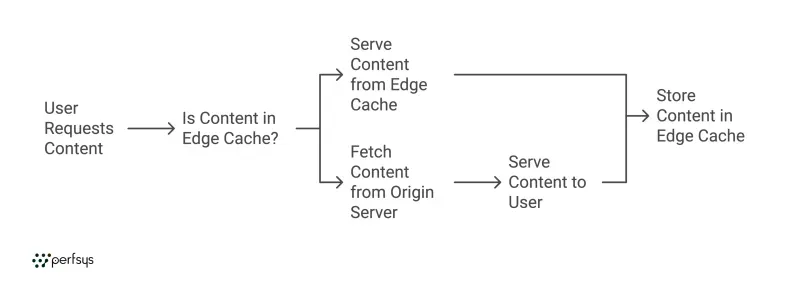
1. Edge Cache check
CloudFront checks whether the content is already cached at the Edge Location nearest to the user. If it is, it serves it immediately with minimal latency.
2. Origin Fetch
If the content isn't cached yet, CloudFront retrieves it from your origin server (an S3 bucket, EC2 instance, load balancer or any custom HTTP server), serves it to the user, and stores a copy at the edge for future requests.
3. Global Distribution
All subsequent requests for that content from nearby users come from the edge cache, and your origin stays out of it. This continues until the cache expires, based on the TTL (Time to Live) rules you configure.
The practical effect: a user in Helsinki and a user in Tokyo both get your content from a server close to them. Nobody waits on one central data center.
Key Features of Amazon CloudFront
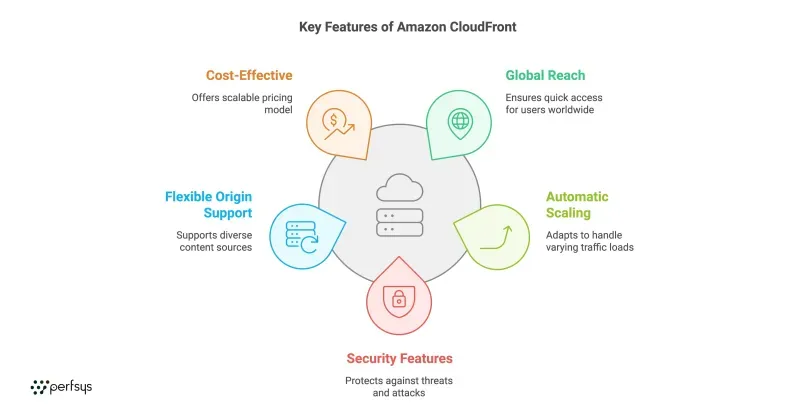
Global Reach
CloudFront runs on 750+ Points of Presence across 100+ cities in 50+ countries, plus 1,140+ embedded Points of Presence inside ISP networks. Content reaches users everywhere with minimal delay.
Automatic Scaling
CloudFront scales automatically with your traffic: no capacity planning, no pre-provisioning. It handles steady traffic and sudden spikes equally well.
Security Features
CloudFront integrates natively with AWS Shield (DDoS protection), AWS WAF (application firewall) and AWS Certificate Manager (free SSL/TLS certificates). Your content is encrypted in transit and protected at the edge before threats ever reach your origin.
Flexible Origin Support
Your origin can live anywhere. CloudFront works with S3 buckets, EC2 instances, load balancers, API Gateway endpoints and any custom HTTP/HTTPS server, including servers outside of AWS entirely. This makes it a viable Amazon CDN option even for hybrid architectures.
Cost-Effective Pricing
CloudFront gives you two ways to pay. Pay-as-you-go bills for data transferred and requests made, with no upfront cost and no minimum commitment. Flat-rate plans, launched in November 2025, bundle CloudFront with AWS WAF and Route 53 DNS for a fixed monthly price with no overage charges. Plans run from Free at $0 to Premium at $1,000 a month. Every AWS account also gets an always-free tier of 1 TB of data transfer out and 10 million requests per month, with no 12-month limit.
For a full breakdown of costs by region and use case, see our CloudFront Pricing Guide →
Benefits of Using Amazon CloudFront
1. Faster Load Times
Serving content from an edge server close to the user reduces the physical distance data travels, which directly reduces page load time. This matters for user experience and for SEO. Google measures page experience through Core Web Vitals such as LCP, and edge caching shortens TTFB, which gives LCP a head start.
2. Reduced Origin Server Load
Every request served from the edge cache never hits your origin. During a traffic spike such as a product launch or a seasonal sale, CloudFront absorbs the load so your backend doesn't have to.
3. Enhanced Security
CloudFront acts as a protective layer in front of your infrastructure. DDoS attacks are absorbed at the edge. WAF rules block malicious bots and injection attempts before they reach your application. SSL/TLS encryption is handled end-to-end.
4. Scalability Without the Work
You don't run or maintain the CDN infrastructure. AWS manages the global edge network; you configure a distribution and point it at your origin. Scaling happens automatically.
5. Cost Savings
Data transfer out via CloudFront Edge Locations is typically priced lower than equivalent data transfer directly from EC2 or S3 in most regions. Combined with reduced origin load, CloudFront generally lowers total infrastructure spend for content-heavy applications.
6. Better SEO via Core Web Vitals
Page speed feeds into Google's page experience signals. Edge caching shortens TTFB (Time to First Byte), which helps LCP (Largest Contentful Paint), one of the Core Web Vitals. Better scores support stronger organic search performance.
Common Amazon CloudFront Use Cases
Static Website and Asset Delivery
Pair CloudFront with an S3 bucket to serve a static website or deliver CSS, JS and image assets globally. Origin Access Control (OAC) ensures your S3 bucket is never directly exposed to the public internet.
Video Streaming
CloudFront supports on-demand video (HLS, DASH) and live streaming, delivering consistent playback performance to viewers worldwide regardless of connection speed or device.
API Acceleration
CloudFront can cache API responses at the edge and route dynamic requests over AWS's optimized backbone, reducing API latency for applications with global users.
Software and File Distribution
Deliver installers, firmware updates and large binaries at scale without straining your origin. CloudFront handles high volumes of concurrent downloads efficiently.
E-Commerce
Faster product images, JS bundles and checkout flows. Geo-restriction capabilities help with regional compliance. Signed URLs protect time-limited or personalized content.
SaaS Applications
For SaaS products with customers across multiple regions, CloudFront reduces application latency and ensures consistent performance, without building multi-region infrastructure from scratch.
Is Amazon CloudFront Right for You?
CloudFront is the natural choice if you're already building on AWS. The integration with S3, EC2, Lambda, WAF, Shield and Route 53 is native, so you can skip stitching together third-party tools.
If your stack is not AWS-based, alternatives like Cloudflare may be worth evaluating. If you want predictable billing on AWS, CloudFront now offers flat-rate plans too. For AWS workloads, especially those involving S3, API Gateway or serverless architectures, CloudFront is typically the right starting point.
"Building a marketplace on top of AWS requires more than picking the right services. It requires an architecture that can isolate clients cleanly, deploy consistently across environments, and stay cost-efficient while the customer base is still growing."
— Eugene Orlovsky, CEO at Perfsys
See how this plays out in practice: Tibica: Serverless Cloud Marketplace on AWS
If you're not sure whether CloudFront is the right fit for your architecture, Perfsys AWS consultants can review your setup and recommend the right approach.
Quick Setup Overview
Getting started with CloudFront typically takes around 15 minutes:
- Open the CloudFront Console in your AWS account
- Click Create Distribution and set your origin (S3 bucket, EC2 instance or custom URL)
- Choose a pricing plan (Free, Pro, Business or Premium) or stay on pay-as-you-go
- Set your Viewer Protocol Policy to redirect HTTP to HTTPS
- Attach an ACM SSL certificate for your custom domain
- Deploy: propagation across all Edge Locations takes 5 to 15 minutes
- Point your domain at your *.cloudfront.net distribution domain with an ALIAS record in Route 53, or a CNAME record at another DNS provider
For detailed configuration steps, including cache behavior settings, Origin Access Control for S3, TTL rules and Lambda@Edge, see the full setup guide in our Ultimate Guide (linked below).
💡 Pro tip: Lambda@Edge lets you run functions at CloudFront edge locations, so you can customize content delivery with redirects or auth checks without routing requests back to your origin. CloudFront Functions is a lighter, lower-cost option for simple request and response changes. Lambda@Edge is billed pay-as-you-go even on flat-rate plans. Both are covered in the Ultimate Guide.
FAQ
Within limits, yes. Every AWS account gets an always-free tier of 1 TB of data transfer out and 10 million HTTP/HTTPS requests per month, with no expiration. A flat-rate Free plan ($0 a month) adds AWS WAF and DNS for one distribution, with 1 million requests and 100 GB of data transfer. Beyond those allowances, you choose pay-as-you-go or a paid flat-rate plan. You can check the official AWS CloudFront pricing page for the latest numbers by region, or see our Pricing Guide (linked below) for a full regional breakdown.
Yes. CloudFront supports any HTTP/HTTPS origin, including servers outside of AWS. You don't need to run your infrastructure on AWS to use CloudFront as your CDN.
CloudFront includes end-to-end SSL/TLS encryption, AWS Shield Standard for automatic DDoS protection, AWS WAF for application-layer filtering, geo-restriction controls and signed URLs/cookies for private content access. You can read more in the AWS CloudFront security documentation.
Amazon S3 is an object storage service: it stores your files. CloudFront is a CDN that caches and distributes those files globally at low latency. They're commonly used together: S3 stores the assets, CloudFront delivers them to users worldwide.
CloudFront is AWS's native CDN with deep integration across the AWS ecosystem: S3, Lambda@Edge, WAF, Shield, ACM and Route 53. Cloudflare is an independent platform that works with any infrastructure stack. For AWS-native workloads, CloudFront is generally the stronger choice.
Amazon CDN is a common way to refer to Amazon CloudFront, which is AWS's content delivery network service. CloudFront is the only CDN product offered natively by AWS.
A CloudFront distribution is the configuration unit you create when setting up CloudFront. It defines your origin server, cache behavior rules, SSL certificate and access controls. Each distribution gets a unique *.cloudfront.net domain that you can map to your custom domain via DNS.
Conclusion
Amazon CloudFront is AWS's content delivery network. For teams building on AWS, it's the most integrated and straightforward CDN available. It caches your content at 750+ Points of Presence worldwide, which protects your origin from traffic spikes and attacks and delivers faster load times to users everywhere. You can pay as you go or pick a flat-rate plan, and an always-free tier lets you start at no cost.

Setting up CDN correctly the first time saves you cost and headaches later. Perfsys AWS consultants help SMBs and startups get their AWS infrastructure right from the start.


Ex-Software Engineer at Perfsys focused on building reliable, well-tested features across the product's frontend and backend.
AWS Experts, On-Demand
Need to move fast? Our cloud team is ready to scale, secure, and optimize your systems. Get serverless expertise, 24/7 support, and seamless CI/CD pipelines when you need it most.
Please accept cookies to load the booking widget.