

AWS vs Azure vs GCP: Which Cloud Platform Should You Choose?
Published on May 2, 2025

Choosing between AWS, Azure and Google Cloud takes more than a feature checklist. The three platforms overlap on core services such as compute, storage, databases and networking, but they diverge on pricing models, ecosystem fit, AI capabilities and hybrid cloud support. This guide breaks down the real differences so you can match them to your actual workload.
Last updated: September 30, 2026
Why Compare AWS, Azure and Google Cloud?
Choosing the right cloud provider matters for businesses and developers alike. Each platform offers the core cloud services: storage, compute and databases. They vary significantly in pricing, services and user experience.
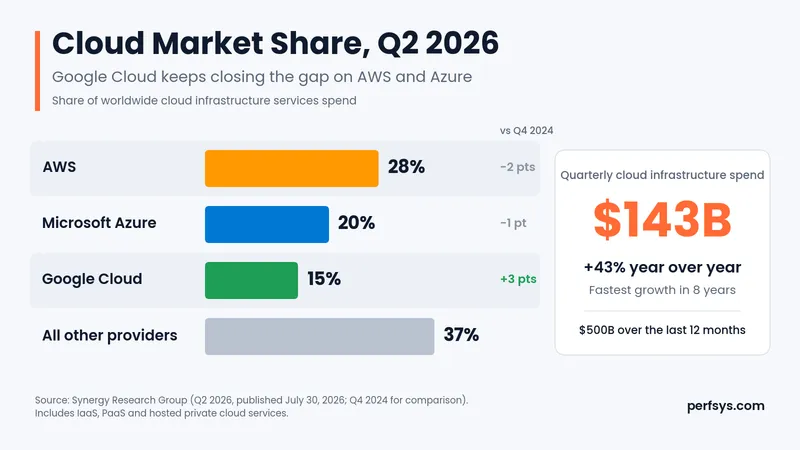
Source: Synergy Research Group, Q2 2026. Q4 2024 comparison figures come from the Statista chart of the same Synergy data.
Quick Comparison Table
Feature | AWS | Microsoft Azure | Google Cloud Platform |
|---|---|---|---|
Market Share | 28% of the market (Q2 2026), the largest globally | 20% of the market, strong in enterprise integration | 15% of the market, known for data analytics and AI |
Best For | Versatile services across industries | Hybrid cloud and Microsoft integration | Data-heavy applications and AI |
Strengths | Extensive service range | Integration with Microsoft products | Strong in AI and machine learning |
Pricing Model | Pay-as-you-go with Savings Plans | Pay-as-you-go with Reservations and Savings Plans | Pay-as-you-go with Committed Use Discounts |
Main Users | Startups to large enterprises | Enterprises using Microsoft products | Data-driven tech companies |
Key Differences Between AWS, Azure and Google Cloud
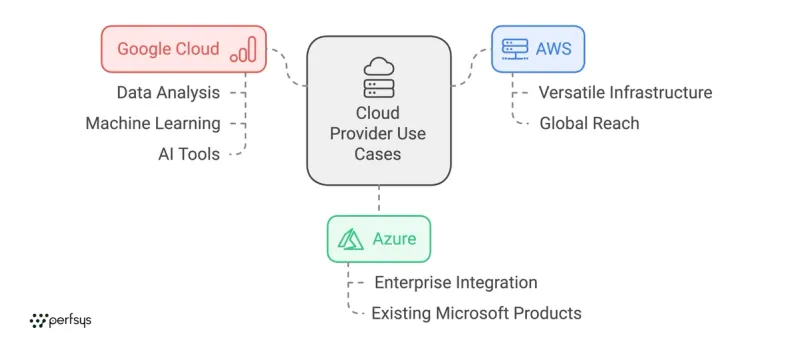
1. Market Share and Popularity
AWS: Launched in 2006, AWS still holds the largest share of the cloud market, at 28% in Q2 2026 according to Synergy Research Group. It's known for its extensive service offerings and global reach.
Azure: Microsoft's cloud platform is a strong second with 20% of the market. It's popular with large enterprises and hybrid cloud setups thanks to tight integration with Microsoft products.
Google Cloud: Google Cloud is third with 15% and is widely adopted by tech companies focused on data, AI and machine learning.
Market share matters beyond brand recognition. AWS launched in 2006, several years before Azure and Google Cloud reached general availability, and that head start means a larger pool of engineers, more third-party tooling integrations and more community documentation. For startups especially, that ecosystem depth reduces the time your team spends solving problems others have already solved.
2. Available Services
Each platform offers a wide range of services, but here's a quick breakdown:
AWS: Provides the broadest selection of services, from general-purpose computing (EC2) and storage (S3) to specialized tools for machine learning (SageMaker), generative AI (Bedrock) and IoT (IoT Core).
Azure: Known for its hybrid cloud capabilities, Azure integrates tightly with Microsoft tools like Microsoft 365 and Entra ID, which makes it a natural fit for organizations already invested in the Microsoft ecosystem.
Google Cloud: Excels in big data, analytics and AI services, with BigQuery for data warehousing and Gemini models on its Gemini Enterprise Agent Platform (formerly Vertex AI).
3. Pricing Models
Pricing in cloud computing can vary significantly. Here's how each provider handles costs:
AWS: Offers pay-as-you-go pricing, plus Savings Plans and Reserved Instances that cut on-demand rates by up to 72%. Spot Instances add a further discount for interruptible workloads.
Azure: Also provides pay-as-you-go pricing, with Reservations saving up to 72% and Savings Plans up to 65%. Azure Hybrid Benefit lowers costs further if you already own Microsoft licenses.
Google Cloud: Offers pay-as-you-go pricing and Committed Use Discounts of up to 55% (70% for memory-optimized machines). Sustained use discounts of up to 30% still apply automatically, but only to older machine families such as N1 and N2, and newer series like C3 or N4 miss out.
One thing all three providers understate: data transfer costs. Compute and storage rates look competitive until you factor in egress fees when moving data out of the cloud or between regions. Model your data transfer volumes before locking into a provider. This is where estimated monthly bills most often diverge from actual invoices.
💡 Pro tip: All three providers offer free starter credits. AWS gives new accounts up to $200 in credits over 6 months. Azure gives $200 for 30 days. Google Cloud gives $300 for 90 days. If you're evaluating providers for a new project, run a proof of concept on those credits before committing to a long-term discount.
4. Best Use Cases for Each Cloud Provider
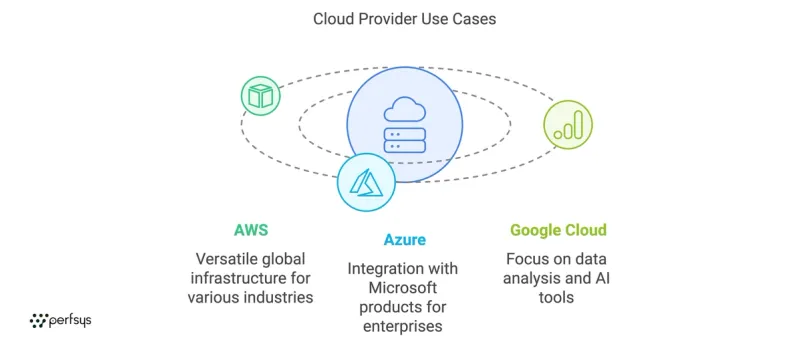
AWS: Suited for a wide range of industries and applications. Ideal for startups to large-scale enterprises needing a versatile, global cloud infrastructure.
Azure: Perfect for enterprises already using Microsoft products, looking to integrate with existing infrastructure.
Google Cloud: Best for organizations focused on data analysis, machine learning and AI, with a strong suite of analytics tools.
One factor the use case descriptions above can't capture: your team's existing knowledge. Moving to a platform your engineers don't know adds ramp-up time to any project, and that time has a cost. On-demand prices for equivalent VMs sit within about 5% of each other across the three providers, so a team that already knows one platform often gains more by staying than by chasing a small price gap.
FAQ
There's no single answer, because it depends on your workload type. For general-purpose compute, a 4 vCPU, 16 GB VM costs about $140 to $147 a month at on-demand rates in US regions (AWS m7i.xlarge, Azure D4s v5 and GCP n2-standard-4). List prices sit within about 5% of each other. Commitments change the picture: AWS and Azure offer savings of up to 72% through Savings Plans and Reservations, while Google Cloud's committed use discounts reach up to 55% (70% for memory-optimized machines).
Always model your specific workload before committing. Sticker prices for standard compute sit close together, so the real gaps come from commitment discounts, data transfer fees and storage tiers. Google Cloud's automatic sustained use discounts apply only to older machine families, so newer instances need a committed use discount to save.
Each provider leads in a different way. Google Cloud has the deepest AI research roots, with Gemini models, TPUs and BigQuery ML on its Gemini Enterprise Agent Platform (formerly Vertex AI). AWS offers the broadest managed catalog: SageMaker covers model training and deployment, and Amazon Bedrock gives you foundation models from several vendors behind one API. Microsoft Foundry (formerly Azure AI Foundry) brings OpenAI models and enterprise tooling into the Azure ecosystem.
If your team builds custom models and wants cutting-edge AI primitives, Google Cloud is a strong starting point. If you want managed, production-ready AI services that plug into your existing cloud setup, Amazon Bedrock and SageMaker on AWS or Microsoft Foundry on Azure are more practical choices.
Azure is the clear leader for hybrid cloud. Azure Arc lets you manage on-premises servers and Kubernetes clusters, including those in other clouds, from a single control plane. The tight integration with Microsoft Entra ID, Windows Server and Microsoft 365 makes it the default choice for enterprises already running Microsoft infrastructure.
AWS offers AWS Outposts for running AWS services on premises, which works well but requires dedicated hardware. Google Cloud covers hybrid Kubernetes through GKE Enterprise and Google Distributed Cloud, the successors to Anthos. For most enterprises evaluating hybrid setups, Azure's ecosystem advantage is hard to match unless you're running a non-Microsoft stack.
Azure has the widest geographic reach, with more than 70 datacenter regions across 33 countries, according to Microsoft. Google Cloud lists 43 regions and 130 zones, and AWS operates 39 regions with more than 120 Availability Zones. Providers count regions and zones differently, so check the locations you actually need before you compare totals.
For data residency requirements in specific countries, check each provider's region map before choosing. Norway is one example: Azure operates a region there, while AWS and Google Cloud have none, so Norwegian residency rules can point you toward Azure.
Yes. This is called a multi-cloud strategy, and it's increasingly common among mid-size and enterprise companies. The main reason is avoiding vendor lock-in: running workloads across two providers means you depend less on one provider's pricing, uptime or roadmap.
In practice, multi-cloud adds operational complexity. You'll need tooling to manage costs, security policies and deployments across both environments. It works best when each provider handles what it does best. For example, Google Cloud can run data pipelines and BigQuery analytics while AWS hosts application infrastructure and serverless workloads. Getting the architecture right from the start matters here, because the wrong split creates duplication costs and erases any savings.
It depends on the size and complexity of your infrastructure. A straightforward lift-and-shift of a small application can take a few weeks. A full migration of a production environment with databases, authentication systems and multiple services typically runs 2 to 4 months.
The database migration step is usually the trickiest part. Moving live data without downtime requires careful sequencing. AWS Database Migration Service (DMS) handles much of this, but it needs proper planning to avoid data loss or extended cutover windows. Our complete guide to AWS DMS covers how the process works in detail, including replication strategies and common failure points to avoid.
All three providers publish SLAs guaranteeing 99.9% to 99.99% uptime per service, but outages do happen. AWS has had notable incidents in us-east-1, Azure has had identity service outages, and GCP has experienced networking disruptions.
Trusting any single provider's uptime guarantee blindly is a risk, so architect for failure. That means deploying across multiple Availability Zones within a region, using health checks and auto-scaling and, for critical workloads, considering cross-region failover. A well-designed cloud setup on any of the three providers is significantly more resilient than on-premises infrastructure.
Start with your existing stack. If your team runs Windows Server and Microsoft 365, Azure removes significant friction. If you're building on open source and prioritizing flexibility, AWS has the widest service catalog and the largest talent pool. If data analytics and AI are core to your product, GCP's tooling is worth the learning curve.
Beyond technology fit, factor in the compliance certifications you need and which provider your engineers already know. Plan for cost management as you scale, too. The wrong choice at the architecture stage is expensive to undo.
If you'd like to see what this looks like in practice, the my-vpa case study shows how a company moved from fragmented identity infrastructure to a unified AWS setup, cutting IAM costs by 90% in the process. For a structured assessment of which provider fits your workload, Perfsys offers AWS consulting and migration services to help you decide with data from your own workload.
Conclusion
Choosing between AWS, Azure and Google Cloud depends on your specific needs. AWS is the go-to for diverse service options and global reach. Azure is best for hybrid cloud setups and Microsoft integration. Google Cloud excels in data and AI-driven applications.
Evaluate each platform against your current technology stack and business goals, and run the numbers for your own workload before you commit. For a step-by-step view of moving workloads, read our AWS Cloud Migration guide.

Getting the architecture decision right from the start saves months of costly rework later. Perfsys is a certified AWS Select Tier Services Partner that helps startups and SMBs evaluate, migrate and build on AWS with hands-on engineering.


Quality Assurance Engineer and Project Manager at Perfsys with 3+ years of experience ensuring software reliability and coordinating delivery across cloud-based systems. She works closely with engineering teams on real-world projects, bringing both hands-on testing expertise and project management insight to every topic she covers.
AWS Experts, On-Demand
Need to move fast? Our cloud team is ready to scale, secure, and optimize your systems. Get serverless expertise, 24/7 support, and seamless CI/CD pipelines when you need it most.
Please accept cookies to load the booking widget.