

AWS DMS Database Migration Service: How It Works & When to Use It
Published on Jun 2, 2026

If you’re moving databases to AWS, you’ve probably already run into the question: can we just use AWS DMS Database Migration Service and handle this ourselves, or do we need outside help? Good question. And the honest answer is: it depends on what you’re migrating and what state your infrastructure is in.
This article walks you through how AWS DMS works, when it’s the right tool for the job, and when the complexity of your migration calls for a different approach. If you would rather have a team plan the move, see our Application Migration to AWS service.
What Is AWS DMS Database Migration Service?
AWS DMS - Database Migration Service is a managed cloud service that moves databases to AWS with minimal downtime. It supports migrations between the same database engine (homogeneous) and between different engines (heterogeneous), and it can keep your source database fully operational during the move.
That last part matters a lot. In most real-world migrations, you cannot afford to take a database offline for hours while data transfers. DMS solves that with continuous data replication: it captures changes from the source in real time and applies them to the target until you’re ready to cut over.
How AWS DMS Actually Works
AWS DMS uses three main components working together:
- Replication instance. This is the compute layer. An EC2 instance that DMS provisions to run your migration tasks. You choose the size based on your data volume and transformation requirements.
- Source and target endpoints. These define where data comes from and where it goes. DMS supports over 20 source and target combinations: PostgreSQL, MySQL, Oracle, SQL Server, MongoDB, Amazon Aurora, Amazon Redshift, and more.
- Migration tasks. Each task defines what gets migrated, how, and when. You can run a full load, ongoing replication, or both at the same time.
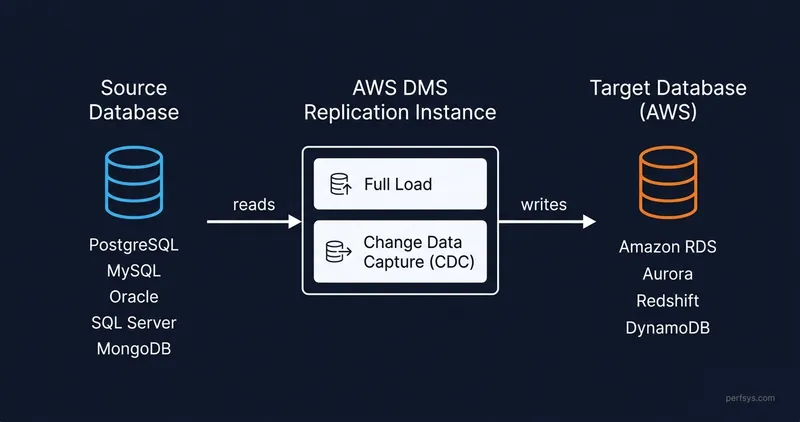
The typical flow looks like this: DMS connects to your source database, reads the existing data, loads it into the target, then switches to Change Data Capture (CDC) mode. CDC tracks every insert, update, and delete on the source and mirrors those changes on the target in near real time. When you’re ready to switch over, the target is current, and you flip the connection.
👇🏻 Here’s a breakdown of the three migration task types DMS supports:
Full Load
Migrates all existing data from source to target in one shot. No ongoing sync. Use this when you can afford a brief downtime window, or when you’re migrating a database that isn’t actively written to.
Full Load + CDC
The most common approach for production systems. Migrates existing data first, then captures and applies ongoing changes until you cut over. This is how you achieve near-zero downtime.
CDC Only
Skips the initial full load. Use this when you’ve already loaded the data by another method (like a native backup/restore) and only need DMS to handle ongoing changes.
Homogeneous vs Heterogeneous Migrations
This is the first thing to figure out, because it determines how much complexity you’re dealing with.
Homogeneous Migration (Same Engine)
You’re moving from PostgreSQL to PostgreSQL, MySQL to MySQL, Oracle to Oracle. The schema and data types are compatible, so DMS can handle the move without transformation.
This is the simpler scenario. DMS does the heavy lifting: replicates data, handles CDC, and lets you cut over when ready.
A common example in cloud-to-cloud migrations is moving from Azure Database for PostgreSQL to Amazon RDS for PostgreSQL. The engines match, so you’re mostly dealing with network connectivity and schema validation, not schema conversion.
Heterogeneous Migration (Different Engines)
You’re moving from Oracle to Amazon Aurora PostgreSQL, or from SQL Server to MySQL. The schemas are incompatible. Data types don’t map one-to-one. Stored procedures, functions, and views need to be rewritten.
This is where AWS Schema Conversion Tool (SCT) comes in, and where things get significantly more complex.

Grab a free 20-minute call with our migration team. Tell us your source, your target, and your timeline, we'll tell you honestly whether DMS on its own gets you there or where you'd need extra hands.

AWS DMS vs. AWS Schema Conversion Tool (SCT): What’s the Difference?
These two tools are almost always used together in heterogeneous migrations, but they do completely different things.
AWS Schema Conversion Tool (SCT) handles the structural layer. It converts your source database schema to the target database format. It translates object definitions, data type mappings, and where possible, converts stored procedures and triggers. SCT gives you a report showing what it converted automatically and what requires manual intervention.
AWS DMS handles the data layer. Once the schema is in place on the target (either created by SCT or manually), DMS moves the actual data and keeps it in sync.
The practical sequence for a heterogeneous migration:
- Run SCT to convert the schema and identify what needs manual work.
- Review and fix the objects SCT flagged.
- Deploy the converted schema to the target.
- Configure DMS endpoints and replication instance.
- Run a full load task to migrate existing data.
- Enable CDC to capture ongoing changes.
- Validate data consistency between source and target.
- Cut over when the target is confirmed current and correct.
💡 Pro tip: Don't skip the SCT assessment report before starting a heterogeneous migration. It tells you the percentage of code that can be converted automatically versus what needs manual work. If the manual effort is high, your timeline needs to reflect that. Not the time DMS takes to transfer data. The manual work is always what takes longer.
Main Use Cases for AWS DMS
On-Premises to AWS
You’re moving a database that lives in your data center to Amazon RDS, Aurora, or another AWS managed database service. DMS handles the replication over a Direct Connect link or VPN. The primary complexity here is network throughput and latency during the initial load.
Cloud to Cloud (Azure or GCP to AWS)
This is the most common pattern we see at Perfsys. Companies outgrow their initial cloud setup on Azure or GCP, or decide AWS fits their stack better, and need to move their databases as part of a broader infrastructure migration.
In our Azure-to-AWS migration for a B2B software company, we replaced Cosmos DB (Gremlin) with Amazon RDS for PostgreSQL. Because the engines were completely different, this wasn’t a pure DMS task. We had to redesign the data model before any data moved. DMS handled the transfer once the target schema was ready, but the actual migration work happened in the architecture phase.
The company migrated 27 cloud applications in 2 months. The database migration was one piece of that, and it required a different approach than someone moving PostgreSQL to PostgreSQL would need.
Continuous Replication
DMS isn’t only for one-time migrations. Some teams use it for ongoing replication to analytics databases, disaster recovery targets, or read replicas across regions. The CDC capability makes this practical without custom replication infrastructure.
Database Consolidation
Multiple databases into one. Multiple schemas that need to merge. DMS supports multi-source migrations, though the complexity of data mapping and conflict resolution grows quickly.
What DMS Does Well (and Where It Falls Short)
AWS DMS is genuinely good at what it was designed for: moving relational data between compatible systems with minimal downtime. When the source and target engines match, the setup is straightforward and the replication is reliable.
Where it gets complicated:
Large binary objects (LOBs). Tables with large columns (BLOBs, CLOBs, large text fields) slow DMS down significantly. Full LOB mode preserves data accurately but at a real performance cost. Limited LOB mode is faster but truncates data above a certain size. You need to audit your schema before you decide which mode to use.
Heterogeneous schema complexity. SCT converts a lot automatically, but complex stored procedures, proprietary SQL syntax, and non-standard data types require manual work. The more your source database relies on engine-specific features, the more rewriting you’ll do.
Data validation. DMS has a built-in validation feature that compares row counts and some data checks between source and target. It’s a useful starting point, but it’s not a substitute for application-level testing. We’ve seen cases where row counts matched but data integrity issues only surfaced when the application ran against the new database.
Network configuration. DMS runs in your VPC. Getting connectivity right between the replication instance, source, and target is tricky, especially in cross-cloud or hybrid scenarios. It requires careful security group and routing configuration. Mistakes here are quiet: the task simply fails or stalls without obvious error messages.
How to Know If You Need an AWS Partner for Your Database Migration
AWS DMS is a powerful tool. It's also a tool that rewards teams who have done this before.
If you're evaluating a database migration as part of a larger cloud migration initiative, our AWS Cloud Migration guide walks through the entire 4-phase migration process, including how databases fit into the broader infrastructure move.
Here are the signs that a migration is more complex than a standard DMS setup:
Your source database uses engine-specific features heavily. If your Oracle database is full of complex PL/SQL, or your SQL Server relies on linked servers and SQL Agent jobs, the SCT conversion report will tell you how much manual work you’re looking at. That work is usually underestimated.
You’re migrating multiple databases as part of a larger infrastructure move. When database migration is one piece of a broader cloud migration (moving applications, setting up new networking, rebuilding CI/CD), the coordination and sequencing matter as much as the technical steps. Getting them wrong means rollbacks, downtime, and frustrated teams.
Compliance requirements are part of the project. If your migration needs to satisfy SOC 2, HIPAA, or ISO 27001 requirements, the database move is one piece of a larger compliance story. Encryption in transit, key management, and audit logging all need to be set up correctly from the start. Access controls too. This is a separate discipline from migration. Perfsys covers it under AWS Security & Compliance as part of the overall project scope.
You can’t afford data loss or extended downtime. The theory of near-zero downtime migrations is sound. The practice depends on how well the replication is configured, monitored, and validated. An experienced team has seen failure modes that aren’t in the AWS documentation.
At Perfsys, we’ve run migrations ranging from straightforward RDS moves to full Azure-to-AWS platform migrations with 27 applications and multiple database engines. The technical complexity varies enormously, and the right answer for your team depends on your specific stack, timeline, and risk tolerance.
If you’re evaluating whether your migration is the kind you can run in-house with DMS or the kind that needs a structured plan and external expertise, our team is happy to talk through it. No sales pitch. Just a straight conversation about what your migration actually involves.
Getting Started with AWS DMS: Practical Steps
If you’ve assessed your migration and DMS is the right tool, here’s how to approach the setup:
- Audit your source database first. Understand your data volume, table sizes, LOB columns, and any engine-specific objects. This shapes every decision that follows. If you’re not sure where to start, DMS Fleet Advisor is a free AWS tool that scans your on-premises or cloud database servers and builds an inventory of schemas, dependencies, and migration complexity before you touch anything. For a broader infrastructure view, an AWS Cloud Assessment maps what needs to happen before any data moves.
- Run SCT if you’re doing a heterogeneous migration. Get the conversion report before you plan your timeline. The manual remediation work needs time.
- Size your replication instance correctly. Undersizing the replication instance is the most common performance issue. For large data volumes, start with a larger instance class and scale down after the initial load.
- Configure VPC and security groups before creating endpoints. Test connectivity between your replication instance, source, and target before you start any tasks. DMS connectivity errors are easier to diagnose when nothing else is running.
- Run a test migration on a non-production database first. Validate the full process: load, CDC, cutover, before touching production data. Measure how long the initial load takes. That number tells you your cutover window.
- Set up CloudWatch monitoring on your replication tasks. DMS publishes metrics for replication lag, table load state, and full load progress. Monitoring these during the migration gives you early warning of issues.
- Validate data at the application level, not just in DMS. Run your application against the new database in staging before cutting over production. Row count checks are a starting point, not a finish line.
AWS DMS Pricing: What You'll Actually Pay
AWS DMS pricing has three components: the replication instance, storage, and data transfer. The replication instance is almost always the biggest number on the bill. Let's go through each.
Replication Instance Cost (On-Demand)
You pay per hour, from the moment you provision the instance until you stop it. AWS DMS supports T2, T3, C4, C5, C6i, R4, R5, and R6i instance classes.
For most migrations, you'll start with a T3 or C5:
- T3 instances are the low-cost option. Good for testing, smaller databases, and migrations that don't need sustained high CPU. The catch: T3 runs in unlimited burst mode, so if your migration pushes CPU above the instance baseline for an extended period, you'll be charged extra CPU credits at $0.075 per vCPU hour.
- C6i and R6i instances are the right choice for large databases where you need to minimize migration time. More expensive per hour, but they get the job done faster and don't have the burst credit complexity.
Multi-AZ doubles the instance cost roughly, but gives you automatic failover if the replication instance fails mid-migration. For production cutovers where a failure would be genuinely painful, it's worth it.
You can estimate your specific instance costs using the AWS Pricing Calculator before you commit to anything.
DMS Serverless
AWS also offers DMS Serverless, which removes the need to provision and size an instance yourself. Instead, you pay per DCU-hour (one DCU equals 2GB of RAM), and DMS scales capacity automatically based on your workload. The current Serverless rate is approximately $0.094 per DCU-hour.
Serverless works well for homogeneous migrations and situations where you're not sure how to size a provisioned instance. The tradeoff: DMS Serverless does not support continuous replication after the migration is complete. If you need ongoing CDC replication post-migration, you'll need a provisioned instance.
Storage
T2 and T3 replication instances include 50GB of GP2 storage. Compute-optimized and memory-optimized instances include 100GB. That covers swap space, replication logs, and data cache. If your migration runs long or you have large LOB columns, you may need to add storage above the included amount.
Data Transfer
There's no DMS data transfer charge for traffic in or out of the DMS node itself. Where transfer costs do appear is when data moves between regions or out of AWS entirely, which applies to your source or target database, not DMS directly.
AWS Free Tier
If you signed up for AWS Free Tier prior to July 15, 2025, you get 750 hours per month of a dms.t3.micro Single-AZ instance for one year, plus 50GB of included storage. That's enough to test a migration end-to-end without spending anything.
💡 Pro tip: Size up your replication instance for the initial full load, then scale it down for the CDC phase. The full load is compute-intensive. Ongoing replication is not. Switching instance class takes a few minutes and can cut your total migration bill noticeably. People run the heavy instance for the whole project and then wonder why the invoice is higher than expected.
FAQ
Yes, DMS supports MongoDB as both a source and a target. If you’re migrating from MongoDB to Amazon DocumentDB, DMS handles the document-level replication without much friction. Moving to a relational database is a different story. You’ll need to define how your document structures map to table schemas before DMS touches anything. That mapping work is where the real time goes.
It depends almost entirely on your data volume and network throughput. A 50GB database over a well-configured Direct Connect link might complete its initial full load in under an hour. A multi-terabyte database with LOB columns could take days. There’s no formula that works ahead of time. Run a test migration on a non-production copy first and measure the actual load time. That number is the only one you can trust.
Simple. DMS moves data. SCT converts schemas. If you’re doing a homogeneous migration, same engine to same engine, you only need DMS. If you’re changing engines, you need SCT to convert the schema first, then DMS to move the data. They work in sequence, not interchangeably. Teams that skip SCT on a heterogeneous migration find out why the hard way.
Yes. Some teams keep DMS running as a continuous replication layer long after the initial migration completes, using it for disaster recovery or cross-region read replicas. The CDC mode handles ongoing changes indefinitely. Just remember: you pay for the replication instance the entire time it’s running.
Yes. You configure a Multi-AZ replication instance, which provisions a standby in a different Availability Zone. If the primary instance fails, DMS fails over automatically. No manual intervention. For production migrations where a failure mid-transfer would be genuinely painful, the extra cost is easy to justify.
Conclusion
AWS DMS is the right tool for a specific job: moving database data to AWS with minimal downtime, especially when the source and target engines match. When you’re dealing with heterogeneous migrations, complex schemas, or database moves that are part of a larger infrastructure transition, the complexity scales up quickly.
The question isn’t whether DMS can technically do the job. It usually can. The question is how much coordination, schema conversion, validation, and risk management your migration actually requires. Getting that answer right before you start is what separates a smooth cutover from a three-week incident.

Whether you’re moving from Azure, GCP, or on-premise, we’ll tell you exactly what your migration involves, what DMS can handle, and where you’ll need extra hands. No open-ended scoping. Just a straight answer.

CEO & Founder @ Perfsys | Serverless architect with 10+ years of hands-on experience designing cloud-native architectures on AWS, backed by multiple AWS certifications. His writing bridges deep technical expertise with real-world business strategy, covering topics from AWS best practices to scaling tech-driven organizations.
AWS Experts, On-Demand
Need to move fast? Our cloud team is ready to scale, secure, and optimize your systems. Get serverless expertise, 24/7 support, and seamless CI/CD pipelines when you need it most.
Please accept cookies to load the booking widget.