
AWS Cloud Migration: How It Works, What It Costs, and When to Hire Help
Published on Jul 24, 2026

Cloud migration isn’t a vacation for your infrastructure. It’s a 2-4 month surgical operation that touches everything: databases, APIs, networking, access control, automation, and compliance. Done right, you get a faster development cycle and a setup that scales without burning you out. Done wrong, you inherit a mess that’s harder to clean up than your original infrastructure.
This guide is for people who’ve already committed to migrating to AWS and are now asking: What actually happens during a migration? What’s the real cost? And at what point does bringing in experts save money instead of burning it?
What AWS Cloud Migration Actually Involves
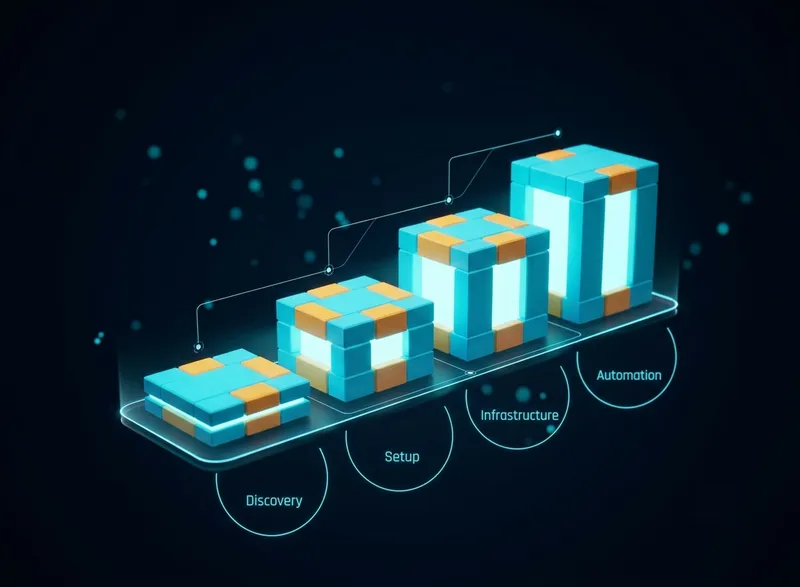
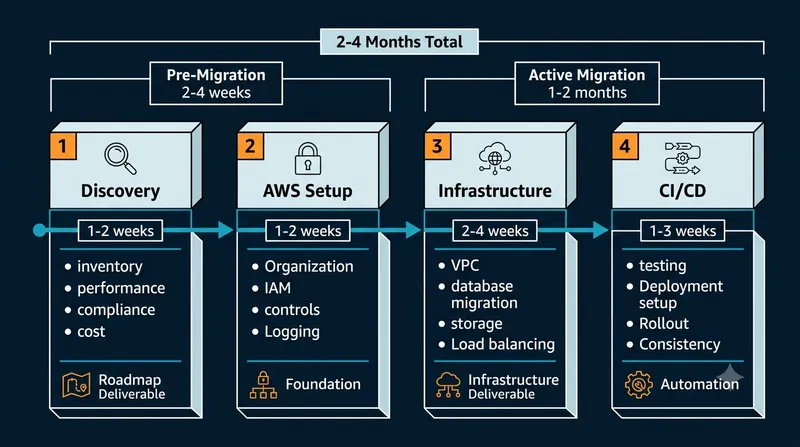
The AWS cloud migration process is a structured handoff of your entire platform to a new environment, with checks at every step to make sure nothing breaks in production. Most migrations follow four phases.
Phase 1: Discovery and Architecture Mapping
The discovery phase typically takes 1-2 weeks and involves inventorying all your applications, databases, dependencies, and performance bottlenecks to create a migration roadmap. Here’s what this phase covers in detail.
Your cloud team (or external partners) spend the first 1-2 weeks understanding what you actually have. This sounds basic, but most teams discover things during this phase they didn’t know were broken on their current platform.
- Inventory: How many applications, databases, microservices, and dependencies live in your current infrastructure.
- Performance data: Which systems are bottlenecks. Which ones barely get used. Which ones are causing outages.
- Security and compliance requirements: Are you moving HIPAA data? PCI compliance? SOC2? Each one changes what AWS services you can use and how you configure them.
- Cost drivers: Why is your current cloud bill what it is. What services are bleeding money, and what does actually matter to your business.
Real Examples from Discovery
Discovery often reveals that you don't need to move everything as-is. One company we worked with found their Kubernetes setup was over-provisioned by 60% — they were paying for capacity they'd never use. Moving to AWS with right-sized infrastructure saved them money immediately.
Here’s what our Senior AWS Developer, Mykyta Glushko, observed during a recent discovery engagement:
"During discovery we realized the client didn’t need to migrate their dedicated server the way they planned. Instead, we replaced it with static content in S3 behind CloudFront, plus a CodeBuild automation job that updated the content on demand. This eliminated 90% of their server maintenance and cut infrastructure costs significantly. They got a better solution by moving less, not more."
— Mykyta Glushko, Senior AWS Developer, Perfsys
The deliverable from this phase is a clear map: what’s moving, what’s staying, what’s getting rebuilt, and why. Often the biggest savings come from realizing you don’t need to migrate something as-is.
Phase 2: AWS Account and Identity Setup
Before you move a single container, you need the foundation built right. This is where most companies skip steps and pay the price later.
AWS account and identity setup means establishing the security and organizational structure that keeps your infrastructure safe and auditable. This phase takes 1-2 weeks. It feels boring while it’s happening. You’ll be grateful for it the first time someone asks "Who changed that database permission?" and you can pull the exact answer from AWS CloudTrail.
Setting up AWS properly includes:
- AWS Organization structure. Separate accounts for production, staging, and development. This isn’t paranoia—it’s standard practice. If a developer accidentally deletes a database in staging, production stays standing. If an attacker compromises one account, they don’t automatically get access to your production data. If you would rather have this account structure defined as code than clicked together in the console, an AWS CDK landing zone sets up the organization, separate environment accounts and baseline guardrails in one automated deployment.
- Identity and access management (IAM). Who can do what. Developers get sandbox permissions. Ops gets production deployment rights. Finance can read billing reports but can’t change infrastructure. This is the difference between a secure setup and one that treats everyone like an admin.
- Compliance controls. If you need SOC2, you need centralized logging, audit trails, and environment separation from day one. Bolting on compliance after you’ve already built infrastructure is expensive.
For migrations requiring SOC2 compliance, establishing this infrastructure is non-negotiable before production launch. As one client's CEO noted in their review: they "deployed our environment to spec, with an IAC created as we required. We were now able to deploy to a secure production environment." The best approach builds compliance into the migration itself, not after launch.
Phase 3: Infrastructure and Networking
Building the AWS environment that will run your applications is where the rubber meets the road. This phase transforms your architecture from a plan into a running system.
AWS infrastructure and networking setup means configuring your VPC, databases, storage, and load balancing so your applications can communicate securely and scale reliably. Here’s what this covers:
- VPC and networking. A Virtual Private Cloud is your isolated network in AWS. Subnets keep different parts of your infrastructure separated. Load balancers route traffic to your services. A solid network design means your services can talk to each other without exposing APIs to the internet.
- Databases. If you’re on MySQL or PostgreSQL, AWS RDS manages patching, backups, and failover for you. If you need document storage, you move to DynamoDB. If you have legacy Oracle databases, there are migration paths for those too. Each database type has different migration complexity based on your data volume, schema complexity, and dependencies. Our AWS DMS complete guide covers database migration strategies in depth.
- Storage. Files move to S3. Logs go to CloudWatch. Backups get versioned and encrypted.
This is the infrastructure work. Most of this gets defined in Terraform (Infrastructure-as-Code), which means it’s versioned, repeatable, and auditable.
For Cadstrom, this phase included setting up a VPC, PostgreSQL databases via AWS RDS, S3 buckets for file storage, and load balancing for their containerized services. As the team moved from Azure to AWS, the migration gave them "a scalable and secure AWS infrastructure" that was "production-ready from day one," according to their Clutch review. See the full AWS migration case study for implementation details.
Phase 4: CI/CD Automation and Production Rollout
CI/CD automation determines whether your development speed improves dramatically after migration or stays exactly where it was.
A proper CI/CD pipeline means your development team can ship code to production reliably, repeatedly, and quickly. Here’s what this covers:
- Code to production in minutes, not days. A developer pushes code. Tests run automatically. If tests pass, containers are built. Containers go to production behind load balancers. All automatic. No manual deployments. No "I forgot to update that config file."
- Environment consistency. What runs in staging runs identically in production. What runs in your laptop with Docker runs the same way in AWS. Configuration drift—where production slowly becomes different from staging—becomes impossible.
- Rollback safety. If something breaks in production, you deploy the previous version in seconds, not hours.
For teams that implement proper CI/CD, the results are dramatic: deployment frequency increases from monthly or bi-weekly to daily or multiple times per day. This 10x improvement in delivery speed is where you see the real ROI from migration.
DIY vs. Hiring Help: What Makes Sense
Migrating to AWS yourself is possible. Hiring help is faster. The choice depends on your team’s bandwidth and risk tolerance.
Option 1: Do It Yourself (In-House)
- Timeline: 3-5 months
- Team requirement: 2-3 full-time engineers
- Total cost: $0 to Perfsys, but your team’s time (roughly 600-800 hours)
- Risk level: High. First migrations often hit unexpected problems: compliance oversights, database migration failures, performance bottlenecks discovered post-launch.
This works if:
- Your team has done cloud migrations before.
- You can afford to have them fully focused on migration for 3-5 months (not context-switching between features and infrastructure).
- Your infrastructure is relatively simple (a few applications, one database, straightforward compliance requirements).
- You have time to learn AWS best practices yourself.
This doesn’t work if:
- Your team is already stretched thin shipping features.
- You need SOC2, HIPAA, or similar compliance built in from the start.
- You have complex legacy systems or integrations.
- You want the migration done in 2 months instead of 5.
Option 2: Hire a Migration Partner
- Timeline: 2-4 months
- Team requirement: Your team handles product; Perfsys handles infrastructure
- Total cost: $12,400-$14,800 (see breakdown below)
- Risk level: Low. Your partner has done this before. They catch edge cases you’d miss.
This works if:
- You need migration done fast without slowing feature development.
- You need compliance-ready infrastructure from day one.
- You want knowledge transfer so your team can operate AWS independently afterward.
- You’d rather avoid hiring and training AWS specialists yourself.
The Real Cost of DIY (Beyond Hourly Rates)
Hourly rates are the wrong comparison. Whether your engineers cost $50 or $100 per hour, the real cost of DIY migration shows up in four places that most teams don't budget for:
- Security misconfigurations discovered post-launch. Open S3 buckets, overly permissive IAM roles, and unencrypted data flows are the most common findings in post-migration audits. Fixing these becomes an urgent project that pulls your team off other work.
- Compliance retrofitting. Building SOC2, HIPAA, or ISO 27001 controls after migration means rebuilding network configuration, logging structure, and access controls. This often costs more than the original migration.
- Over-provisioned infrastructure. Without experience right-sizing AWS resources, most teams over-provision by 40-60% out of caution. That extra spend continues every month, often for years, until someone catches it.
- Feature velocity loss. Your engineers can migrate to AWS or ship product features. They can't do both at the same pace. Most DIY migrations slow feature development by half for 4-5 months.
What Perfsys Migration Returns
The $12,400-$14,800 migration investment is not the interesting number. The interesting number is what it returns:
- Payback within 3 months. Right-sized infrastructure, eliminated operational overhead, and faster deployments recover the migration cost within one quarter.
- 10x faster deployments. Daily releases instead of bi-weekly means features reach users faster and bug fixes deploy in minutes.
- 200 hours saved per year through automation and knowledge transfer.
- Compliance from day one. SOC2-ready infrastructure means zero rework when you're ready to certify.
- Team stays productive. Your engineers ship features while we handle migration in parallel.
The comparison is not "cheaper labor." It is "faster time-to-value with lower risk."
What Cloud Migration Costs
Here’s where most migration conversations break down. Everyone wants a number. “How much does it cost to migrate to AWS?” is like asking “How much does it cost to build a house?” The answer depends on your house. But there are patterns.
The Time Investment
AWS migration typically takes 2-4 months from discovery to production, with a small team (2-3 engineers). If your infrastructure is simple (a few applications, one database, straightforward networking), you're at the shorter end. If you've got legacy systems, complex compliance requirements, or integrations with third-party infrastructure, you're at the longer end. Your timeline depends on what you're moving and how rigorous you want the process to be.
Our standard approach is 40 hours in Phase 1 (discovery), then 60 hours/month during Phase 2 (2 months of active migration), plus ongoing support in Phase 3.
Migration Costs by Phase
Phase 1: Exploration and Planning (up to 1 month)
A Solution Architect works with your team to inventory your infrastructure and understand dependencies. This phase typically takes 40 hours at $70/hour = $2,800.
Deliverable: detailed architecture diagrams and a risk-assessed migration roadmap.
Phase 2: Active Migration (around 2 months)
We scale to 60 hours/month ($2,400/month) for 2 months = $4,800. This covers the actual infrastructure build, database migration, CI/CD setup, and cutover.
Phase 3: Post-Migration Support (4-6 months)
After cutover, you stay on our Cloud Care Standard service ($1,200/month) for monitoring setup, performance tuning, and team training. This usually runs 4-6 months depending on complexity.
Total Migration Investment
- Phase 1: $2,800
- Phase 2: $4,800
- Phase 3: $4,800-$7,200 (depending on length)
- Total: $12,400-$14,800 (plus your own AWS infrastructure costs)
What to Do Right Now
If you’re in the "serious about migrating" phase, here’s what actually matters.
- Understand your current setup. Know what you’re running, what it costs, and where it’s causing friction. This takes a week. It’s the foundation for everything else.
- Set a compliance baseline. If you need SOC2, HIPAA, or ISO 27001, say it now. This changes the AWS setup, the timeline, and the cost. You can’t add it later without rework.
- Decide: do it yourself or bring in help. There’s no shame in either choice. The right choice depends on your team’s capacity and the complexity of your infrastructure. Use the comparison above to make the call.
- If bringing in help, ask about the migration process. A good partner walks you through discovery, shows you a clear roadmap, and doesn’t treat the migration as a black box. You should understand what’s happening at each phase and why.
- Plan for the transition. Decide how long you’ll run parallel infrastructure. Plan your cutover window. Know what rollback looks like if something breaks during the switch.
If you want to explore what a migration would look like for your specific setup, our application migration to AWS service page walks through the process in detail.
TL;DR: AWS Cloud Migration at a Glance
- Timeline: 2-4 months from discovery to production deployment
- Cost: $12,400–$14,800 for professional migration (plus your AWS infrastructure costs)
- Phases: Discovery (1-2 weeks) → AWS Setup (1-2 weeks) → Infrastructure Build (2-4 weeks) → CI/CD Automation & Rollout (1-3 weeks)
- DIY vs. Hiring: DIY takes 4-5 months and slows feature development. Perfsys takes 2-4 months while your team keeps shipping. Payback within 3 months either way, but risk profile differs significantly.
- ROI: Payback within first 3 months through faster deployments (10x release cycle improvement typical)
- Best for: Teams that need migration done fast without slowing feature development, or those requiring compliance-ready infrastructure from day one

We’ll walk through your situation, talk through the phases, and give you an honest estimate. No pitch. No pressure. Just expert guidance.

FAQ
Most migrations take 2-4 months from discovery to production. Simple setups (a few apps, one database, no compliance requirements) might take 6-8 weeks. Complex setups with compliance requirements can take 4-5 months. Your timeline depends on what you're moving and how rigorous you want the process to be.
This is why rollback planning matters. During a migration, you keep your old infrastructure running while you test the new one. You don't flip the switch until you're confident everything works. If something breaks after cutover, you have a documented rollback procedure to go back to the old environment in minutes. A solid rollback plan typically takes 15-30 minutes depending on your data volume.
Technically, yes. Realistically, it’s hard. Your team is context-switching between "make the product better" and "move infrastructure to AWS." One of them loses. Usually it’s the product. A good migration partner handles the infrastructure work while your team focuses on features. That’s when migrations work best without slowing your delivery.
Each cloud has different strengths. AWS has the largest ecosystem of services and the most mature tooling for container workloads and databases. Azure is strong if you’re already deep in Microsoft products (Office 365, Dynamics, SQL Server). Google Cloud is good for data pipelines and ML workloads. Pick based on what services you actually need, not which cloud is "best in general." We recommend AWS Cloud Assessment if you want help thinking through the trade-offs.
You know migration is complete when: all your applications are running in the new environment, traffic is fully routed to the new infrastructure, your old infrastructure can be shut down without impact, and your team has run at least one full release cycle through the new CI/CD pipeline. This typically takes 2-4 months depending on complexity. It's not just moving infrastructure—it's proving the new setup works under real production conditions.
Migration is phase one. What comes after depends on your needs. Some teams want hands-off—they take over operations themselves. Others want ongoing managed support: 24/7 monitoring, incident response, cost optimization. We offer managed support packages starting at $800/month for small teams and $1,200/month for scaling teams if you want a dedicated cloud engineering function. Or your team goes independent. The migration doesn’t lock you in to ongoing work with us.
Worth it depends on whether you're hitting limitations in your current setup. If Azure meets your needs, works for your team, and your infrastructure costs are reasonable, there's no urgent reason to move. But if you're paying too much, your infrastructure is hard to manage, or you need services AWS does better, migration pays for itself quickly. Common reasons to migrate include container scalability needs and stronger compliance tooling requirements.
We break migration into three phases, each with transparent pricing:
Phase 1: Exploration and Planning (up to 1 month)
— A Solution Architect works with your team to inventory your infrastructure and understand dependencies. This phase typically takes 40 hours at $70/hour = $2,800. Deliverable: detailed architecture diagrams and a risk-assessed migration roadmap.
Phase 2: Active Migration (around 2 months)
— We move to our Cloud Care Managed Services model, but at 2x the standard capacity. Standard Cloud Care is 30 hours/month at $40/hour ($1,200/month). During migration, we run at 60 hours/month ($2,400/month) for 2 months = $4,800. This covers the actual infrastructure build, database migration, CI/CD setup, and cutover.
Phase 3: Post-Migration Support (4-6 months)
— After cutover, you stay on Cloud Care Standard ($1,200/month) for monitoring setup, performance tuning, and team training. This usually runs 4-6 months depending on complexity.
Total Migration Investment: Phase 1: $2,800 | Phase 2: $4,800 | Phase 3: $4,800-$7,200 (depending on length) |
Total: $12,400-$14,800 plus your own AWS infrastructure costs.

CEO & Founder @ Perfsys | Serverless architect with 10+ years of hands-on experience designing cloud-native architectures on AWS, backed by multiple AWS certifications. His writing bridges deep technical expertise with real-world business strategy, covering topics from AWS best practices to scaling tech-driven organizations.
AWS Experts, On-Demand
Need to move fast? Our cloud team is ready to scale, secure, and optimize your systems. Get serverless expertise, 24/7 support, and seamless CI/CD pipelines when you need it most.
Please accept cookies to load the booking widget.