
DevOps
5 min read


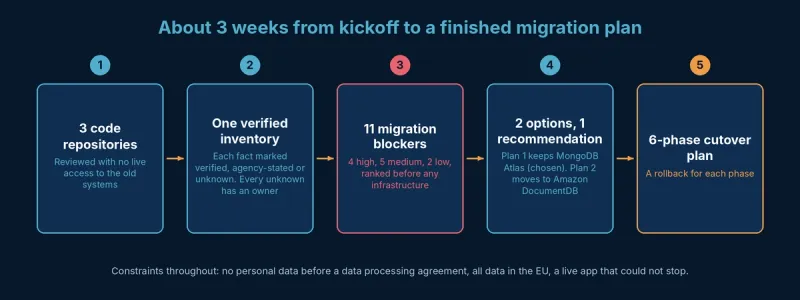
About 3 weeks
from kickoff to a finished migration plan
11
migration blockers found before the build, 4 rated high-severity
6-phase
cutover plan with a rollback for each phase
Key Insights
Location
Germany
Project duration
3 weeks
Industry
Fitness equipment and apps
Technologies used
Heroku, MongoDB Atlas, Amazon DocumentDB (evaluated)
The riskiest part of a cloud migration is usually what nobody has written down. A German fitness equipment brand with a live strength-training app had its backend on an outgoing agency's Heroku setup. It wanted the backend in an AWS account it owns, but nobody outside the agency knew exactly what that backend depended on.
In this AWS consulting case study, we mapped the backend in about 3 weeks with no live access to the old systems, found 11 migration blockers and gave the client a plan it could choose and act on.
The client is a German fitness equipment brand. It sells online and runs a strength-training app for iOS and Android with a few thousand users. The app handles sign-in, training programs, exercise videos and AI-assisted program matching. A small in-house team owns the product, while an external agency had built and hosted the backend.
The agency relationship was ending. The client wanted the backend in its own AWS account, built so its own team and partners could run it. Their biggest worry was the unknown: hosting, the database account, media storage and error tracking all sat with the agency, and the client had only rough monthly cost figures.
Inventory first. We reviewed all 3 code repositories and listed every service and integration. Each fact was marked as verified, agency-stated or unknown, and every unknown was given an owner. That turned the unknowns into a short list of questions with names next to them.
Blockers ranked by severity. We recorded 11 migration blockers before touching infrastructure: 4 high, 5 medium and 2 low. Three of them show why this phase matters.
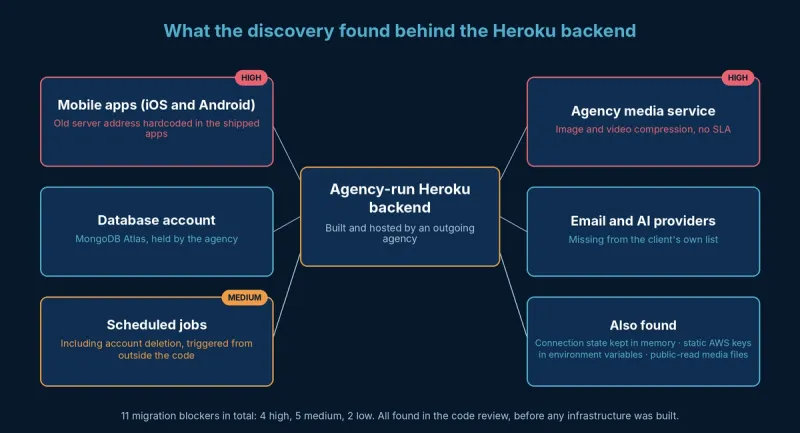
High severity. The mobile apps had the old server address hardcoded. A DNS change would have moved nothing, and every phone running an older app version would have lost its backend. We built the whole cutover plan around this fact.
High severity. The API sent images and videos to a compression service run by the agency, with no SLA. Had we missed it, media processing would have stopped the day the agency switched it off, and new uploads would have had no thumbnails or compressed versions. Email and AI providers were also missing from the client's own list.
Medium severity. Scheduled maintenance, including the account deletion job, was triggered from outside the application. We rated it medium for migration risk, but it was the clearest GDPR compliance risk on the list.
Had we missed it, accounts deleted by users would never have been permanently removed after 30 days, and nobody would have noticed. In the build, the job moved to a scheduler with alarms for failed and missed runs.
We also found real-time connection state kept in memory, which blocks running more than one server. Static AWS keys sat in environment variables, and media files were public-read. The database tier turned out much smaller than the cost figures suggested.
"Most of the risk in this backend sat in things nobody had written down: a hostname baked into the apps, a media service the agency ran and a deletion job triggered from outside the code. We found them in the code review, before any infrastructure existed, and that is what made a safe cutover plan possible."
— Eugene Orlovsky, Founder and CEO, Perfsys
Plan 1 kept MongoDB Atlas and replaced only what the agency controlled. Plan 2 went fully AWS-native with Amazon DocumentDB.
The deciding factor was another high-severity blocker. The code relies on multi-document MongoDB transactions, and moving to a database without full transaction support would have broken every write that uses them. DocumentDB supports them only with caveats, and Plan 2 cost about the same.
We recommended Plan 1, and the client chose it. Sometimes the best AWS design keeps a proven database where it is.
Before writing a line of infrastructure code, we designed a 6-phase cutover with a rollback for each phase. The client could see the order of events and how each step could be undone.
The client chose Plan 1, signed a data processing agreement and moved straight into the build with the same team. Read how the migration went in our Heroku to AWS migration case study.
Want the same clarity before your own move? Learn more about our AWS consulting and AWS cloud assessment services.

We map your setup and rank the risks, so you get a plan before any infrastructure is built.
In this project, about 3 weeks of code review, an agency handover session and a full service inventory. Every fact was marked as verified, agency-stated or unknown, and every unknown got an owner.
Yes. We worked from the source code and a handover session, and kept personal data out of reach until a data processing agreement was signed.
Not always. This app uses multi-document transactions, and DocumentDB would have cost about the same, so we recommended keeping MongoDB Atlas in the client's own account.
By reading the code and checking it against the documentation. Hardcoded hostnames and jobs triggered from outside the application surfaced this way. So did third-party services missing from the client's own list.

Software Engineer at Perfsys with hands-on experience building scalable backend systems on AWS using Python and TypeScript. He works directly on cloud infrastructure projects, bringing practical engineering depth to every topic he covers.
Recommended for You
AWS Experts, On-Demand
Need to move fast? Our cloud team is ready to scale, secure, and optimize your systems. Get serverless expertise, 24/7 support, and seamless CI/CD pipelines when you need it most.
Please accept cookies to load the booking widget.