
CloudFormation Best Practices for Multi-Account AWS Deployments
Published on Oct 23, 2026

Most CloudFormation best practices read fine in a single AWS account. Add a second account and half of them quietly stop working. We learned that building the delivery pipelines for a client whose multi-tenant SaaS platform onboards enterprise customers into separate AWS accounts. Here is what held up and what broke.
What Are the Best Practices for CloudFormation in Multi-Account, Multi-Tenant AWS?
Preview every change, split plan and apply permissions, avoid stored keys, lock down cross-account access and test across two real accounts early. Here is how each one worked in practice.
CloudFormation is AWS's infrastructure as code service that creates and updates resources from templates. Our client is a small consulting company that runs a multi-tenant SaaS platform for enterprise customers, and we built its delivery layer. If you want the wider picture first, read our guide to DevOps on AWS.
The five practices, in the order we would set them up 👇🏻
- Preview every change with a change set.
- Split the credential that plans from the credential that applies.
- Authenticate CI with short-lived credentials.
- Gate every cross-account role.
- Build the two-account split on day one.
How Do CloudFormation Change Sets Make Deployments Safer?
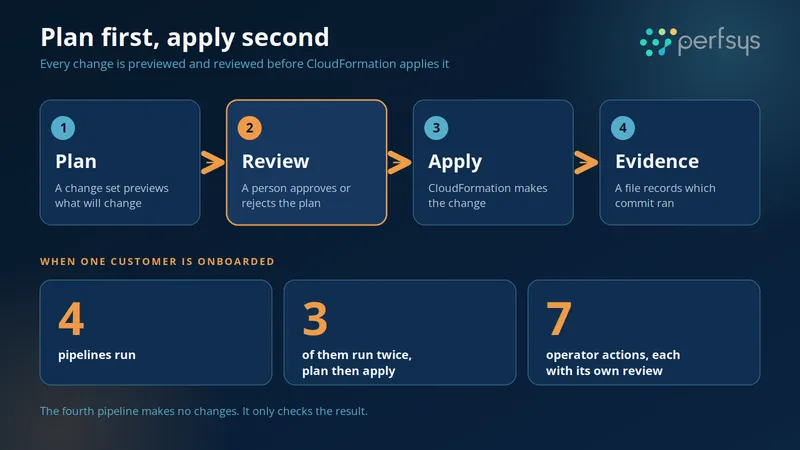
A change set shows what CloudFormation will change before it changes anything, so a person can approve or reject the plan. AWS describes change sets as a way to preview the changes to a stack and then decide whether to apply them.
We run every deployment as a plan followed by an apply. Onboarding one new customer takes four pipelines, and three of them run twice. That makes seven operator actions, and each one gets its own review.
The fourth pipeline makes no changes. It checks every stack and registry field against deployed outputs. It also confirms that the tenant can read its own data and is denied everything else.
Our client reports that 100% of infrastructure changes now pass through a reviewed change set gate with a recorded evidence file. Before, that figure was effectively zero, because changes were applied by hand.
Every apply also writes an evidence file that records which commit actually ran. We compare it with the release manifest, and that comparison is our promotion check.
💡 Pro tip: Keep the plan output with each deploy record. It costs nothing, and it is the only thing that answers what you actually shipped in August when somebody asks in February.
What Does a Change Set Not Catch?
A change set reliably catches the shape of a change, such as replacements, deletions and wrong targets. It cannot tell you whether the change is correct.
We know this the slow way. During our two-account proof we found seven defects, and none of them came from a plan. Failing applies in a dev account found every one. A plan keeps surprises away from your accounts. Proving the result still takes a test environment.
We did test the gate itself on purpose. Wrong-account rejection and the missing-foundation stop were both exercised against a real account before we deployed anything there. The config validator also rejected all seven deliberately broken test configurations, each with a specific message.
How Does CloudFormation Drift Detection Help When a Plan Looks Wrong?
Drift detection tells you whether a resource still matches its template, which turns a confusing plan into a clear story. It compares a stack's actual configuration with its expected configuration.
A routine plan against one of our dev targets once came back with two change sets. One reported a replacement of the shared search domain. Replacing a search domain destroys and rebuilds it, so we held the apply.
Read-only investigation found the cause. Drift detection reports a resource as DELETED when it no longer exists but the template still expects it, and that is exactly what it showed. The domain had already been deleted outside CloudFormation, and the change set was creating a new one under a slightly different name.
Not a disaster. Also not routine. We applied only after explicit approval the next day, and then reran the search enrollment and tenant readiness checks.
How Do You Split Plan and Apply Permissions With CloudFormation Service Roles?
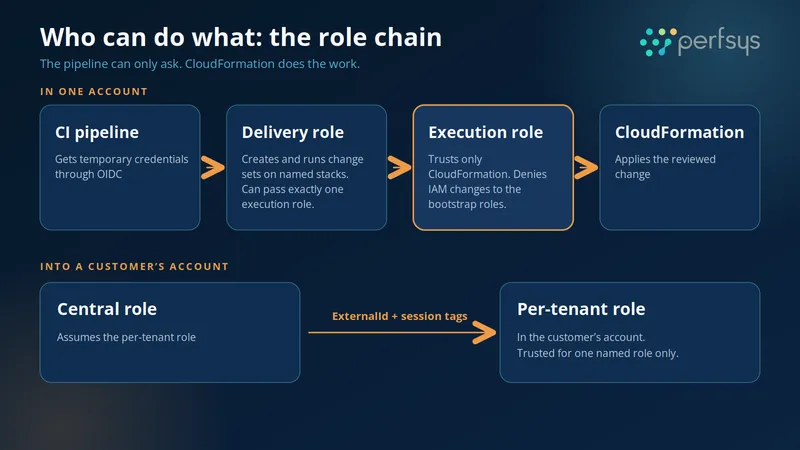
Give your pipeline a weak role that can only create and run change sets, and put the real permissions in a CloudFormation service role that only CloudFormation can assume.
AWS explains that when you pass a service role to CloudFormation, it uses that role's credentials instead of the caller's, and the caller needs permission to pass it. Here is how we applied it:
- The delivery role can create and execute change sets on named stacks. It can pass exactly one execution role and read the registry. Nothing else.
- The execution role trusts only CloudFormation, so the pipeline can never assume it directly.
- Both execution roles deny IAM changes against the bootstrap roles, so the pipeline cannot widen its own permissions.
If you deploy with the CLI, pass the service role with the --role-arn flag on aws cloudformation deploy.
The whole bootstrap is three CloudFormation stacks. An account administrator reviews each one as its own change set before anything else can run. After that, no human needs standing AWS access to deploy.
How Do You Use AWS OIDC to Run CloudFormation Without Long-Lived Keys?
Use OIDC federation. Your CI proves its identity and receives temporary credentials, so nothing long-lived sits in your pipeline settings. AWS describes OIDC federation as exchanging a token from an identity provider for temporary credentials tied to an IAM role.
We pin the trust to one repository and one deployment environment. There is no workspace-wide fallback, so a different repository cannot assume the role even if it lives next to yours.
Our client reports that long-lived AWS keys in its CI and delivery tooling went from several to zero. Everything authenticates through short-lived federated roles now. For more on locking down access, see our overview of core AWS security services.
How Do You Deploy Into Customer Accounts Without a Confused Deputy Risk?
Gate every cross-account role with an ExternalId and matching tags, so a role can only be assumed on behalf of the right tenant. The confused deputy problem happens when one party tricks a more trusted party into acting for it, and the external ID is the standard defense.
Reaching into a customer's account is a third hop in our setup. A central role assumes a per-tenant delivery role in the customer's account. The assumption needs an ExternalId held in Secrets Manager plus matching session tags, and the allowed tag keys are limited to three.
The customer's account grants that trust to one named role and nothing else. Our readiness pipeline then checks that the ExternalId matches across the registry, the role trust and the binding.
AWS partner guidance adds one rule worth copying: generate the external ID yourself and never let the customer choose it. This kind of access design is part of our security and compliance work.
What Did We Get Wrong?
We proved the whole lifecycle in a single AWS account first. It passed. Then we split it into two real accounts and found seven defects in a row, and the single-account setup had masked every one.
Our lesson, in one line: build the two-account split on day one, even if both accounts are yours. A single-account proof of a cross-account system proves a-l-m-o-s-t nothing, and it feels like progress. That is worse.
The defects were small and painful. One ExternalId was never exported to a component command. One cross-account pass-role permission silently reverted.
One IAM condition key turned out to be one that AWS never populates at runtime. One missing read-only permission produced a false mismatch. Each cost us a full diagnose, fix and redeploy cycle.
Why Did We Collapse Fifteen Pipelines Into Five?
We started with one pipeline per environment and ended with fifteen. We collapsed them into five parameterized pipelines, one per ownership boundary.
The boundary that defines a pipeline is who owns the blast radius. The target environment matters less.
Can You Trust IAM Policy Simulation?
Treat it as a filter. Our preflight check simulated a permission with a context key present that the service never supplies at runtime. The simulation said ALLOW. In practice, the permission always denied.
How Long Does This Take, and When Is It Worth It?
Building this machinery took months, not weeks. It pays off the moment a second AWS account enters the picture.
Our client now stands up a full production environment in a brand-new AWS account in roughly 4 to 6 hours of part-time work by its own team, using our pipelines and runbook. Onboarding a new customer environment takes about half a day. Before the machinery existed, replicating the environment would have taken weeks of hand-built work.
If you deploy one application into one account, a plan/apply gate is good hygiene but not urgent. Once you have two accounts, it stops being optional.
If you are starting from scratch, build in this order:
- Split the credentials. Give CI a weak role that can only create and execute change sets on named stacks. Put the real permissions in a role only CloudFormation can assume. It works with any CI system.
- Keep the plan output with the deploy record.
- Write the runbook while you build. It turns a process one person can run into a process anyone can run, which is the whole point for a small team.
Not sure where your setup stands? A Well-Architected review is a good way to find the gaps first. And if your team is too small to own all of this, DevOps as a service is worth a look.
Conclusion
The best CloudFormation practices hold up across accounts when you treat the plan as a gate, the credentials as a chain and the second account as a test from day one. We learned that by getting it wrong first.
If you are about to add a second AWS account to a platform, we would like to hear about it.

Tell us how you deploy today, and we will show you where a plan/apply gate and short-lived credentials fit.

FAQ
A change set is a preview of the changes CloudFormation will make to a stack. You review it first and then decide whether to apply it.
Drift detection compares the actual configuration of your stack resources with what the template expects. It flags each resource as in sync, modified or deleted.
OIDC gives your pipeline temporary credentials for each run. There are no stored keys to leak, rotate or forget.

CEO & Founder @ Perfsys | Serverless architect with 10+ years of hands-on experience designing cloud-native architectures on AWS, backed by multiple AWS certifications. His writing bridges deep technical expertise with real-world business strategy, covering topics from AWS best practices to scaling tech-driven organizations.
AWS Experts, On-Demand
Need to move fast? Our cloud team is ready to scale, secure, and optimize your systems. Get serverless expertise, 24/7 support, and seamless CI/CD pipelines when you need it most.
Please accept cookies to load the booking widget.