

AWS Well-Architected Review: What It Covers, How It Works, and What to Do With the Results
Published on Jun 23, 2026

Your AWS bill is climbing. You're not sure whether your infrastructure is actually secure. And honestly, nobody on the team can fully explain why things are set up the way they are.
This is more common than you'd think. An AWS Well-Architected Review is exactly what cuts through that uncertainty. In this guide, you'll learn what the review covers, how the process works step by step, and what you can realistically expect to walk away with.
What Is an AWS Well-Architected Review?
An AWS Well-Architected Review is a structured assessment of one specific AWS workload against AWS best practices. It is not an audit and it is not a report card. Think of it as a risk triage meeting: you and an AWS partner go through your infrastructure together, answer a set of questions per pillar, and produce a ranked list of what to fix.
AWS designed it to be a conversation, not an inspection. The goal is to find the gaps that matter most, agree on the tradeoffs, and turn the findings into a concrete improvement plan.
The review is built on the AWS Well-Architected Framework, a collection of architectural best practices AWS has refined by working with thousands of customers. The full framework document runs over 850 pages; the AWS Well-Architected Framework documentation covers every pillar in depth. The framework was last significantly updated in November 2024, with 78 additional best practices added in April 2025.
"We were able to improve our cloud security posture and solve existing issues. The efficiency and expertise they demonstrated were impressive." — CTO, Financial Services Company, London (Clutch Review, February 2025)
That quote is from a London-based fintech that came to Perfsys with rising AWS costs, legacy systems, and no clear visibility into their infrastructure. After a Well-Architected Review, they secured $5,000 in AWS credits, uncovered 41% potential compute savings, and uncovered 20+ critical vulnerabilities including an IAM key that had been active for 1,198 days.
The Six Pillars of the AWS Well-Architected Framework
The review evaluates your workload across six pillars. Each one covers a different dimension of cloud health.
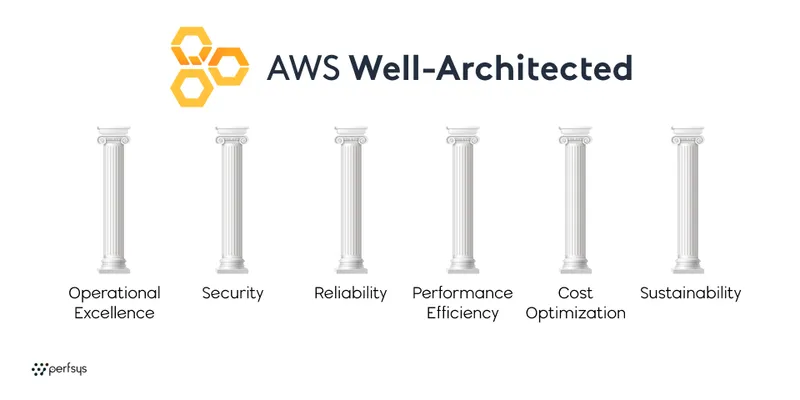
1. Operational Excellence
Operational excellence is about whether your team can actually run and improve your systems over time. The review looks at how changes get deployed, how incidents get handled, and whether you have the observability to detect problems before your users do.
A common finding here: manual deployment processes that introduce errors, or teams with no documented runbooks for incident response.
2. Security
Security covers everything from IAM configuration and encryption to threat detection and compliance alignment. This is typically where the most urgent findings surface.
Common issues found during real reviews: overly permissive IAM roles, long-lived access keys that were never rotated, disabled MFA on root accounts, and unencrypted RDS backups.
3. Reliability
Reliability asks whether your workload performs its intended function consistently and recovers quickly from failure. The review looks at backup strategies, fault tolerance design, and whether you've actually tested your disaster recovery process.
One finding that appears frequently: Lambda functions with timeouts set to 900 seconds, which can silently consume resources and mask underlying failures.
4. Performance Efficiency
This pillar is about using the right resources at the right size: compute, storage, networking, and database choices. The review surfaces over-provisioned and under-provisioned resources, and recommends rightsizing where AWS tools like Compute Optimizer have identified clear opportunities.
5. Cost Optimization
Cost optimization goes beyond just rightsizing. It looks at whether you're using the right service types, whether idle resources are accumulating, and whether your spending patterns match your actual usage.
In our fintech case study, AWS Compute Optimizer identified 41% potential savings on ECS Fargate workloads after a single review. That kind of finding is not unusual.
6. Sustainability
Added to the framework in 2021, the sustainability pillar evaluates the environmental impact of your workloads. It looks at resource utilization efficiency, idle resource decommissioning, and whether your architecture could be restructured to reduce the compute footprint without affecting performance.
How the AWS Well-Architected Review Process Works
The review follows three phases. AWS describes it as lightweight, meaning hours, not days. In practice, the depth of findings depends on how honestly you answer the questions.
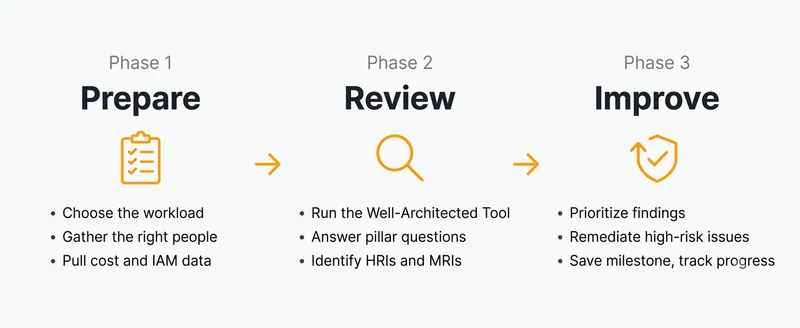
Phase 1: Prepare
Before the review session, you choose which workload to assess. This is important: a review is scoped to one workload, not your entire AWS account. Trying to review everything at once produces shallow results.
You'll also need the right people in the room. An accurate review requires someone who knows how the system was built, someone who knows how it runs, and ideally someone from security or compliance. If the review only involves people who joined after the system was designed, you'll miss context that matters.
Phase 2: Review
The review session itself uses the AWS Well-Architected Tool, a free service in the AWS Management Console that guides you through pillar-based questions and generates an improvement plan. It categorizes findings as High-Risk Issues (HRIs) or Medium-Risk Issues (MRIs).
Risk Level | What it means | Typical examples |
|---|---|---|
High-Risk Issue (HRI) | A gap that could directly cause an outage, security breach, or significant cost overrun | Unrotated IAM credentials, no backup encryption, missing MFA on root account |
Medium-Risk Issue (MRI) | A real gap, but with lower immediate impact | Deprecated runtimes still in production, service quotas not monitored |
HRIs should be remediated before your next production deployment. MRIs are real problems too, just with a lower near-term blast radius.
According to IBM's 2024 Cost of a Data Breach Report, the global average breach cost reached $4.88 million, with cloud misconfiguration linked to 15% of breaches. HRIs in the security pillar are the most direct path to that kind of exposure.
The current version of the tool covers 57 questions across the six pillars. You don't have to answer all 57 in one session. Many reviews start with a focused set of three or four pillars based on the client's most pressing concerns.
💡 Pro tip: Answer each question based on what is live today, not what is planned or in progress. Reviews where teams mark in-progress items as done produce a clean scorecard but miss the real risks. The findings are only as useful as the honesty behind them.
Phase 3: Improve
After the session, you have a prioritized list of findings and a set of recommended improvements. The AWS Well-Architected Tool saves this as a milestone, so you can track progress over time and show improvement across reviews.
This is also the phase where AWS service credits come in. If you work with an AWS partner like Perfsys and remediate the high-risk issues identified in the review, you can qualify for up to $5,000 in AWS credits to fund the implementation work. Our AWS Cloud Assessment covers exactly this process from first conversation to remediation plan.
What Does a Well-Architected Review Actually Find?
Here's what the process looked like in a real engagement.
A London-based financial services company came to us with three specific concerns: they didn't fully understand their own AWS environment after staff changes, their AWS bills were growing without a clear explanation, and they had compliance obligations they weren't sure they were meeting.
We ran an AWS Well-Architected Review focused on security, reliability, and cost optimization. Using Amazon Inspector and AWS Trusted Advisor alongside the Well-Architected Tool, the review surfaced:
- 64 critical findings across EC2 instances, representing 20+ unique critical vulnerabilities, including remote code execution flaws
- An IAM access key that had been active and unrotated for 1,198 days
- Deprecated Lambda runtimes (Node.js 14/16, Python 3.8) still in production
- RDS backups running without encryption
- ECS Fargate workloads that could be rightsized for 41% monthly savings
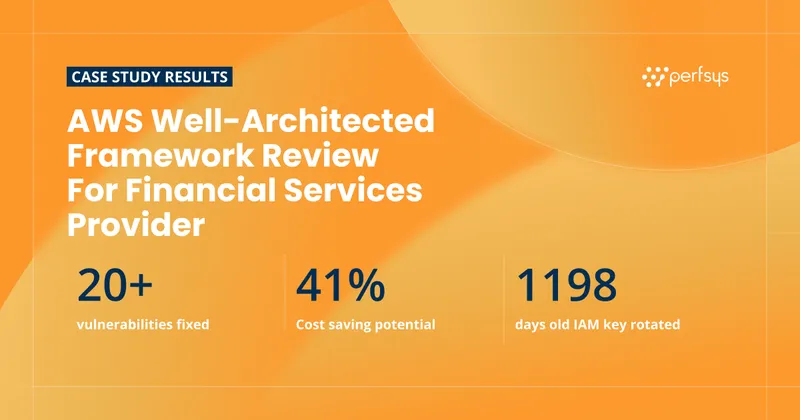
We rotated the exposed credentials immediately, enabled IAM Access Analyzer, and set up automated vulnerability management workflows. The client secured $5,000 in AWS credits and walked away with a clear, prioritized roadmap for everything else.
You can read the full AWS Well-Architected Framework Review case study here.
AWS Well-Architected Framework Lenses
Beyond the six core pillars, AWS offers specialized lenses that extend the review for specific workload types. If your workload is anything other than a general-purpose application, there's likely a lens for it.
Current lenses include guidance for serverless architectures, container-based workloads, machine learning pipelines, IoT systems, financial services, and generative AI. AWS added a Responsible AI Lens at re:Invent 2025 and expanded the Generative AI Lens with additional guidance for teams building on services like Amazon Bedrock.
Lenses run alongside the core framework, not instead of it. For most SMBs, the core six pillars are the right starting point. Lenses become relevant when you have a specialized workload that the standard questions don't address well enough.
Who Should Run an AWS Well-Architected Review?
The review is designed for any team running workloads on AWS. In practice, the teams that get the most value from it are:
Companies going through staff transitions. When the people who built the system are gone, a review is the fastest way to rebuild visibility into what you actually have.
Startups preparing to scale. Architecture decisions made at 10 users create problems at 100,000. A review before a major growth phase is much cheaper than remediating after an incident.
Companies in regulated industries. Financial services, healthcare, and similar sectors have compliance requirements that map directly to the security and reliability pillars. A review produces the documentation and gap analysis that compliance audits ask for.
Teams with rising AWS costs. If your bill is growing but you can't explain exactly why, the cost optimization and performance efficiency pillars will tell you where to look.
How to Get the Most Out of Your Review
A few things determine whether a review produces real value or just a PDF nobody reads.
Scope it correctly. One workload per review. Pick the one where a security incident or outage would hurt you most.
Bring honest answers. Findings only help if they reflect reality. The review is not assessed or reported to AWS by default.
Work with a certified partner. AWS partners who run reviews regularly bring external perspective that internal teams miss. They've seen the same issues across dozens of environments and know which findings are most likely to cause real problems.
Plan to act on the results. A review without a remediation plan is an expensive list. Build the fix phase into your timeline before the review session starts.
At Perfsys, we run AWS Well-Architected Reviews as part of our AWS consulting service. We help you prepare, run the session, and then work through the findings with you, including handling the remediation work if you need a team to execute it.
AWS Well-Architected Framework Review Checklist
Use this checklist to prepare before your review session. Teams that arrive prepared get more actionable findings in less time.
Before the session:
- Identify the one workload you are assessing (a specific application or environment, not your entire AWS account)
- Confirm who on your team will join: at minimum one person who built the system, one who operates it
- Pull recent AWS Cost Explorer reports so cost patterns are fresh
- Note any compliance frameworks you are working toward (SOC 2, ISO 27001, PCI DSS, etc.)
- Gather your current IAM policy structure and recent access key activity from IAM Credential Report
During the session:
- Answer each question based on what is live today, not what is planned
- Flag questions where you are genuinely unsure rather than guessing
- Note the context behind each HRI: when was it created, who owns it, what would remediation require
After the session:
- Export the improvement plan from the AWS Well-Architected Tool
- Categorize findings by effort and impact, not just AWS risk level
- Assign an owner and a target date to each HRI before closing the review
- Save a milestone in the tool so you can measure progress at the next review
💡 Pro tip: Schedule your remediation sprint within two weeks of the review session. Teams that wait longer lose context and momentum. The findings are most actionable while the conversation is still fresh.

A Well-Architected Review with Perfsys takes hours, not weeks, and gives you a clear picture of your biggest risks before they become incidents.

FAQ
A focused review covering three to four pillars typically takes two to four hours for the session itself. The preparation and remediation planning add time on top of that. AWS describes the process as hours, not days.
The AWS Well-Architected Tool in the AWS Management Console is free to use. If you work with an AWS partner to run the review, the partner's time is a cost. However, completing a review with a certified partner and remediating high-risk findings can qualify you for up to $5,000 in AWS service credits, which often offsets the cost.
AWS recommends reviewing at key milestones: before a major launch, after a significant architecture change, and at least once a year for production workloads. For fast-moving teams or regulated industries, a quarterly cadence for your most critical workload makes sense.
The AWS Well-Architected Framework is the reference document: the principles, pillars, and best practices AWS has defined for cloud architecture. The AWS Well-Architected Review is the process of applying those standards to your specific workload to find gaps and prioritize improvements.
Yes. The review process uses the AWS Well-Architected Tool in your AWS account. We run all sessions remotely, regardless of where your team is located.

Software Engineer at Perfsys with hands-on experience building scalable backend systems on AWS using Python and TypeScript. He works directly on cloud infrastructure projects, bringing practical engineering depth to every topic he covers.
AWS Experts, On-Demand
Need to move fast? Our cloud team is ready to scale, secure, and optimize your systems. Get serverless expertise, 24/7 support, and seamless CI/CD pipelines when you need it most.
Please accept cookies to load the booking widget.