
What Is Amazon Bedrock? AWS's Managed AI Platform Explained
Published on Jun 22, 2026

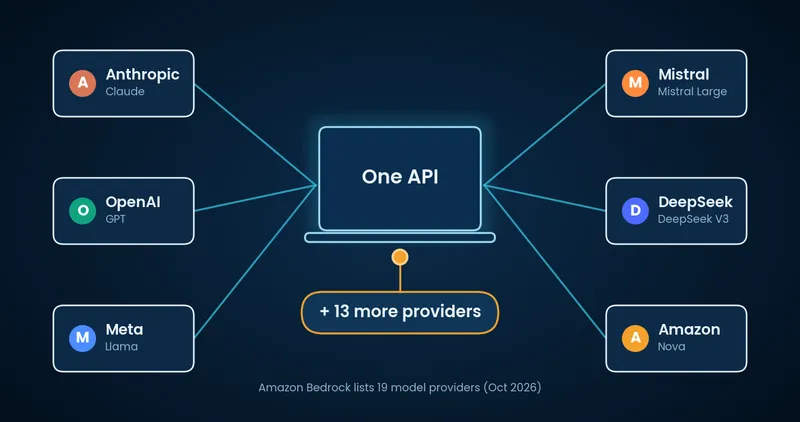
Amazon Bedrock (also called AWS Bedrock) is Amazon's fully managed generative AI service on AWS. It's AWS's answer to a real problem: generative AI is powerful, but building with it from scratch is hard. You need GPUs, model pipelines, security layers and months of setup before you can ship anything. Bedrock removes that work. It gives you direct API access to top foundation models from Anthropic, OpenAI, Meta, Mistral, Amazon and more, with no servers to provision and no infrastructure to manage.
Whether you are a startup evaluating AI tools or a technical lead planning your next product, this guide explains what Amazon Bedrock is, how it works, what it costs and when it makes sense to use it. We refreshed it in October 2026 with the latest models, pricing tiers and setup steps.
Last updated: October 1, 2026
Key takeaways
Amazon Bedrock gives you one API for models from 19 providers, including Anthropic Claude, OpenAI, Meta Llama, Mistral and Amazon Nova.
You pay per token with no flat fee. There is no permanent free tier, but new AWS accounts get up to $200 in credits.
Bedrock gives you models, RAG, guardrails and agent tooling. You still build the application around them.
What Is Amazon Bedrock?
Amazon Bedrock is a fully managed generative AI service that lets you build, customize and deploy AI applications using pre-trained foundation models (FMs) through a single API. You don't manage infrastructure, train models or handle GPUs. AWS handles all of that behind the scenes. You can read the official overview on the Amazon Bedrock product page.
Think of it as one platform where you choose the model that fits your use case, connect it to your data if needed and call it through an API. The models come from many AI labs, and Amazon's own Nova family is one option among them.
AWS lists 19 model providers on its Bedrock pricing page, and the catalog changes almost monthly. Claude Opus 5.5 and Claude Sonnet 5.5 both arrived on Bedrock in late September 2026.
Amazon Bedrock Explained: How It Works
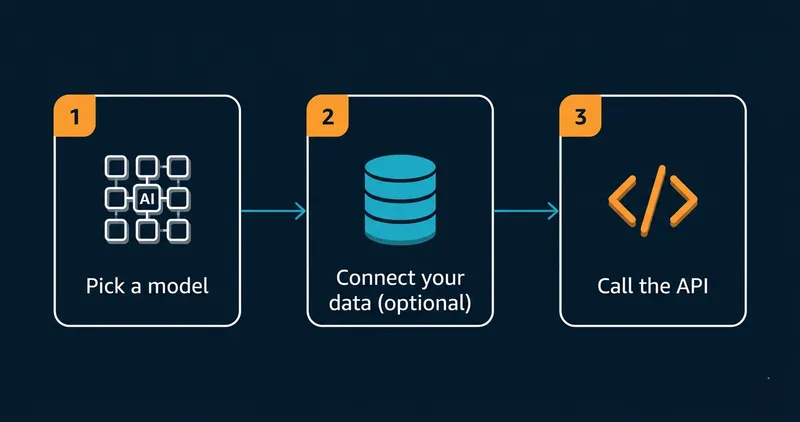
Bedrock works in three steps.
First, you pick a foundation model. Bedrock hosts models from providers like Anthropic (Claude), OpenAI, Meta (Llama), Mistral, Amazon (Nova and Titan) and Stability AI. You can compare them in the console playground or test them through the API before you commit. Switching later means changing a model ID, so your first pick does not lock you in.
Second, you customize if needed. You can connect the model to your own data with a Knowledge Base (retrieval-augmented generation, or RAG), or customize it through fine-tuning. This is how you move from a generic model that answers any question to one that understands your product, your customers and your terminology.
Third, you call the API. Your application sends prompts and receives completions, summaries, embeddings or images, depending on the model. Bedrock handles scaling automatically.
Key Features of Amazon Bedrock
Access to Multiple Foundation Models Through One API
Most AI platforms tie you to one model family. Bedrock gives you a choice. Current options include Anthropic Claude (Opus 5.5, Sonnet 5.5 and Haiku 4.5), OpenAI GPT and gpt-oss models, Meta Llama 4, Mistral, DeepSeek, Cohere, Stability AI and Amazon Nova. The list changes often, so check the model catalog in the Bedrock console for what your Region offers.
This matters in practice. A customer support use case might fit Claude well. A document search use case might benefit from Cohere embeddings. You can run both through the same Bedrock API without managing separate vendor relationships or changing your infrastructure.
Amazon Nova: AWS's Own Model Family
Amazon Nova is AWS's own foundation model family on Bedrock. It covers fast, low-cost text and multimodal models (Nova Micro, Lite and Pro) along with speech and image or video generation. AWS has since added a second generation, including Nova 2 Lite and Nova 2 Sonic, and it marks some first-generation models as legacy.
Nova models are priced for volume, so they suit classification, summarization and chat at scale. They are a sensible default for simple tasks, with larger Claude or OpenAI models reserved for harder ones. In our fintech AI assistant case study, Nova Pro gave the best balance of cost and accuracy against Claude 3 Haiku and Claude 3.7 Sonnet.
Retrieval-Augmented Generation (RAG) with Knowledge Bases
RAG is the technique that makes Bedrock genuinely useful for business applications. Instead of relying solely on what the model was trained on, you give it access to your own documents, databases or product content at query time.
You upload your data, Bedrock indexes it into a vector store, and the model retrieves relevant context before it generates a response. This reduces hallucinations and keeps answers factual. You can use Amazon OpenSearch Serverless, Aurora PostgreSQL or Neptune Analytics as the vector store, or use the newer Managed Knowledge Base, which handles parsing, embeddings and retrieval for you.
Fine-Tuning and Continued Pre-Training
For teams that need more than RAG can offer, Bedrock supports fine-tuning and continued pre-training on supported models, plus reinforcement fine-tuning for some open-weight models. You supply labeled examples or domain text, and Bedrock trains a customized version that stays inside your AWS environment.
Custom models add two kinds of cost. Training is billed by the amount of data you train on. After that, you pay $1.95 per month to store each custom model, plus the inference you run on it. Reinforcement fine-tuning on supported open-weight models is billed by the training hour, and AWS lists $80 per hour for gpt-oss-20b and Qwen3 32B.
Bedrock Agents for Multi-Step AI Tasks
Bedrock Agents lets you build AI systems that take actions as well as answer questions. An agent can query your database, call an external API, check inventory and return a synthesized result in a single flow, with no human involved at each step.
Amazon Bedrock AgentCore became generally available in October 2025. It is the platform for running agents in production, and it is modular, so you use only the pieces you need. Runtime hosts agents serverlessly. Memory keeps context across sessions. Gateway turns your APIs and Lambda functions into tools. Identity controls access, Observability traces every step, and Browser and Code Interpreter give agents more abilities.
Policy and Evaluations are now generally available too. Policy controls which tools an agent may call, and Evaluations scores agent quality automatically. AgentCore works with any framework and with models inside or outside Bedrock. Bedrock Agents remains available if you already use it.
If you need to host your own MCP tool server on AgentCore to expose existing AWS operations as callable actions for any AI agent, we documented the full setup, real costs and what you can skip in our practical walkthrough of building an MCP server on Bedrock AgentCore.
If you want a production agent built on Bedrock rather than a prototype, see our AWS AI Agents solution.
Bedrock Guardrails
One of the more practical features for businesses: Guardrails lets you define what the model should and shouldn't do. You can block harmful content, restrict topics, filter specific phrases, redact personal data and set content policies tailored to your use case. According to AWS, Guardrails can help block up to 88% of harmful content, and Automated Reasoning checks can identify correct model responses with up to 99% accuracy.
For regulated industries, this makes compliance measurably easier.
Enterprise Security Out of the Box
Bedrock inherits AWS's security posture. Data is encrypted in transit and at rest, and you control access through IAM policies. Models can run behind VPC endpoints. Bedrock does not use your inputs or outputs to train its base models, so your data stays yours.
Bedrock is in scope for common compliance standards including ISO, SOC, CSA STAR Level 2, GDPR and FedRAMP High, and it is HIPAA eligible. That matters when you build for healthcare, finance or any sector with strict data governance requirements.
Other Bedrock Capabilities Worth Knowing
Beyond models, RAG and agents, Bedrock includes several tools that save time and money:
- Flows chain prompts, models and AWS services into visual workflows.
- Prompt caching reuses repeated context so you pay far less for the same input.
- Intelligent Prompt Routing sends each request to a cheaper or stronger model in the same family, and AWS says it can cut costs by up to 30%.
- Data Automation turns documents, images, audio and video into structured data for document processing and RAG.
- Custom Model Import lets you bring your own fine-tuned open-weight model and run it on Bedrock.
- Model Evaluation scores model outputs automatically or with human reviewers before you commit.

Our team has shipped Bedrock-based applications for startups across healthcare, e-commerce and SaaS. We can scope your project and tell you what's realistic in your timeframe and budget.

Amazon Bedrock Pricing: What Does It Actually Cost?
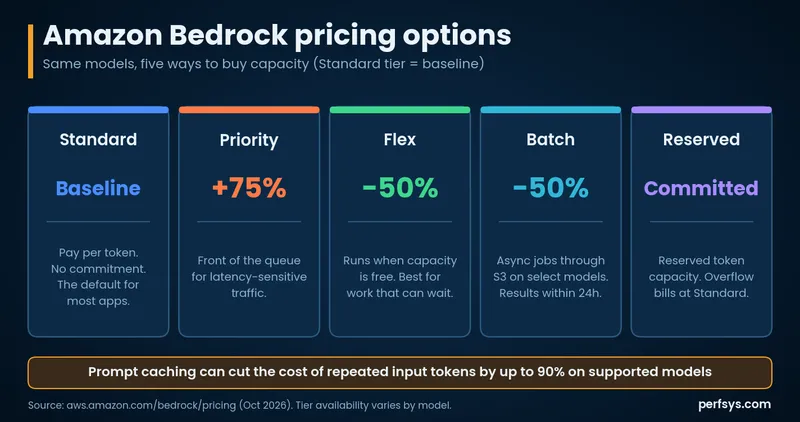
Bedrock charges per token for text models, with no flat fee and no minimum commitment. Image and video models are billed per image or per second. Beyond the base rate, you choose how you buy capacity.
Standard tier (on-demand) charges per request with no commitment, and it is the default. As a price anchor, Amazon Nova Pro costs about $0.80 per million input tokens and $3.20 per million output tokens, while frontier Claude and OpenAI models cost considerably more. Your model choice drives the bill more than the platform does.
Priority and Flex tiers adjust the same on-demand call on supported models. Priority costs 75% more than Standard and puts your requests first in line. Flex costs 50% less and runs when capacity is available, which suits background work that can wait.
Provisioned throughput reserves dedicated capacity for a model. You pay per hour for each model unit, with lower hourly rates on 1-month and 6-month commitments. It suits steady, high-volume production workloads that need predictable performance.
Reserved tier launched in November 2025 and reserves token-per-minute capacity for a model. Traffic above your reservation overflows to the Standard tier and is billed at on-demand rates.
Batch processing is for large jobs that can wait. Select models get a 50% discount against on-demand rates, and results land in your S3 bucket, typically within 24 hours. It suits bulk document processing, embeddings generation and large dataset analysis.
Prompt caching is the other big lever. When many requests share the same context, cached input tokens cost far less, and AWS lists cache-read prices as low as a tenth of the standard input price on some models.
Budget for the extras too. Data transfer, knowledge base storage and custom model storage ($1.95 per month per model) all add to the bill. The Managed Knowledge Base charges $5 per GB of indexed data per month plus $1 per 1,000 retrieval calls. Guardrails and AgentCore usage are billed separately.
Does Amazon Bedrock Have a Free Tier?
Not permanently. Amazon Bedrock has no always-free allowance, so you pay from the first API call. New AWS accounts do get up to $200 in credits, and Bedrock is one of the services you can spend them on.
Here is how the credits work:
- $100 at sign-up: AWS adds credits to new accounts on the free plan when you create them
- Up to $100 more: You earn extra credits by completing guided activities, and one of them is trying a model in the Bedrock playground
- 6-month limit: The free plan ends after 6 months or when your credits run out, whichever comes first
- Startups: Eligible startups can also use AWS Activate credits on Bedrock
The credits are enough to build a working prototype, test RAG with your own data and compare models before you spend real money.
💡 Pro tip: Use your credits to run the same prompt against three or four models in the Bedrock playground. Claude tends to win on nuanced language tasks, while Nova Lite is faster and cheaper for simple classification or summarization. Doing this comparison before you start building saves a painful model switch later.
For current pricing by model, check the AWS Bedrock pricing page.
Amazon Bedrock vs. SageMaker: What's the Difference?
This is the most common question from teams already using AWS.
SageMaker is a full machine learning platform built for data scientists who want to train custom models, build ML pipelines, manage notebooks and run experiments. It requires ML expertise and infrastructure decisions.
Bedrock is for application developers who want to use AI without managing ML infrastructure. You start from powerful pre-trained models and customize as needed. No training from scratch required.
Feature | Amazon Bedrock | Amazon SageMaker |
Primary audience | App developers, product teams | Data scientists, ML engineers |
Infrastructure management | None (fully serverless) | Required |
Model source | Pre-trained FMs from multiple providers | Custom-trained or open-source models |
Getting started | Minutes | Days to weeks |
Best for | Building AI apps and agents | Training and running custom ML models |
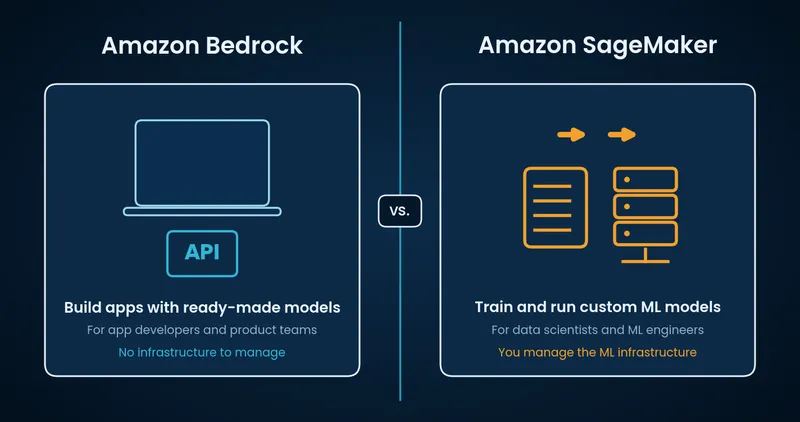
The two services complement each other. Many teams use both: Bedrock for application-layer AI features, SageMaker for custom model training and MLOps.
Amazon Bedrock Alternatives: Azure, Google Cloud and the OpenAI API
Bedrock is one of three hyperscaler options for managed foundation models. Microsoft Foundry (formerly Azure AI Foundry) is the Azure equivalent, and Google Cloud's Gemini Enterprise Agent Platform (formerly Vertex AI) is the Google equivalent. If you already run on one of those clouds, start there.
The OpenAI API connects you to OpenAI models directly. Bedrock now hosts OpenAI models too, so you can reach them through the same AWS IAM, billing and network controls as everything else.
For a wider look at how the three clouds compare on pricing, AI services and hybrid support, read our AWS vs Azure vs GCP comparison.
What Can You Build with Amazon Bedrock?
AI Chatbots and Customer Support Agents
The most common use case. Connect a Claude or Nova model to your product knowledge base through RAG, and you get a support assistant that understands your documentation, answers in your brand's voice and escalates edge cases to a human.
Content Generation and Summarization
Legal teams use Bedrock to summarize contracts, and marketing teams use it to draft campaign copy. The pattern is the same: pass in text, get a useful output without manual effort.
Code Generation and Developer Tooling
Claude and Llama models perform well on code generation tasks. Teams use Bedrock to build internal developer tools, automate code review and generate test cases for existing codebases.
Document Analysis at Scale
For industries that handle high volumes of documents, such as insurance claims, medical records and legal filings, Bedrock can classify, extract and summarize information faster and cheaper than manual review. Bedrock Data Automation adds structured extraction from documents, images, audio and video.
AI Agents for Business Workflows
Using Bedrock Agents or AgentCore, you can automate multi-step processes that used to need human coordination. An agent might receive a customer inquiry, check the order status in your database, pull account history and return a resolution, with no support rep involved.
For a detailed example of building an AI product on Bedrock, see our guide: AWS Bedrock: The Smart Way for Startups to Build Scalable, Secure AI Solutions.
If you're ready to build an AI agent on Bedrock for your own product, our AI agents team can help you scope and build it.
Who Should Use Amazon Bedrock?
Bedrock is a good fit for teams that match at least one of these descriptions.
According to the McKinsey State of AI 2025 report, 88% of organizations now use AI in at least one business function, yet nearly two-thirds have not begun scaling it across the enterprise. Infrastructure complexity is often the bottleneck. Bedrock addresses that directly.
You want to ship AI features fast. Bedrock gets you from zero to a working prototype in hours instead of weeks. You skip the infrastructure setup entirely.
You're already on AWS. Integration with S3, Lambda, CloudWatch, IAM and other AWS services is native. If your stack is already in AWS, Bedrock is the path of least resistance for adding AI.
You need enterprise security. If data governance, compliance or privacy are non-negotiable for your industry, Bedrock solves a lot of problems early: no training on your data, VPC isolation and full encryption.
You want model flexibility. Bedrock's multi-model approach keeps your architecture independent of any single AI provider. As the model landscape evolves, you can switch or combine models without rewriting your application layer.
You don't have ML engineers in-house. Bedrock is built for product and application developers. You don't need to understand gradient descent to build a useful AI feature with it.
What Amazon Bedrock Does Not Replace
Bedrock is not a replacement for everything ML-related.
If you need to train a fully custom model from scratch on proprietary data, look at SageMaker or dedicated ML infrastructure. Bedrock fine-tuning is powerful but works within the boundaries of existing foundation models.
If your use case requires real-time inference at very high throughput with tight latency SLAs, provisioned throughput on Bedrock can help, but for truly specialized, performance-critical AI workloads, a more custom architecture may be warranted.
And if your data cannot leave your on-premises environment under any circumstances, Bedrock's fully managed cloud approach may not meet your compliance requirements without additional controls.
How to Use Amazon Bedrock: Getting Started in 4 Steps
Getting up and running takes four steps.
- Open the model catalog. Log into the AWS Console, open Amazon Bedrock and browse the model catalog. Serverless models enable on first use, so there is no separate access request. Anthropic models need a one-time use-case form, which you can submit from the playground.
- Test in the playground. The Bedrock console has a built-in playground for running prompts against multiple models side by side. Use this to compare outputs before writing any code.
- Connect your data (optional). If you want RAG, create a Knowledge Base, point it at your documents in S3 and Bedrock handles chunking, embedding and indexing for you.
- Call the API. Bedrock's Converse API works the same way across models, so switching models later means changing a model ID. AWS provides SDKs for Python, JavaScript, Java, Go and more.
New AWS accounts get up to $200 in credits, which is enough to build and test a prototype before you commit to production spending.
A Minimal Python Example
Here is a first call with the Converse API. It assumes you have configured AWS credentials and installed boto3.
import boto3

client = boto3.client("bedrock-runtime", region_name="us-east-1")

response = client.converse(
    modelId="global.anthropic.claude-sonnet-5-5",
    messages=[
        {
            "role": "user",
            "content": [{"text": "Explain Amazon Bedrock in two sentences."}],
        }
    ],
    inferenceConfig={"maxTokens": 300},
)

print(response["output"]["message"]["content"][0]["text"])
Anthropic models need the one-time use-case form before the first call. Your IAM role also needs permission to invoke both the model and its inference profile. To try another model, change the modelId.
Security Best Practices for Amazon Bedrock
A few habits keep a Bedrock setup safe as it grows:
- Use least privilege. Scope IAM permissions to the models and actions each role needs.
- Keep traffic private. Use VPC endpoints so Bedrock calls stay on the AWS network.
- Encrypt with your own keys. Use customer-managed KMS keys for custom models, agent sessions and knowledge base data.
- Log every invocation. Turn on model invocation logging so you can audit activity and spot anomalies.
- Apply Guardrails. Add content and prompt attack filters to any app that faces the public.
How Perfsys Builds with Amazon Bedrock
Perfsys is a certified AWS Select Tier Services Partner that helps startups and growing companies ship AI applications on AWS. We've used Bedrock to help clients launch AI MVPs in weeks, including a mental health support assistant that reduced infrastructure costs by 90% compared to the client's original architecture estimate.
Most recently, we built an MCP server on Bedrock AgentCore Runtime to automate AWS Marketplace seller operations. It is a production tool server that exposes complex AWS workflows as callable actions for any AI agent, hosted at zero idle cost. It is our second production build on Bedrock this year.
If you're evaluating whether Bedrock fits your use case, or you want a technical team to handle the build, our MVP development services and AWS consulting team are the right starting point.
FAQ
Amazon Bedrock is a managed cloud service that gives developers API access to powerful AI models without setting up or managing any infrastructure. You pick a model, optionally connect it to your data and call it from your application.
You use Amazon Bedrock by opening the model catalog in the AWS Console, testing prompts in the playground, optionally connecting your own data through a Knowledge Base for RAG and then calling the Converse API from your application. Serverless models enable on first use, and Anthropic models need a one-time use-case form. AWS provides SDKs for Python, JavaScript, Java, Go and more, so switching models later means changing a model ID.
Not permanently. Amazon Bedrock has no always-free tier, so you pay from the first API call. New AWS accounts get up to $200 in credits that you can spend on Bedrock, which is enough to build and test a prototype. After the credits, you pay by tokens processed with no upfront fees or minimum commitment. See the pricing section above for the full breakdown.
ChatGPT is a consumer product built on OpenAI's models. Amazon Bedrock is a developer platform that gives you access to many model families, including Anthropic's Claude, Meta's Llama, Amazon Nova and OpenAI's models, with enterprise security controls and direct AWS integration. You use Bedrock to build your own AI applications, and you don't chat with it directly.
No. Amazon Bedrock does not use your inputs or outputs to train its base foundation models. Your data stays within your AWS environment.
Yes. Bedrock supports two approaches. Knowledge Bases let you connect documents and databases so the model can retrieve relevant context at query time (RAG). Fine-tuning lets you train a customized version of a model on your labeled data for more specialized tasks.
As of October 2026, Bedrock offers models from 19 providers, including Anthropic (Claude Opus 5.5, Sonnet 5.5 and Haiku 4.5), OpenAI (GPT and gpt-oss), Meta (Llama 4), Mistral, DeepSeek, Cohere, Stability AI, Google (Gemma), xAI and Amazon (Nova and Titan). Anthropic models need a one-time use-case form before first use.
Use Bedrock if you want to build an application using existing foundation models. Use SageMaker if you need to train a fully custom model, run complex ML experiments or manage an end-to-end MLOps pipeline.
Bedrock (short for Amazon Bedrock or AWS Bedrock) is Amazon's fully managed service for building generative AI applications. It gives you API access to foundation models from providers like Anthropic, OpenAI, Meta and Amazon itself, with no infrastructure to manage.
No. Bedrock is the service that hosts models. The LLMs themselves, such as Claude, Nova and Llama, run on top of it, and you reach all of them through one API.
Teams use Bedrock to build chatbots and support assistants, summarize and analyze documents, generate content and code, and run multi-step AI agents. It suits any application that needs a foundation model without the work of hosting one.
Microsoft Foundry is the Azure equivalent, and Google Cloud's Gemini Enterprise Agent Platform is the Google equivalent. Bedrock is the natural choice if your workloads already run on AWS, because IAM, billing and networking stay in one place.

CEO & Founder @ Perfsys | Serverless architect with 10+ years of hands-on experience designing cloud-native architectures on AWS, backed by multiple AWS certifications. His writing bridges deep technical expertise with real-world business strategy, covering topics from AWS best practices to scaling tech-driven organizations.
AWS Experts, On-Demand
Need to move fast? Our cloud team is ready to scale, secure, and optimize your systems. Get serverless expertise, 24/7 support, and seamless CI/CD pipelines when you need it most.
Please accept cookies to load the booking widget.