

Amazon Web Services for Small Business: A Practical Guide
Published on Jun 11, 2026

If you are running a startup or a small business and wondering whether Amazon Web Services is worth it for a company your size, the short answer is yes. Most of our clients are SMBs and startups. And practically all of them run their infrastructure on AWS.
But the bigger question is which AWS services you actually need, what it will cost you, and how to avoid the trap of over-engineering your setup before you have traction. That is what this guide covers.
Is AWS Good for Small Businesses?
Amazon Web Services is well-suited for small businesses because it eliminates upfront infrastructure investment and lets you pay only for what you use. You get access to the same infrastructure that powers Netflix, Airbnb, and NASA. You don't need to buy a single server.
For a small business or startup, this matters in a concrete way. Before cloud computing, scaling meant purchasing hardware months in advance, guessing your future capacity, and absorbing the cost whether the product took off or not. AWS removes that equation entirely.
According to IDC research cited by AWS, cloud has replaced hardware and traditional software as the top IT budget category for small and medium-sized businesses. The shift is not a trend anymore. It is the baseline.
What Makes AWS Different from Other Cloud Providers
AWS holds 33% of the global cloud infrastructure market, ahead of Microsoft Azure and Google Cloud. For small businesses, that market share translates into a practical advantage: the largest ecosystem of services, the most extensive documentation, and the widest pool of engineers and partners who know the platform.
If you need to hire a DevOps engineer six months from now, AWS experience is far easier to find than niche cloud expertise. And if you ever want a structured comparison of all three providers, our AWS vs Azure vs GCP guide breaks down which platform fits which use case.
Perfsys is a certified AWS Select Tier Services Partner. Our team holds AWS certifications in Solutions Architecture, Developer, and Security. The guidance in this article comes from delivering 70+ AWS projects across startups and SMBs in software, fintech, digital health, and logistics.
The AWS Services Small Businesses Actually Use: Compute, Storage, and Databases
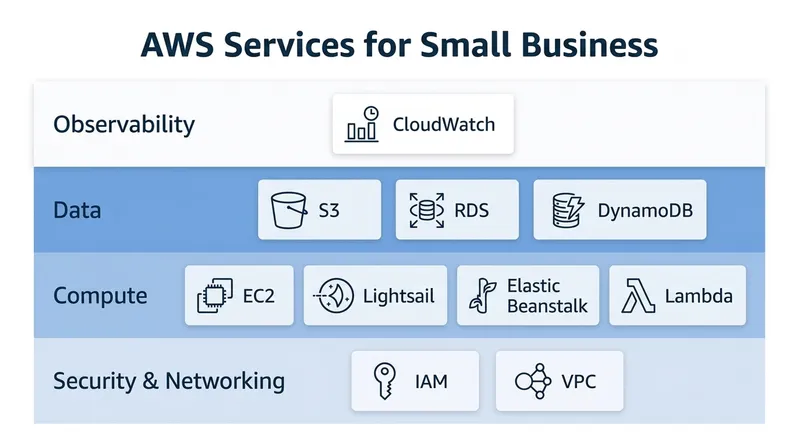
AWS offers over 200 services. Most small businesses use about seven of them. Here is what matters for your stage.
Compute: Where Your Applications Run
Amazon EC2 gives you virtual servers you can configure and scale. Your engineers choose the instance type based on your workload: memory, CPU, storage. You pay by the hour. You can resize or shut down at any time.
AWS Lightsail is a simpler, fixed-price alternative to EC2. Bundled compute, storage, and networking in a predictable monthly cost. Good for launching a basic web app, a staging environment, or an MVP quickly without DevOps overhead.
AWS Elastic Beanstalk takes it further: you upload your code, and Beanstalk handles server provisioning, load balancing, and scaling automatically. Your engineers focus on the product, not the infrastructure. For most early-stage teams, this is the right starting point.
💡 Pro tip: If you are early-stage and debating whether to manage your own servers, start with Elastic Beanstalk or Lightsail. Full EC2 control makes sense once your team grows and your traffic patterns become predictable. Most startups over-engineer this decision early.
Storage: Files, Backups, and Static Assets
Amazon S3 (Simple Storage Service) stores any type of file: images, videos, documents, backups, and static website assets. It offers high durability and virtually unlimited capacity. You pay only for what you store. S3 is often one of the first AWS services a small business touches, even before migrating any core infrastructure.
Databases: Stop Managing Your Own
Amazon RDS (Relational Database Service) runs managed PostgreSQL, MySQL, and other relational databases. AWS handles backups, patching, and failover. Your team does not manage a database server.
Amazon DynamoDB is a serverless NoSQL database built for real-time performance with variable traffic. It scales automatically without manual intervention.
Switching from a self-managed database to RDS is one of the highest-impact, lowest-risk moves a small business can make on AWS. We did exactly this in our Azure-to-AWS migration case study, replacing Cosmos DB with Amazon RDS for PostgreSQL as part of migrating 27 applications in 2 months.
Security, Serverless, and Monitoring on AWS
Security and Access Control
AWS IAM (Identity and Access Management) controls who can access what in your AWS environment. It is not optional. IAM is the foundation of everything secure you build on AWS, and it needs to be configured correctly from day one, not retrofitted later.
To illustrate why this matters: in our AWS Well-Architected Framework review for a London-based fintech, we discovered an IAM access key that had been active for 1,198 days without rotation, a critical compliance violation the team was unaware of. We rotated it immediately and set up automated credential management going forward.
Amazon VPC (Virtual Private Cloud) creates isolated network boundaries around your resources. Think of it as your private section of AWS infrastructure.
AWS Security Hub and GuardDuty monitor your environment for threats. GuardDuty analyzes over 53 billion DNS queries daily to flag anomalous behavior. For a small business without a dedicated security team, these services give you automated threat detection at enterprise scale.
Serverless: The Right Model for Many Startups
AWS Lambda runs code in response to events without provisioning any servers. You pay per execution, not per hour. For workloads with variable or unpredictable traffic, Lambda is often significantly cheaper than running a server continuously.
This is what we used in the i Got This! AI mental health assistant MVP, a UK startup that came to us after an initial build with another vendor failed to meet requirements. We delivered a 7-service AWS architecture in 3 months using Lambda, API Gateway, Cognito, DynamoDB, Amplify, Bedrock, and S3. The result: 90% cost savings on their avatar testing process, from roughly 300–350 minutes per month down to 20. The startup was self-funded and used AWS Activate credits to cover a meaningful portion of their initial infrastructure costs. More on that below.
Monitoring: Know What Is Happening
Amazon CloudWatch tracks performance metrics, sends alerts, and logs events across your entire AWS environment. It is the difference between finding out about a problem from a user complaint and catching it yourself before it affects anyone.
If you want a full picture of how your AWS environment is performing across cost, security, and reliability at once, an AWS Cloud Assessment gives you exactly that: a structured review with actionable findings from senior AWS engineers.
How Much Does AWS Cost for a Small Business?
AWS pricing is consumption-based. You pay for what you use, with no fixed contracts unless you choose them.
For a typical early-stage startup running a web application, realistic monthly costs look like this:
- Compute (Elastic Beanstalk or EC2): $50–$300
- Database (RDS, small instance): $50–$150
- Storage (S3): $5–$50
- Networking and data transfer: $20–$100
- Total: $150–$600 per month for a basic production setup
More complex products with higher traffic or multiple environments typically run $500–$3,000 per month. That is still a fraction of what equivalent dedicated hardware would cost, and it includes built-in redundancy, backups, and global availability.
AWS also provides Reserved Instances and Savings Plans: commitments of 1 or 3 years that reduce compute costs by 30–60% compared to on-demand pricing. Once you have a stable baseline workload, this is worth evaluating. Most clients we work with see 20–40% cost reductions after a proper architecture review.
AWS Activate: Free Credits for Startups
If you are an early-stage startup, AWS Activate is worth applying for immediately. The program provides free AWS credits, training, and support to qualified startups. Credits can range from a few hundred dollars to $100,000 depending on your stage and investor relationships.
We helped the i Got This! mental health startup access AWS Activate funding as part of their MVP build. It covered a meaningful portion of their initial infrastructure costs during the pre-revenue phase. If you are building on AWS and have not applied yet, you are leaving money on the table.
TD Synnex Partnership: 5% Discount on AWS Workloads
As a certified TD Synnex reseller partner, Perfsys can provide a 5% discount on AWS workloads for eligible clients. If you are evaluating AWS costs and comparing what different partners can offer, this is worth factoring in before you commit to a spend level. Check if your workload qualifies.
Public Cloud vs. Private Cloud: What You Actually Need
There are three deployment models you will encounter. For the vast majority of small businesses and startups, the decision is straightforward.
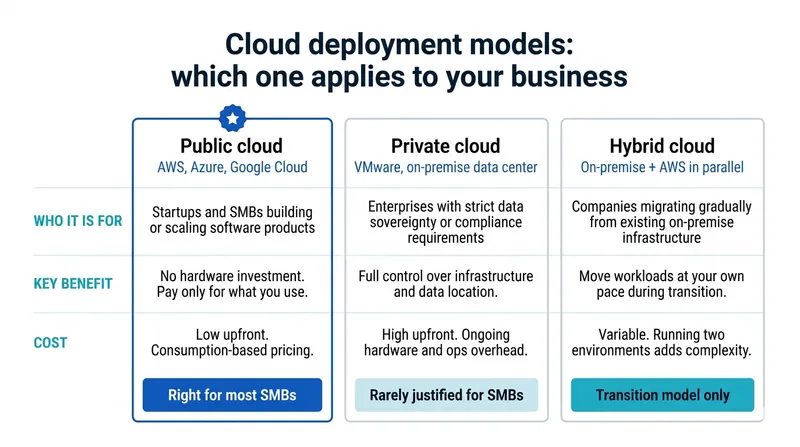
Public cloud (AWS, Azure, Google Cloud) means your workloads run on shared infrastructure managed by the provider. Your data and environment are isolated. It is cost-effective, requires no hardware investment, and gives you instant access to every AWS service.
Private cloud is dedicated infrastructure for a single organization. It offers more control and stricter compliance boundaries, and is relevant for enterprises in heavily regulated industries with specific data sovereignty requirements. For most SMBs and startups, the cost and operational overhead far exceeds the benefit.
Hybrid cloud makes sense when you have existing on-premises infrastructure you are migrating gradually, or workloads with specific regulatory requirements that cannot move to public cloud. It is a transition model for most small businesses, not an end state.
Start on public cloud. Revisit the question only when you have a specific compliance or regulatory driver that forces a different decision.
How to Get Started with AWS as a Small Business
If you are evaluating AWS for the first time, or you are already using it without a clear architecture plan, here is the practical starting point:
- Audit what you are already running. Most companies using web-based software are already consuming cloud services. Map out what you have before adding more.
- Identify your biggest pain point. Slow deployments, unpredictable hosting costs, scaling bottlenecks. The answer determines which AWS services to prioritize.
- Start with managed services. Elastic Beanstalk, RDS, and Lambda remove operational complexity. Unless you have strong DevOps experience in-house, avoid managing raw EC2 instances from day one. If you don't have DevOps experience in-house, working with a dedicated development team is often the fastest way to get a production-ready AWS setup without building that capability yourself.
- Apply for AWS Activate. If you qualify as a startup, do this before you spend anything.
- Get an architecture review before you commit. The decisions you make early, including which services, how you structure accounts, and how you handle environments, are hard to reverse after you have scaled. Our AWS consulting services are built around exactly this starting point: helping small teams build a solid foundation before complexity accumulates.
For teams with existing infrastructure wondering whether their current AWS setup is optimized, the DevOps on AWS guide covers architecture patterns and CI/CD tooling worth reviewing before you scale.

Many SMBs and startups discover gaps in their cloud architecture only after growth exposes them. A structured review catches those issues early, before they become expensive.

FAQ
Yes. AWS maintains certifications including SOC 2, ISO 27001, GDPR, and HIPAA compliance. Security Hub, GuardDuty, and IAM give small businesses automated threat detection and access control at a level that would require a dedicated security team to replicate on-premise. The relevant question is how you configure your AWS environment. Most cloud security incidents originate from misconfiguration, not from the platform itself.
A basic production environment on AWS, covering compute, database, networking, and IAM, can be up in days with the right team. A full architecture including CI/CD pipelines, monitoring, and compliance-ready account structure takes two to four weeks. A migration from an existing environment takes four to twelve weeks depending on complexity.
For managed services like Elastic Beanstalk, RDS, and Lambda, a strong backend developer can operate the infrastructure. As your product grows and your architecture becomes more complex, dedicated DevOps or a cloud managed services partner becomes worthwhile. Many of our clients start without a DevOps hire and bring Perfsys in as an extension of their team.
AWS has the largest service catalog, the most extensive global infrastructure, and the deepest partner ecosystem. Azure is a natural fit if your organization is already on Microsoft tools. Google Cloud has strengths in data and ML workloads. For most small businesses starting fresh, AWS is the most practical choice. See our full AWS vs Azure vs GCP comparison (perfsys.com/blog/aws-vs-azure-vs-gcp) for a detailed breakdown.
Yes. We have migrated clients from Azure, GCP, and on-premise environments to AWS. Our Azure-to-AWS migration case study (perfsys.com/case-studies/aws-migration/) covers a 27-application migration completed in 2 months. The process involves a discovery phase, infrastructure setup, CI/CD automation, and a staged production cutover designed to minimize downtime.
Conclusion
Amazon Web Services gives small businesses and startups access to enterprise-grade infrastructure without the enterprise-grade overhead. The right starting point is simpler than most people expect: a handful of managed services, a clean account structure, and a clear picture of what you are building toward.
The complexity comes later, and it is manageable when you build on a solid foundation from the start.
"Most SMBs come to AWS expecting to move fast, and are surprised by how much legacy debt needs to be addressed first. A successful migration is as much about modernizing what you have as it is about moving it." — Eugene Orlovsky, CEO & Founder, Perfsys
If you want to understand what the right AWS setup looks like for your specific situation, the Perfsys team works with SMBs and startups as a certified AWS Select Tier Services Partner. Book a discovery call via the link above to walk through your infrastructure and what makes sense for where you are heading.

Software Engineer at Perfsys with hands-on experience building scalable backend systems on AWS using Python and TypeScript. He works directly on cloud infrastructure projects, bringing practical engineering depth to every topic he covers.
AWS Experts, On-Demand
Need to move fast? Our cloud team is ready to scale, secure, and optimize your systems. Get serverless expertise, 24/7 support, and seamless CI/CD pipelines when you need it most.
Please accept cookies to load the booking widget.