

AWS Lambda URL: What It Is and When to Skip API Gateway
Published on Jul 6, 2026

You want to trigger a Lambda function over HTTPS, and you do not want to spend an afternoon wiring up API Gateway to get there. An AWS Lambda URL, also called a Lambda function URL, gives you a direct HTTPS endpoint for your function in a couple of clicks. No routes, no stages, no extra service sitting between your client and your code.
At Perfsys we set up serverless architecture for startups and SMBs every week, and one question comes up on almost every call: do you actually need API Gateway for this? Sometimes yes. Often, no. This guide walks through what a Lambda URL is, how it works, when it is the right call, and when you should still reach for API Gateway.
Watch the explanation of AWS Lambda URLs in under 5 minutes on the Perfsys YouTube channel: AWS Lambda URLs: A Simpler Way to Build Serverless APIs Without API Gateway
What Is an AWS Lambda URL?
An AWS Lambda URL is a built-in HTTPS endpoint attached directly to a Lambda function. Once you turn it on, you can call your function from a browser, curl, Postman, or any HTTP client, with no API Gateway in between.
That's it. No request mapping templates, no deployment stages, no separate service to monitor.
Instead of building a full API stack just to catch a webhook from Stripe or GitHub, you enable a Lambda URL and get a working, secure endpoint right away. According to AWS's own documentation, Lambda URLs cover exactly that gap: a single function that needs a public endpoint but none of API Gateway's heavier machinery.
💡 Pro tip: Default to AWS_IAM as your auth type unless you have a specific reason to expose the endpoint publicly. NONE means anyone with the URL can invoke your function, and that includes anyone who finds it in a public GitHub repo.
How an AWS Lambda URL Request Flows
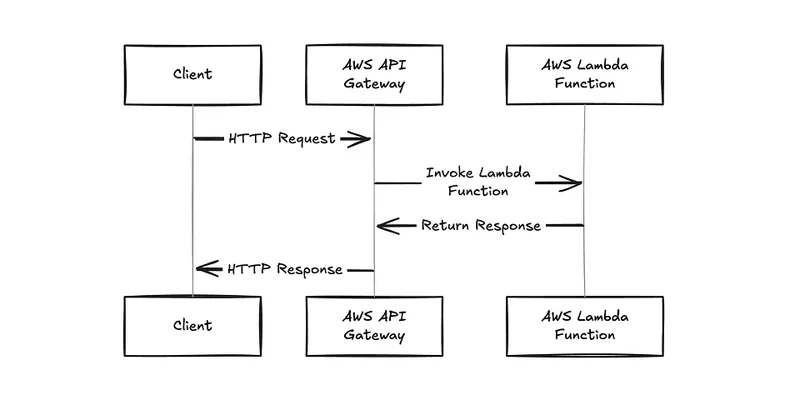
Here is the difference in plain terms. With API Gateway, the client hits the gateway, the gateway invokes Lambda, and the response travels back through the gateway before it reaches the client. Three hops, one extra service to configure.
With a Lambda URL, the client talks straight to the function. The endpoint sits on the function itself, so there is nothing in the middle to configure, throttle, or pay for separately.
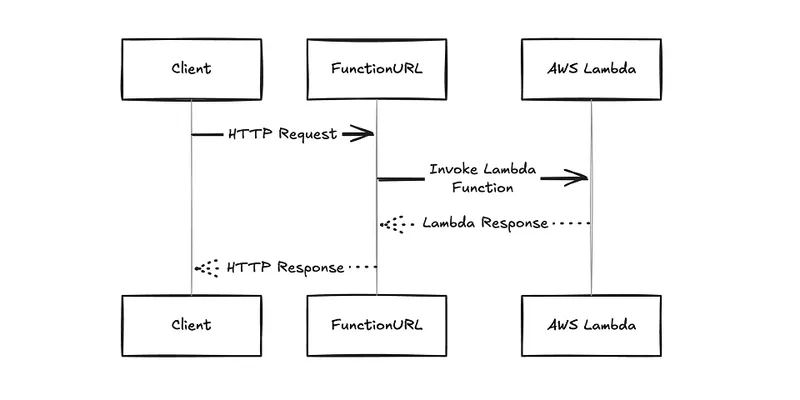
Fewer moving parts means fewer things that can break, and fewer things you have to explain to a new engineer on day one.
Why Skip API Gateway?
Do you need a full API Gateway setup for every Lambda function? Not always, and for a lot of small workloads, the answer is closer to never.
API Gateway is powerful. It supports request validation, caching, and throttling. It is also time consuming to configure, and it defaults to a 1-minute timeout, which becomes a real blocker the moment you have a task that runs longer than that.
An AWS Lambda URL bypasses all of it. You get a direct HTTPS endpoint tied to your function, and you get it in minutes, not hours. AWS positioned the feature exactly this way when it announced Lambda URLs: a fit for single-function microservices that do not need API Gateway's advanced routing. For lean startups and SMBs where speed to market matters more than granular API controls, that trade is usually worth making.
How to Create an AWS Lambda URL
Setting one up takes less time than reading this section. Here's the process:
- Open the Functions page in the Lambda console and select your function.
- Go to the Configuration tab, then Function URL.
- Choose Create function URL.
- Pick an auth type: AWS_IAM for authenticated callers, or NONE for public access.
- If a browser will call the endpoint directly, configure CORS: allowed origins, methods, and headers.
- Save, copy the generated URL, and test it with curl, Postman, or your browser.
You can also enable a function URL through the AWS CLI or a CloudFormation template if you are managing infrastructure as code, which is what we recommend once you move past the prototype stage.
Top Benefits of an AWS Lambda URL
Here is why more teams reach for a Lambda URL before they reach for API Gateway:
- No API Gateway required. One less service to configure, monitor, and pay for.
- Supports long-running tasks. Up to the full 15-minute Lambda execution limit, well past API Gateway's default timeout.
- Built for webhooks and lightweight endpoints. Stripe, GitHub, and most SaaS webhook senders just need a URL that responds. This is that URL.
- Fast to set up. Minutes instead of hours, which matters when you are validating an MVP or an internal tool.
Read more about how we build MVPs on AWS if speed to market is your main constraint right now.
Limitations to Be Aware Of
Lambda URLs are intentionally lightweight, and that comes with real trade-offs:
- No built-in authentication beyond IAM, though IAM signatures do protect the endpoint effectively.
- No request mapping, rate limiting, or caching out of the box.
- No custom domain support unless you configure Route 53 or CloudFront yourself.
- Less routing control, since a Lambda URL is a single entry point to one function, not a router in front of many.
If your project needs any of that, it is worth taking the time to review AWS's own API Gateway documentation before you decide.
Best Use Cases for an AWS Lambda URL
A Lambda URL shines wherever speed and simplicity matter more than advanced routing:
- Receiving public webhooks from third-party tools.
- Kicking off a background job or scheduled task through an HTTP trigger.
- Building a proof of concept or validating an early product idea fast.
- Serving internal tools where security is already handled upstream, by a VPN or an internal network boundary.
AWS Lambda URL vs API Gateway
What actually changes when you pick one over the other? Here is the comparison side by side.
Feature Comparison Table
Feature | AWS Lambda URL | API Gateway |
|---|---|---|
Setup complexity | Minimal | Moderate to high |
Authentication | Basic (IAM) | Advanced (Cognito, OAuth, custom) |
Request/response mapping | None | Full support |
Timeout | 15 minutes | 1 minute by default |
Best for | Webhooks, MVPs, internal tools | Full-featured, customer-facing APIs |

Perfsys helps startups and SMBs pick the right serverless architecture, without the overhead of a full audit.

FAQ
An AWS Lambda URL is a direct HTTPS trigger built into Lambda itself. It skips API Gateway's setup and cost, but it also skips advanced features like request validation, throttling, and custom authorizers.
Yes. Lambda URLs support IAM based authorization, and you can add custom authentication logic inside the function itself. They do not have native OAuth or Cognito support the way API Gateway does.
Yes, Lambda URLs themselves carry no extra charge. You pay only for Lambda execution time and any other AWS resources your function touches, which makes them a cost effective option for startups and SMBs.
Removing API Gateway from the request path can reduce latency, since there is one less hop between the client and your code. Cold start and warm start behavior stay comparable to standard Lambda performance.
Not directly. AWS auto generates the Lambda URL for you. To put a custom domain in front of it, you need to configure Amazon Route 53 or CloudFront yourself.
Typical scenarios include receiving webhooks from SaaS tools, running lightweight internal APIs, validating an MVP, powering internal dashboards, and handling service to service calls inside your own cloud environment.
An AWS Lambda URL supports the full 15 minute Lambda execution limit. That is a real advantage over API Gateway, which defaults to a much shorter timeout.
It can be, for lightweight endpoints, internal tools, and specific services. For customer facing APIs that need strict security, request validation, or complex routing, API Gateway is usually the safer choice.
Summary
- An AWS Lambda URL is a direct HTTPS endpoint built into Lambda, no API Gateway required.
- It is a strong fit for MVPs, internal tools, and public webhooks.
- Setup takes minutes and skips API Gateway's routes, stages, and default timeout.
- It is not built for complex, customer-facing APIs that need advanced auth or routing. That's what API Gateway is for.

CEO & Founder @ Perfsys | Serverless architect with 10+ years of hands-on experience designing cloud-native architectures on AWS, backed by multiple AWS certifications. His writing bridges deep technical expertise with real-world business strategy, covering topics from AWS best practices to scaling tech-driven organizations.
AWS Experts, On-Demand
Need to move fast? Our cloud team is ready to scale, secure, and optimize your systems. Get serverless expertise, 24/7 support, and seamless CI/CD pipelines when you need it most.
Please accept cookies to load the booking widget.