
Migration
15 min read


7
weeks to production on AWS
11
blockers found in Phase 1
0
user-facing incidents
Key Insights
Location
Germany
Project duration
7 weeks to production, then ongoing support
Industry
Fitness equipment and apps
Technologies used
Amazon ECS Fargate, MongoDB Atlas, Amazon S3, AWS Lambda, Amazon CloudFront, Terraform, GitHub Actions
A fitness app cannot stop working because its backend is moving. This client, a German fitness equipment brand with a live strength-training app, had its backend on an outgoing agency's Heroku setup and wanted it in an AWS account it owns.
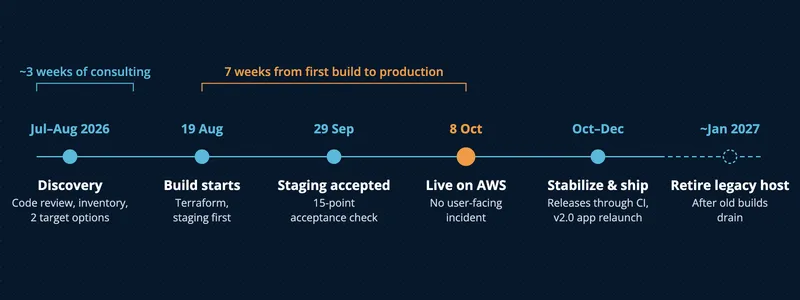
This Heroku to AWS migration case study covers Phase 2: Active Migration and Phase 3: Post-Migration Support. Production switched to Amazon ECS Fargate in Frankfurt 7 weeks after the first build, with no user-facing incident and no data loss. Phase 1, Discovery and Planning, is covered in our AWS consulting case study.
The client is a German fitness equipment brand with an iOS and Android strength-training app and a few thousand users. A small in-house team owns the product, and an external agency had built and hosted the backend.
Phase 1 recorded 11 migration blockers, 4 of them rated high-severity, and left us with a verified inventory, a chosen plan (keep MongoDB Atlas, replace what the agency controlled) and a 6-phase cutover plan. The migration started from that plan.
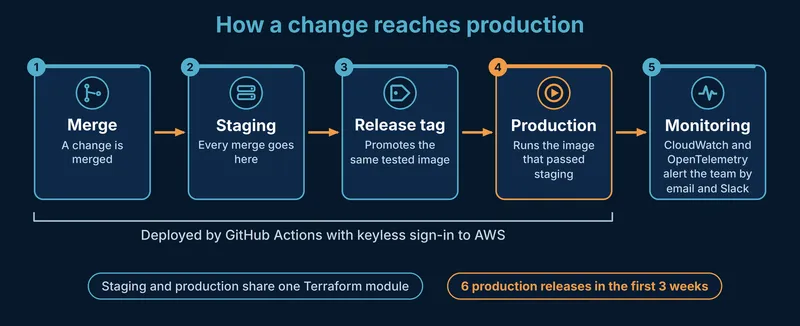
Staging and production are built from one Terraform module, so what passed in staging behaved the same live. Staging passed a 15-point acceptance check before production work began.
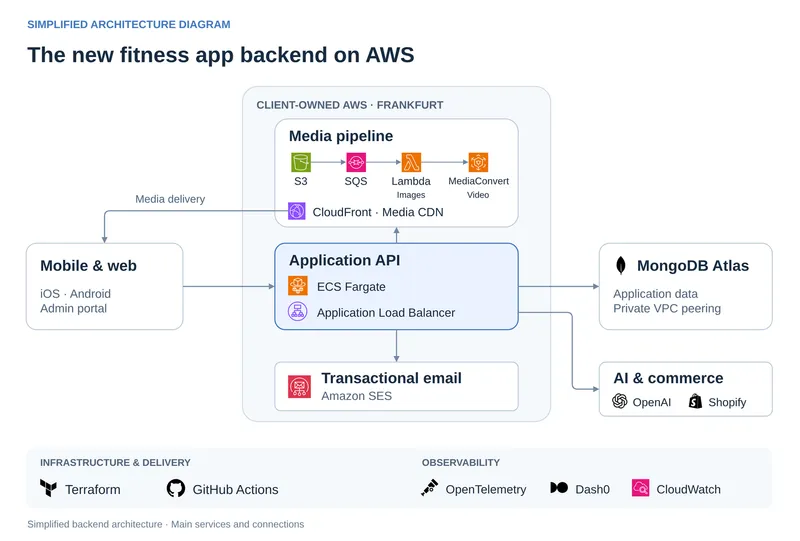
Containers on Amazon ECS Fargate. The Node.js API runs behind an Application Load Balancer, in private subnets in Frankfurt. It is stateless and health-checked, so scaling out is a setting change.
A database that stayed, with a private path. The MongoDB Atlas cluster sits in the client's own Atlas account and connects to AWS over VPC peering. A daily snapshot export copies the database to S3 as a second backup.
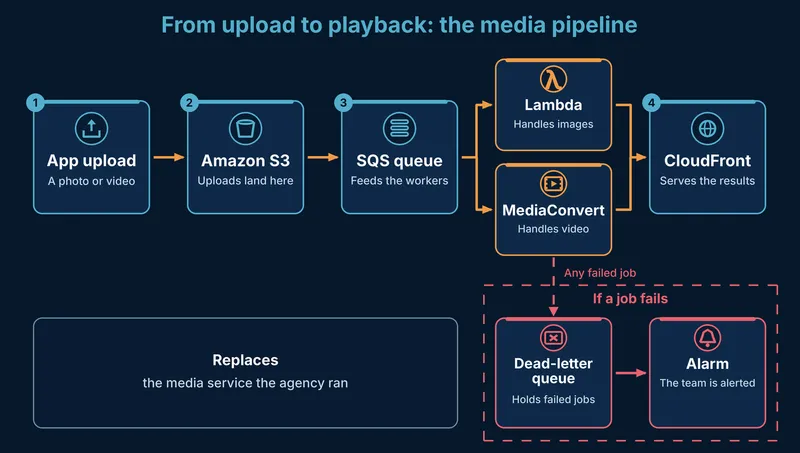
A media pipeline in place of the agency service. Uploads land in Amazon S3. An SQS queue feeds a Lambda worker for images and AWS Elemental MediaConvert for video, and CloudFront serves the results. Failed jobs go to a dead-letter queue that raises an alarm.
Email, jobs and secrets. Amazon SES sends sign-in codes from the brand's own domain. EventBridge Scheduler runs the maintenance jobs, with alarms for failed and missed runs, so the GDPR deletion job can no longer stop silently. Secrets live in AWS Secrets Manager.
Releases and monitoring. GitHub Actions deploys with keyless sign-in to AWS. A merge goes to staging, and a release tag promotes the same tested image to production. CloudWatch alarms and OpenTelemetry traces, with personal data redacted, alert the team by email and Slack. We built similar visibility for another client: see the serverless observability case study.
Old app versions on users' phones still called the old host. We turned that old address into a thin forwarder to the new API on AWS. New app builds and the admin panel call the new domain directly. The forwarder is retired once the old versions drop out of use.
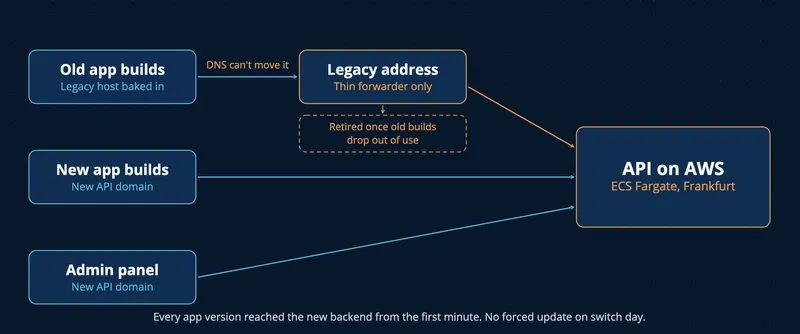
Before the switch, we rehearsed the forwarder on staging and simulated old app versions against it. On switch day, traffic moved to AWS in one step. The database did not move, so there was nothing to sync. Users stayed signed in, and 796 stored media links were moved to the new CDN with 0 conflicts.
"The database stayed where it was and the old address became a forwarder, so there was nothing to sync and nothing for users to notice. That is what a migration built on a verified inventory gives you."
The client continued with Perfsys through AWS Marketplace on a 6-month CloudCare Standard plan covering foundation, cutover, stabilization, operations, hardening and a Well-Architected review with handover.
Here is where the platform stands now:
We now run day-to-day operations and support the client's v2.0 app relaunch, planned for December. The roadmap covers:

We plan and run AWS migrations for startups and SMBs, from discovery to a cutover your users don't notice.
In this project, about 3 weeks of discovery, then 7 weeks from the first build to production on AWS. Retiring the old host follows later, once old app versions drop out of use.
Keep the old address alive as a thin forwarder to the new backend. Ship new app builds that call a domain you control, and retire the forwarder once the old versions drain.
In this project, yes. Traffic moved to AWS in one step with no user-facing incident and no data loss. The database did not move, so there was nothing to sync, and users stayed signed in. The old address kept working as a forwarder for older app versions.
Yes, through CloudCare managed support packages for ongoing monitoring and incident response.

Software Engineer at Perfsys with hands-on experience building scalable backend systems on AWS using Python and TypeScript. He works directly on cloud infrastructure projects, bringing practical engineering depth to every topic he covers.
Recommended for You
AWS Experts, On-Demand
Need to move fast? Our cloud team is ready to scale, secure, and optimize your systems. Get serverless expertise, 24/7 support, and seamless CI/CD pipelines when you need it most.
Please accept cookies to load the booking widget.