

Amazon CloudFront: The Ultimate Guide 2026
Published on Jul 25, 2025

Amazon CloudFront is Amazon Web Services' global CDN — and in 2026, it remains the default choice for teams already running on AWS. This guide covers everything: how CloudFront works, its core features, pricing breakdown, step-by-step setup, and real-world examples from Perfsys client projects. Whether you're evaluating CloudFront for the first time or optimizing an existing setup, you'll find actionable answers here.
Introduction to Amazon CloudFront and CDN Technology
What Is a CDN (Content Delivery Network)?
A Content Delivery Network (CDN) is a system of distributed servers that deliver web content to users based on their geographic location. The primary goal of a CDN is to enhance the speed and reliability of content delivery, reducing latency and improving user experience. By caching content at various edge locations around the world, CDNs minimize the distance data must travel, ensuring faster access for end-users.
CDNs are particularly beneficial for websites with high traffic, as they can handle large volumes of requests without compromising performance. They also provide redundancy and reliability, ensuring that content remains accessible even during peak times or server outages.
Overview of Amazon CloudFront
Amazon CloudFront is AWS's CDN offering, designed to accelerate the delivery of static and dynamic web content. It integrates seamlessly with other AWS services, such as Amazon S3, EC2, and Elastic Load Balancing, making it a versatile choice for developers and businesses.
New to CloudFront? Start with our beginner's guide to Amazon CloudFront before diving in.
CloudFront allows users to distribute content globally with low latency and high transfer speeds, ensuring a smooth experience for users regardless of their location.
With its extensive network of edge locations, CloudFront can cache content closer to users, which significantly enhances loading times. Furthermore, it supports various content types, including HTML, CSS, JavaScript, images, and video, making it suitable for a wide range of applications.
Why Choose AWS CloudFront for Content Delivery?
Choosing Amazon CloudFront for content delivery comes with numerous advantages. Firstly, its integration with the AWS ecosystem allows for easy management and deployment of applications. Users can leverage other AWS services, such as AWS Lambda and Amazon Route 53, to create a comprehensive and efficient architecture.
Additionally, CloudFront offers robust security features, including HTTPS support and integration with AWS Web Application Firewall (WAF). This ensures that content is delivered securely, protecting both the content and the users accessing it. The flexible pricing model, which is based on usage, also makes CloudFront a cost-effective solution for businesses of all sizes.
Who Should Use CloudFront? (Developers, SaaS, E-commerce, Media)
Amazon CloudFront is an excellent choice for a variety of users, including developers, SaaS providers, e-commerce businesses, and media companies. Developers can benefit from its easy integration with other AWS services, allowing them to build scalable applications quickly. SaaS providers can ensure that their applications are fast and reliable, enhancing user satisfaction.
E-commerce businesses can leverage CloudFront to deliver product images, videos, and other content quickly, improving the shopping experience and potentially increasing conversion rates. Media companies, on the other hand, can use CloudFront to stream video content efficiently, reaching a global audience without buffering issues.
Understanding CDN Architecture and CloudFront's Role
How CDNs Work: From Traditional Hosting to Edge Delivery
Traditional web hosting relies on a single server to deliver content to users. This can lead to slow loading times, especially for users located far from the server. CDNs, in contrast, use a network of distributed servers, known as edge locations, to cache and deliver content closer to users. When a user requests content, the CDN determines the nearest edge location and serves the content from there, significantly reducing latency.

This architecture not only improves speed but also enhances reliability. If one server goes down, the CDN can reroute requests to another server, ensuring continuous availability. As a result, CDNs are essential for businesses that require high uptime and fast content delivery.
Amazon CloudFront in the AWS Ecosystem
Amazon CloudFront is deeply integrated into the AWS ecosystem, allowing users to take advantage of various AWS services. For instance, content can be stored in Amazon S3, which CloudFront can then distribute globally. Similarly, applications running on Amazon EC2 can utilize CloudFront to enhance performance and scalability.
This integration simplifies the deployment process, enabling users to manage their infrastructure from a single platform. Moreover, AWS services like AWS Lambda can be used in conjunction with CloudFront to create serverless applications that respond to events in real-time, further enhancing the capabilities of content delivery.
CDN vs Cloud Hosting: Key Differences Explained
While both CDNs and cloud hosting aim to improve content delivery, they serve different purposes. Cloud hosting provides a virtual server environment where applications can run, while a CDN focuses on distributing content efficiently across a network of servers. A CDN enhances the performance of cloud-hosted applications by caching content at edge locations, reducing the load on the origin server.
In essence, cloud hosting is about where the application runs, while a CDN is about how content is delivered to users. For optimal performance, many businesses choose to use both cloud hosting and a CDN in tandem.
How Amazon CloudFront Works
Global Edge Locations and Intelligent Request Routing
CDN Amazon operates a vast network of edge locations around the globe. These locations are strategically placed to ensure that content is delivered from the nearest server to the user, minimizing latency. When a user requests content, CloudFront intelligently routes the request to the closest edge location, ensuring fast access.

This intelligent request routing not only improves performance but also optimizes bandwidth usage. By caching content at edge locations, CloudFront reduces the number of requests that need to be sent to the origin server, allowing it to handle more traffic without degradation in performance.
Supported Origin Types: S3, EC2, Load Balancers & Custom Origins
CloudFront supports various origin types, making it a flexible choice for different applications. Users can set Amazon S3 bucket as origins for static content, such as images and videos. For dynamic content, Amazon EC2 instances and Elastic Load Balancers can serve as origins, allowing for scalable application delivery.
Additionally, CloudFront supports custom origins, which means users can connect it to any web server, whether hosted on AWS or elsewhere. This versatility makes CloudFront suitable for a wide range of use cases, from simple static websites to complex dynamic applications.
Content Caching, TTL Settings, and Cache Invalidation
One of the core functionalities of CDN Amazon is its content caching capabilities. When a user requests content, CloudFront caches it at the edge location for future requests. This reduces the load on the origin server and speeds up delivery for subsequent users. The Time-to-Live (TTL) settings determine how long content remains cached before it is considered stale and needs to be refreshed from the origin.
Users can configure TTL settings based on their content update frequency. For frequently changing content, shorter TTLs can be set, while static content can have longer TTLs. In cases where immediate updates are necessary, CloudFront offers cache invalidation options, allowing users to remove outdated content from the cache manually.
Secure Content Delivery with HTTPS and AWS WAF
Security is a top priority for any online business, and Amazon CloudFront provides robust security features to protect content during delivery. CloudFront supports HTTPS, ensuring that data transmitted between the user and the edge location is encrypted. This is particularly important for sensitive information, such as personal data and payment details.
Furthermore, CloudFront integrates seamlessly with AWS Web Application Firewall (WAF), providing an additional layer of security. Users can set rules to filter out malicious requests, protecting their applications from common web exploits and vulnerabilities.
Serverless at the Edge with Lambda@Edge
Lambda@Edge is a powerful feature of Amazon CloudFront that allows users to run serverless functions at edge locations. This capability enables developers to customize content delivery based on user requests without the need for a dedicated server. For instance, Lambda@Edge can be used to modify HTTP headers, redirect users based on their geographic location, or even personalize content.
By leveraging Lambda@Edge, businesses can enhance user experience while reducing latency. This serverless approach also simplifies application architecture, as it eliminates the need for additional infrastructure to handle custom logic.
Core Features of AWS CloudFront
Fine-Grained Caching Control (TTL, Headers, Cookies)
Amazon CloudFront offers fine-grained caching control, allowing users to customize how content is cached and delivered. Users can set TTL values for different content types, ensuring optimal performance based on the nature of the content. Additionally, CloudFront can cache based on specific headers and cookies, enabling personalized content delivery.
This level of control is particularly beneficial for applications that require dynamic content, as it allows developers to balance performance with the need for up-to-date information. By fine-tuning caching settings, businesses can significantly enhance user experience while optimizing resource usage.
Advanced Security: HTTPS, AWS Shield, and WAF Integration
Security is paramount in today's digital landscape, and Amazon CloudFront offers advanced security features to protect content and applications. With support for HTTPS, users can ensure that data is encrypted during transit, safeguarding sensitive information. Additionally, AWS Shield provides DDoS protection, ensuring that applications remain available even under attack.
Integration with AWS WAF further enhances security by allowing users to define rules that filter out malicious traffic. This multi-layered security approach helps businesses maintain the integrity of their applications while providing a safe experience for users.
Access Control with Geo-Restrictions and Signed URLs
Amazon CloudFront provides robust access control features, allowing users to manage who can access their content. Geo-restrictions enable businesses to limit content delivery based on geographic location, ensuring compliance with regional regulations or licensing agreements. This is particularly useful for media companies that need to restrict access to certain content in specific regions.
Additionally, CloudFront supports signed URLs, which allow users to grant temporary access to specific content. This feature is essential for pay-per-view services or any application that requires controlled access to premium content.
Real-Time Logs and Performance Metrics with CloudWatch
Monitoring performance is crucial for any online application, and Amazon CloudFront provides real-time logs and metrics through AWS CloudWatch. Users can track various performance indicators, such as request counts, error rates, and latency, enabling them to identify and address potential issues quickly.
These insights allow businesses to optimize their content delivery strategies, ensuring that users receive the best possible experience. By leveraging CloudWatch, organizations can make data-driven decisions to enhance performance and reliability.
In conclusion, Amazon CloudFront is a powerful and versatile CDN that offers numerous features to enhance content delivery. Its integration with the AWS ecosystem, robust security measures, and fine-grained control over caching make it an ideal choice for developers, businesses, and media companies alike.
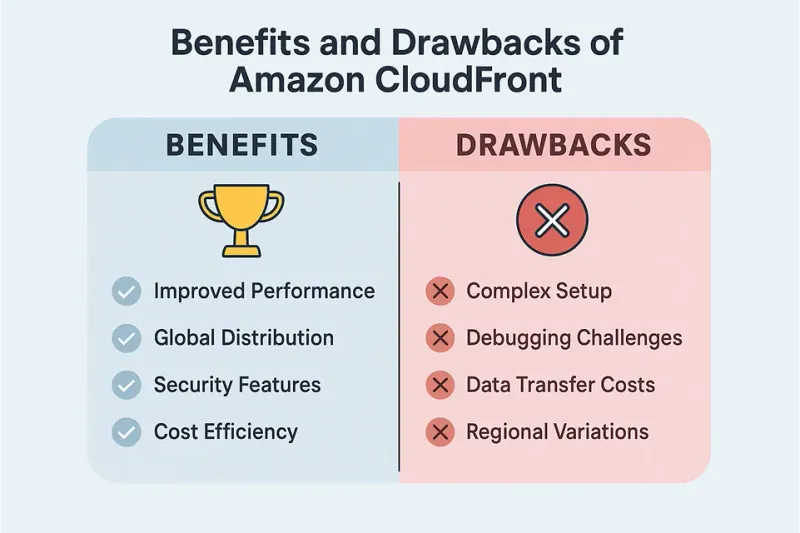
Benefits and Drawbacks of Amazon CloudFront
Speed and Performance Optimization
One of the standout features of Amazon CloudFront is its ability to enhance speed and performance. By utilizing a network of edge locations worldwide, CloudFront caches content closer to users, significantly reducing latency. When a user requests data, it is delivered from the nearest edge location rather than the origin server, leading to faster load times.
Dynamic content acceleration. CloudFront supports real-time metrics and dynamic content acceleration, allowing businesses to monitor performance and make adjustments as needed. For latency-sensitive applications like online gaming or live streaming, this makes a measurable difference.
Personalization at the edge. CloudFront's integration with Lambda@Edge allows developers to run code closer to users — enabling personalized content delivery without adding round-trip latency. E-commerce sites can use this to tailor product recommendations per user, served at edge speed.
Scalability and Global Reach
Amazon CloudFront scales automatically — no capacity planning required. Whether you're serving a hundred users or a hundred million, the infrastructure adjusts without manual intervention.
Traffic spikes handled automatically. Product launches, Black Friday sales, viral content — CloudFront absorbs sudden demand without your origin server straining. No configuration changes needed during peak events.
Global reach without global infrastructure investment. Instead of deploying servers in each region, CloudFront's 600+ edge locations handle delivery worldwide. You pay per use, not per region.
Security scales with you. As traffic grows, CloudFront's integration with AWS Shield and AWS WAF ensures your content delivery stays protected against DDoS attacks and malicious traffic — without any additional setup on your end.
CloudFront Cost Efficiency at Scale
Amazon CloudFront uses a pay-as-you-go model — you only pay for data transferred and requests made. There are no upfront commitments or minimum fees.
S3 + CloudFront is a cost-efficient pairing. Storing assets in Amazon S3 and serving them through CloudFront reduces origin bandwidth costs significantly. Requests served from edge cache never hit your origin, which means lower compute and transfer costs on the origin side.
Costs decrease as you scale. CloudFront uses tiered pricing — the more data you transfer, the lower your per-GB rate becomes. For high-volume workloads, this compounds into meaningful savings over time.
For a full breakdown of how costs are calculated, see our Amazon CloudFront Pricing Guide.
Limitations and Trade-offs Compared to Other CDN Providers
CloudFront is not the right fit for every situation. A few trade-offs worth knowing before you commit:
Setup complexity. Compared to Cloudflare or Fastly, CloudFront has a steeper initial configuration curve. Teams without AWS experience may find the distribution settings, cache behaviors, and IAM permissions harder to navigate.
Support tiers. AWS support is tiered and paid. Unlike some CDN competitors that include responsive support in base plans, CloudFront's developer-tier support is limited to documentation and community forums.
Feature overhead. CloudFront's extensive feature set is powerful, but if your use case is simple — a static site or basic asset delivery — lighter alternatives like Cloudflare's free tier may be faster to set up and cheaper to run.
The key question is whether your stack is already on AWS. If it is, CloudFront's native integrations make it the obvious choice. If you're starting fresh with no AWS dependency, it's worth comparing against simpler options first.
AWS CloudFront Pricing Explained
Breakdown of Amazon CloudFront Pricing Structure
Understanding the pricing structure of Amazon CloudFront is essential for budgeting and planning. CloudFront pricing is based on several factors, including data transfer out to the internet, HTTP/HTTPS requests, and data transfer to AWS services. The costs can vary depending on the geographic region and the amount of data transferred.

In general, the pricing is tiered, meaning that the more data you transfer, the lower the per-unit cost becomes. This tiered pricing model incentivizes businesses to scale their usage, as larger volumes can lead to significant savings.
What's Included in the Free Tier?
For those new to CloudFront, the AWS Free Tier offers a great opportunity to explore its capabilities without incurring costs. The Free Tier includes 1 TB of data transfer out and 2 million HTTP or HTTPS requests per month for the first 12 months.
This allowance is ideal for small businesses or developers looking to test the service before committing to a paid plan. However, it's essential to monitor usage closely, as exceeding the free tier limits can lead to unexpected charges.
Data Transfer, Request Costs, and Cache Invalidation Charges
When evaluating costs, it's crucial to consider all aspects of CloudFront pricing. Data transfer out to the internet is typically the most significant expense, especially for high-traffic websites. Request costs are another factor; each HTTP or HTTPS request incurs a fee, which can add up quickly for popular sites.
Additionally, cache invalidation charges may apply if you need to remove cached content before it expires. While the first 1,000 invalidation paths per month are free, subsequent requests incur a fee. Understanding these elements can help businesses manage their budgets effectively while using CloudFront.
Tips to Optimize and Reduce CloudFront Costs
To maximize cost efficiency, businesses can implement several strategies. First, optimizing cache settings can significantly reduce the number of requests made to the origin server. By setting appropriate cache expiration times and using cache behaviors effectively, organizations can minimize data transfer costs.
Moreover, leveraging CloudFront's regional pricing can also lead to savings. To explore detailed cost breakdowns and make better budgeting decisions, check out our in-depth Amazon CloudFront Pricing Guide — it's your go-to resource for understanding how CloudFront pricing works in real-world scenarios.
Price Classes: Control Which Edge Locations Serve Your Content
By default, CloudFront distributes content across all global edge locations. But if your users are concentrated in one region, you can reduce costs by choosing a Price Class:
- Price Class All — all edge locations globally (highest cost, lowest latency everywhere)
- Price Class 200 — most regions excluding the most expensive (South America, Australia)
- Price Class 100 — North America and Europe only (lowest cost)
If 90% of your traffic is from the US and Europe, Price Class 100 cuts data transfer costs significantly with minimal latency impact. Set this in Distribution Settings → General → Price Class.
Origin Shield: Reduce Origin Load and Improve Cache Hit Ratio
Origin Shield is an optional additional caching layer between CloudFront's regional edge caches and your origin. Enabling it means fewer requests reach your actual server, which reduces origin compute costs and improves cache hit ratios for globally distributed audiences.
It adds a small per-request fee (approximately $0.0075 per 10,000 HTTPS requests depending on region), but typically pays for itself when your origin is under heavy global load. Enable it per origin in your distribution's Origins settings.
Step-by-Step Guide to Setting Up AWS CloudFront
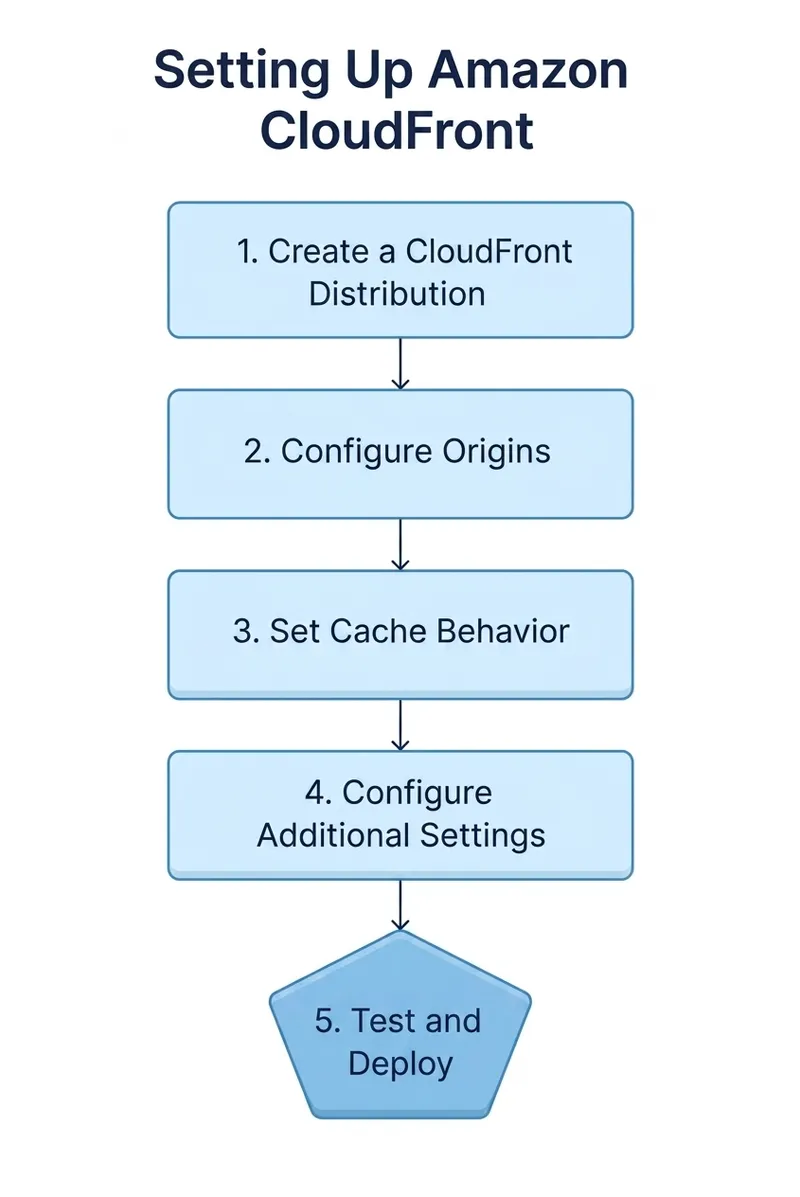
Configuring CloudFront with S3, EC2, or Custom Origins
Setting up Amazon CloudFront begins with configuring the distribution. Users can choose from various origins, including Amazon S3 buckets, EC2 instances, or even custom origins hosted outside of AWS. The first step is to log into the AWS Management Console and navigate to the CloudFront service.
Once there, users can create a new distribution by selecting the desired origin type and configuring settings such as caching behaviors, SSL certificates, and more. This flexibility allows businesses to tailor their CloudFront setup to meet specific requirements.
Important for S3 origins: When connecting CloudFront to an S3 bucket, use Origin Access Control (OAC) — the current AWS recommendation — rather than the older Origin Access Identity (OAI). OAC supports additional S3 bucket policies, AWS KMS encryption, and all S3 regions. In the AWS console, when creating your distribution, select your S3 bucket as origin and choose "Origin access control settings (recommended)" under Origin access. AWS will generate the required bucket policy automatically.
Enabling HTTPS and SSL Certificates with ACM
Security is paramount in today's digital landscape, and enabling HTTPS is a critical step in protecting user data. Amazon CloudFront allows users to secure their content with SSL certificates, which can be easily managed through AWS Certificate Manager (ACM).
To enable HTTPS, users must request a certificate through ACM and associate it with their CloudFront distribution. This process ensures that all data transferred between the user and the CloudFront edge locations is encrypted, providing peace of mind for both businesses and their customers.
Defining Cache Behaviors and Invalidation Policies
Cache behaviors play a crucial role in how CloudFront delivers content. Users can define different cache settings based on the path patterns of their content, allowing for granular control over caching strategies. For example, static assets like images may have longer cache durations, while dynamic content may require more frequent updates.
Additionally, setting up cache invalidation policies is essential for maintaining content accuracy. Users can specify which files to invalidate when updates occur, ensuring that users always receive the latest version of the content. This step is vital for businesses that frequently update their offerings or content.
Amazon CloudFront vs Other CDN Providers
CloudFront vs Cloudflare: A Feature Comparison
When comparing Amazon CloudFront to Cloudflare, several key differences emerge. Cloudflare is known for its robust security features, including DDoS protection and a built-in web application firewall. In contrast, CloudFront excels in integration with other AWS services, making it a preferred choice for businesses already within the AWS ecosystem.
Both CDNs offer competitive performance, but the choice often comes down to specific business needs. For organizations prioritizing security and ease of use, Cloudflare may be more appealing, while those seeking deep integration with AWS might find CloudFront to be the better option.
Akamai vs AWS CloudFront: Enterprise Use Cases
Akamai has long been a leader in the CDN space, particularly for enterprise-level solutions. Its extensive network and advanced features cater to large organizations with complex requirements. However, AWS CloudFront is increasingly becoming a strong contender, thanks to its scalability and cost-effectiveness.
For enterprises already utilizing AWS services, CloudFront offers seamless integration and a familiar interface. In contrast, Akamai may provide more specialized features for certain industries, such as media and entertainment. The decision between these two providers often hinges on the specific needs and existing infrastructure of the business.
Fastly, StackPath, and Other Alternatives
While Amazon CDN CloudFront is a leading choice, several other CDN providers deserve consideration. Fastly, for instance, is known for its real-time caching capabilities and developer-friendly features, making it popular among tech-savvy organizations. StackPath, on the other hand, emphasizes security and performance, catering to businesses that prioritize these aspects.
Each of these alternatives has its strengths and weaknesses, and the best choice depends on the unique requirements of the business. In conclusion, Amazon CloudFront stands out as a powerful and versatile CDN solution, offering numerous benefits for businesses of all sizes.
Case Studies and Real-World Implementation Examples from Perfsys Clients
At Perfsys, we don't just talk cloud — we build it. With over 70 projects delivered globally, our team specializes in creating robust, scalable, and cost-efficient AWS-based solutions. Below are two real-world examples showcasing how we've implemented Amazon CloudFront and other AWS services to solve complex challenges for our clients.
High-Performance Media Delivery with CloudFront
For Roligt AB, a Swedish media company, we built a full-scale Video on Demand platform titta.io. Amazon CloudFront was used to securely distribute video content with DRM and geo-restrictions. Combined with AWS MediaConvert, Cognito, and serverless infrastructure, this solution delivered high availability and performance with pay-per-use cost efficiency. The platform was launched within five months, meeting all media industry standards. Read the full Roligt AB video-on-demand case study.
Cloud-Native CMS Deployment at Scale
Tibica, a cloud-native SaaS provider, needed a headless CMS and DevOps toolset deployable in any AWS account. Perfsys developed a Git-based CMS (t.Site) and used Amazon CDN CloudFront to deliver static sites globally with minimal latency. Integrated with S3, Cognito, and CodeCommit, this serverless architecture enabled fast, secure content updates and simplified multi-tenant management. Read the full Tibica headless CMS case study.
Common Pitfalls and Optimization Tips
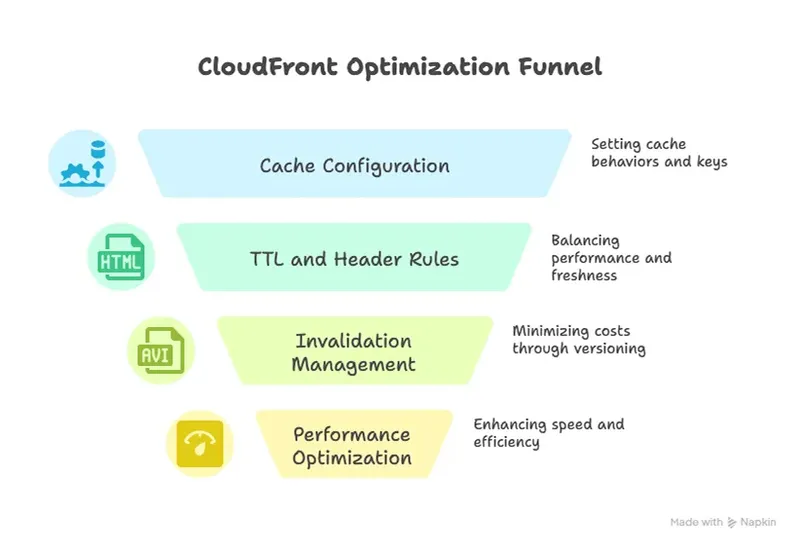
Avoiding Cache Misconfigurations
One of the most common pitfalls when using Amazon CloudFront is misconfiguring cache settings. Cache misconfigurations can lead to stale content being served to users, which can negatively impact user experience. It is crucial to understand how caching works in CloudFront, including the role of cache behaviors and the importance of the cache key.
To avoid these issues, ensure that you are correctly setting cache behaviors based on the content type. For instance, static assets like images and stylesheets can have longer cache durations, while dynamic content should have shorter TTLs. Regularly reviewing and updating your cache configurations can help maintain optimal performance.
Setting Appropriate TTL and Header Rules
Time to Live (TTL) settings dictate how long CloudFront caches your content before checking for updates. Setting appropriate TTL values is essential for balancing performance and freshness of content. A common mistake is to set TTLs too high, which can result in users receiving outdated content.
In addition to TTL settings, configuring header rules is critical. Headers can control caching behavior, and understanding how to use Cache-Control and Expires headers effectively will enhance your CloudFront setup. Tailoring these settings to your specific use case can lead to significant improvements in both performance and user satisfaction.
Managing Invalidations Without Overspending
Content invalidation is a necessary process to ensure that users receive the most up-to-date content. However, frequent invalidations can lead to increased costs. Each invalidation request incurs a charge, so it is essential to manage this process wisely.
One way to minimize costs is to use versioning for your assets. By changing the file name or adding a version number in the URL when updates occur, you can bypass the need for invalidation altogether. This method not only saves money but also simplifies cache management.
Optimization Strategies for Performance and Cost
Optimizing performance and managing costs are two critical aspects of using Amazon CDN CloudFront effectively. To enhance performance, consider enabling features like compression and HTTP/2, which can significantly reduce load times for users. Additionally, utilizing edge locations strategically can ensure that content is delivered from the nearest point to the user, further improving speed.
On the cost management side, regularly analyzing your usage and adjusting your settings based on traffic patterns can help reduce unnecessary expenses. Leveraging CloudFront's reporting tools can provide insights into usage trends, allowing for informed decisions about scaling and optimization.
Related Resources and Learning Paths
Official AWS CloudFront Documentation
The official AWS CloudFront documentation is an invaluable resource for users looking to deepen their understanding of the service. It provides comprehensive guides, best practices, and troubleshooting tips to help users navigate their CloudFront setup effectively.
Accessing the documentation can also help users stay updated on new features and enhancements, ensuring they are making the most of the service's capabilities.
In-Depth Setup, Pricing, and Optimization Guides
For those looking to dive deeper into specific aspects of Amazon CloudFront, there are numerous in-depth guides available. These resources cover topics such as setting up CloudFront from scratch, understanding pricing models, and implementing optimization strategies for performance and cost.
Utilizing these guides can empower users to create a tailored CloudFront experience that meets their unique needs and objectives.
Conclusion and Next Steps
Recap of Key Benefits and Use Cases
Amazon CloudFront offers a robust solution for content delivery, providing users with enhanced performance, security, and scalability. Its ability to cache content at edge locations reduces latency, while integration with other AWS services allows for a seamless user experience.
Whether delivering static assets, dynamic content, or live streams, CloudFront is versatile enough to meet a wide range of use cases. Understanding its features and best practices can lead to improved performance and cost savings.
FAQ
Amazon CloudFront is a content delivery network (CDN) that accelerates the delivery of websites, APIs, and other web content by distributing it across a network of global edge locations. This service helps reduce latency and improves the overall user experience by caching content closer to the end-users.
With AWS CloudFront, users can deliver a variety of content types, including static and dynamic web content, APIs, video streams, and software downloads. The service integrates seamlessly with other AWS services, such as Amazon S3 for storage and Amazon EC2 for compute resources, making it a versatile solution for many applications.
Additionally, CloudFront supports multiple protocols, including HTTP and HTTPS, ensuring secure and reliable content delivery. Users can also leverage features like real-time logging, custom error responses, and geo-restriction to enhance their content delivery strategy.
CloudFront pricing is based on several factors, including data transfer out to the internet, the number of HTTP/HTTPS requests, and invalidation requests. Each of these components contributes to the overall cost, making it essential for users to understand how their usage patterns affect pricing.
Data transfer costs vary by geographic region, so users should be aware of their target audience's location to estimate expenses accurately. Additionally, understanding the pricing tiers for requests can help users optimize their usage and minimize costs effectively.
Amazon CloudFront offers a pay-as-you-go pricing model, which means users only pay for what they use. This model includes charges for data transfer out, HTTP/HTTPS requests, and invalidation requests. Users can also benefit from free tier offerings for the first 12 months, which allows new users to explore the service without incurring costs.
For detailed pricing information, it is advisable to consult the official AWS CloudFront pricing page, as it provides up-to-date data on costs associated with various features and usage levels.
Reducing costs associated with Amazon CloudFront can be achieved through several strategies. First, optimizing cache settings to ensure that content is cached effectively can minimize the amount of data transferred, thus lowering costs. Utilizing versioning for assets can also help avoid unnecessary invalidation requests.
Additionally, users should regularly review their usage reports to identify any patterns or spikes in traffic that could lead to unexpected charges. By understanding these trends, users can adjust their CloudFront configurations accordingly to maintain cost efficiency.
Yes, Amazon CloudFront supports live streaming, making it an excellent choice for delivering real-time video content. The service can be integrated with AWS Elemental Media Services to provide a complete solution for live video streaming.
CloudFront supports various streaming protocols, including HLS (HTTP Live Streaming) and DASH (Dynamic Adaptive Streaming over HTTP), ensuring compatibility with a wide range of devices and platforms.
Minimizing latency is crucial for delivering a seamless user experience. To achieve this with CloudFront, it is essential to leverage the global network of edge locations. By serving content from the nearest edge location to the user, latency can be significantly reduced.
Additionally, enabling features like HTTP/2 and using optimized caching strategies can further enhance performance. Regularly monitoring performance metrics and making adjustments based on user feedback can help ensure that latency remains low.
Amazon CloudFront and Amazon S3 serve different purposes within the AWS ecosystem. Amazon S3 is primarily a storage service that allows users to store and retrieve data, while CloudFront is a CDN designed to accelerate the delivery of that data to end-users.
When used together, S3 can serve as the origin for CloudFront, allowing users to take advantage of S3's durability and scalability while benefiting from CloudFront's speed and global reach. This combination is particularly effective for delivering static assets, such as images and videos, to users quickly and efficiently.
Get Started with Amazon CloudFront
Getting started with Amazon CloudFront is straightforward. Users can create an AWS account, set up their CloudFront distribution, and begin delivering content to users around the world. For those who need assistance or have specific questions, reaching out to AWS support or consulting with experts can provide valuable insights and guidance.
By leveraging the power of Amazon CloudFront, users can enhance their content delivery strategies and provide a superior experience for their audiences.

Maximizing the potential of Amazon CDN CloudFront requires expertise and precision, especially for startups and growing businesses. At Perfsys, we specialize in providing affordable and tailored AWS consulting, development, and support services to help you build robust MVPs, optimize cloud costs, and scale with confidence. Our certified team is committed to propelling your cloud infrastructure forward.


CEO & Founder @ Perfsys | Serverless architect with 10+ years of hands-on experience designing cloud-native architectures on AWS, backed by multiple AWS certifications. His writing bridges deep technical expertise with real-world business strategy, covering topics from AWS best practices to scaling tech-driven organizations.
AWS Experts, On-Demand
Need to move fast? Our cloud team is ready to scale, secure, and optimize your systems. Get serverless expertise, 24/7 support, and seamless CI/CD pipelines when you need it most.
Please accept cookies to load the booking widget.