
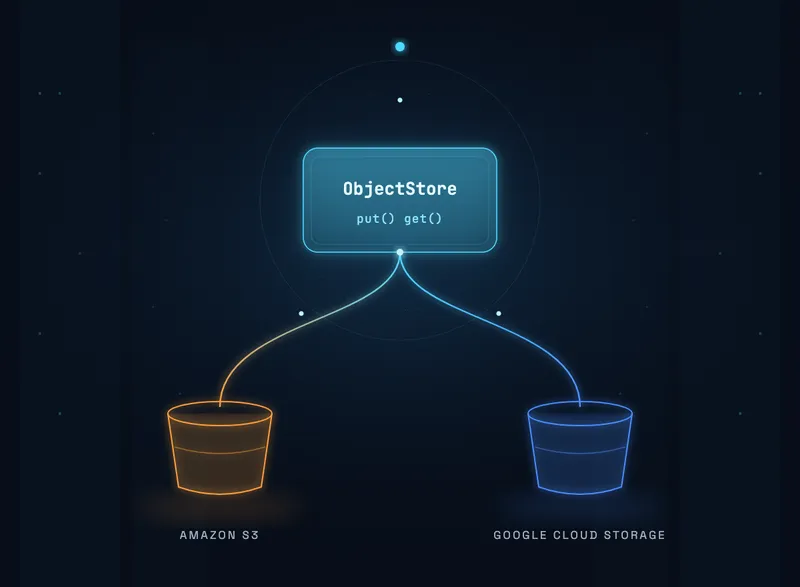
S3 vs Google Cloud Storage: Running Both From One Codebase
Published on Sep 17, 2026

Most teams do not choose multi-cloud object storage. They build on Amazon S3, and then a customer with a data-residency requirement asks for Google Cloud, or an acquisition arrives on the other provider. At that point, S3 vs Google Cloud Storage stops being a comparison article and becomes a pull request.
The good news is that the two services are more alike than the marketing suggests, and the parts that differ are rarely the parts people worry about. Below is what actually matters when one codebase has to write to both. For the platform-level view, see our AWS vs Azure vs GCP comparison.
What Is Genuinely the Same in S3 and GCS
Start here, because it removes most of the anxiety. For standard, hot object storage the two services line up closely on the things that drive both cost and design.
Property | Amazon S3 Standard | Google Cloud Storage Standard |
|---|---|---|
Write operation | PUT, COPY, POST | Class A operation |
Price per 1,000 writes | $0.005 | $0.005 (regional); $0.01 multi-region and dual-region |
Write cost depends on object size? | No, per request | No, per operation |
Read consistency | Strong, read-after-write | Strong, read-after-write |
Age-based expiry | Lifecycle rule | Lifecycle rule |
Storage at rest differs slightly in the other direction, with GCS regional Standard listing a little below S3 Standard. Confirm both against the current Amazon S3 pricing and Cloud Storage pricing pages for your regions, since regional rates vary and committed-use discounts change the picture entirely. Write parity holds for regional GCS buckets; multi-region and dual-region buckets charge double for Class A operations. The point is that, region for region, neither provider is meaningfully cheaper for the write path itself.
The Cost Trap That Applies to Both
Because writes are billed per request and not per byte, a 1 KB object and a 1 GB object cost exactly the same to write in one call. That single fact drives more surprise cloud bills than any provider difference, and it is exactly the kind of usage pattern a Well-Architected cost review is built to catch.
Uploading 10,000 files of 1 MB costs 10,000 write requests. Uploading the same 10 GB as a single object costs one. The storage bill is nearly identical; the request bill differs by four orders of magnitude.
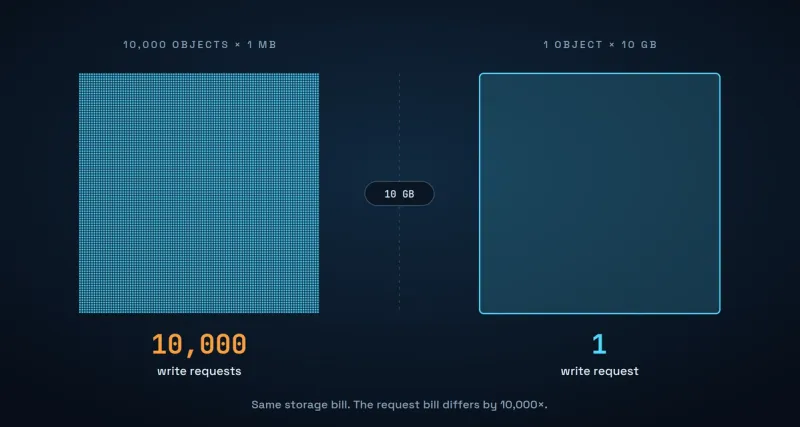
If your system writes many small objects, such as telemetry chunks, per-event files, thumbnails, or append-style logs, request charges can quietly exceed storage charges. The fix is almost always batching or coalescing small writes into larger objects before they leave your service, with an index elsewhere recording what went where. That work pays off identically on both clouds, which is why it belongs in your application rather than in a provider-specific layer.
Two related details are worth knowing. Multipart uploads bill each part as a separate write, so a large object split into 100 parts is roughly 100 write requests rather than one. And DELETE is free on S3, which makes aggressive lifecycle expiry cheap, though early deletion from infrequent-access or archival classes carries its own minimum-duration charges.
What Actually Differs: IRSA vs Workload Identity
This is the real portability work, and it is nearly always underestimated. The object APIs converge; the identity models do not.
On AWS, a workload in EKS assumes a role through IRSA or EKS Pod Identity, and the SDK resolves short-lived credentials with no secret on disk. On Google Cloud, a workload in GKE binds a Kubernetes service account to an IAM principal through Workload Identity, and the SDK resolves credentials the same way. Both are sound. Neither is configured anything like the other.
# EKS: role assumption via a service-account annotation
serviceAccount:
  annotations:
    eks.amazonaws.com/role-arn: arn:aws:iam::123456789012:role/app-storage-writer

# GKE: the same idea, a different mechanism entirely
serviceAccount:
  annotations:
    iam.gke.io/gcp-service-account: app-storage-writer@project-id.iam.gserviceaccount.com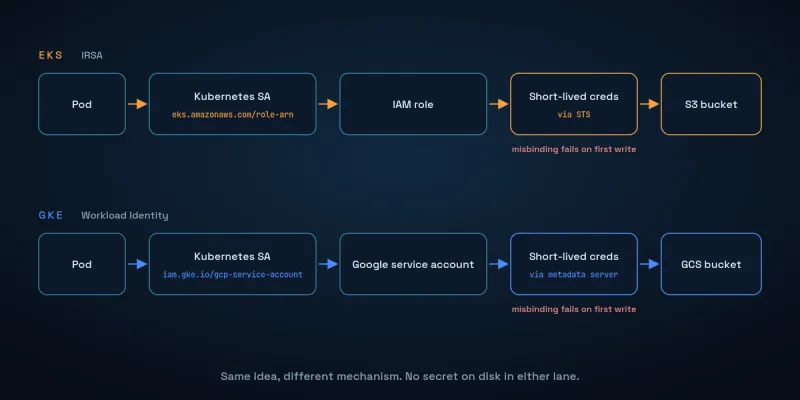
Plan for this to be the slowest part of the migration, and for it to fail late. A misbound identity does not surface at deploy time. It surfaces on the first write attempt, often in a background worker, often as a permission error that reads like a bug in your code. Smoke-test one real write as part of the rollout rather than trusting a green deployment.
Three Ways to Run S3 and Google Cloud Storage From One Codebase
There are three credible approaches, and the right one depends less on engineering taste than on how many backends you genuinely expect to support.
Approach | Best when | Main cost |
|---|---|---|
S3-compatible interop endpoint | A short-lived migration, or a proof of concept | Requires static HMAC keys, losing workload identity |
Native SDK behind a narrow interface | Exactly two backends, and a small surface | Two client libraries and two error paths to maintain |
Abstraction library | Three or more backends, or an unknown roadmap | A new dependency, and the lowest common denominator of features |
The interop shortcut, and its catch
Google Cloud Storage exposes an S3-compatible XML API, so you can often point an existing S3 client at it by overriding the endpoint. For plain uploads and downloads this genuinely works, and it is the fastest way to prove a migration is viable.
The catch is authentication. Interoperability relies on HMAC keys, which are static, long-lived credentials that must be stored and rotated. If you have spent effort eliminating static secrets in favour of workload identity, this hands that ground back. Treat interop as a migration aid with an expiry date, not a destination.
Keep the seam narrow
Whichever route you take, the decision that ages best is keeping the interface small. Most services need far less of an object store than the SDK exposes.
from typing import BinaryIO, Protocol


class ObjectStore(Protocol):
    """Almost every application needs only this much."""

    def put(self, key: str, body: bytes, content_type: str) -> None: ...

    def get(self, key: str) -> BinaryIO: ...
A two-method interface is cheap to implement twice and trivial to fake in tests. Once it grows presigned URLs, multipart control, tagging, and versioning, you are no longer abstracting a store. You are reimplementing one, and portability quietly disappears.
Both implementations fit on one screen. The client libraries differ, but each resolves credentials from its own platform's workload identity, so neither constructor takes a secret.
from typing import BinaryIO

import boto3
from google.cloud import storage


class S3ObjectStore:
    def __init__(self, bucket: str) -> None:
        self._bucket = bucket
        # Credentials resolve from IRSA. Nothing to configure, nothing on disk.
        self._client = boto3.client("s3")

    def put(self, key: str, body: bytes, content_type: str) -> None:
        self._client.put_object(
            Bucket=self._bucket, Key=key, Body=body, ContentType=content_type
        )

    def get(self, key: str) -> BinaryIO:
        return self._client.get_object(Bucket=self._bucket, Key=key)["Body"]


class GCSObjectStore:
    def __init__(self, bucket: str) -> None:
        # Credentials resolve from Workload Identity. Same idea, different mechanism.
        self._bucket = storage.Client().bucket(bucket)

    def put(self, key: str, body: bytes, content_type: str) -> None:
        self._bucket.blob(key).upload_from_string(body, content_type=content_type)

    def get(self, key: str) -> BinaryIO:
        return self._bucket.blob(key).open("rb")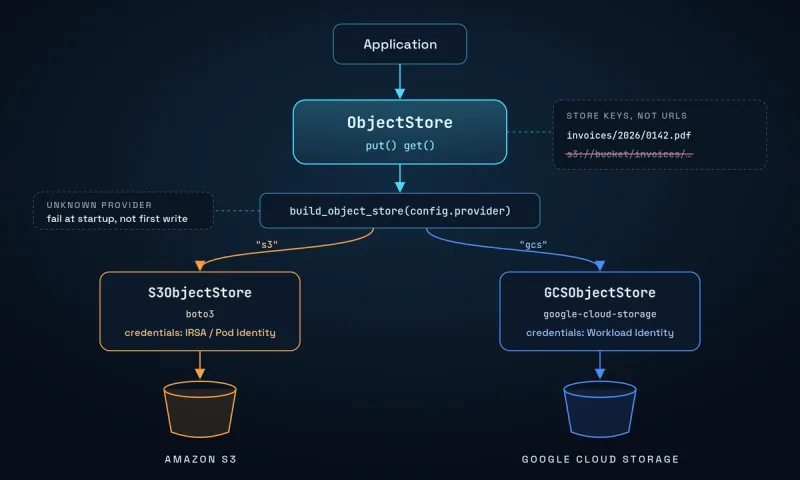
Two habits make the seam hold:
- Store keys, not URLs. Persist a bucket-relative path with no scheme and no host, so the same record is valid whichever backend serves it. Storing a full s3:// URL in a database is a migration you will have to run later.
- Select the backend explicitly. Read it from configuration and fail startup if it is unset, rather than inferring it from ambient credentials. Inference turns a configuration mistake into a silent write to the wrong place.
def build_object_store(config) -> ObjectStore:
    """Fail at startup on an unknown provider, never at the first write."""
    if config.provider == "s3":
        return S3ObjectStore(config.bucket)
    if config.provider == "gcs":
        return GCSObjectStore(config.bucket)
    raise ValueError(f"unknown object store provider: {config.provider!r}")
Error Handling Is Where Parity Breaks
The subtle divergence is not in the happy path but in failures. Both providers distinguish errors you should retry from errors you never should. A throttle or a 5xx deserves a retry, while a malformed key, a missing bucket, or a denied permission does not. But each SDK expresses that distinction through its own error types.
In Python, the whole split fits in one function:
from botocore.exceptions import ClientError
from google.api_core import exceptions as gcs_errors

RETRYABLE_S3_CODES = {"SlowDown", "RequestTimeout", "InternalError", "ServiceUnavailable"}


def is_retryable(err: Exception) -> bool:
    """One classification, both backends, same change."""
    if isinstance(err, ClientError):
        return err.response["Error"]["Code"] in RETRYABLE_S3_CODES
    return isinstance(err, (gcs_errors.TooManyRequests, gcs_errors.ServerError))
If you only implement that classification for one backend, the other will retry permanent failures until a queue backs up and the pipeline stalls. Write the retryable-versus-permanent split for both backends in the same change, and unit-test it. It is a small amount of code that prevents an outage shaped like a slow leak. Track retry counts per backend in your observability and monitoring stack, so a misclassified error shows up on a dashboard before it shows up as a backlog.
Testing S3 and GCS Paths Before Release
A backend that runs in one region and is exercised by no test will rot. MinIO covers the S3 path locally and is widely used for exactly this. A GCS emulator such as fake-gcs-server covers the other. Neither is a perfect replica, so pair them with at least one real write against each provider in a staging environment before release.
Run production traffic through the less-used backend somewhere, even if only for an internal workload. A path with no users is a path nobody notices breaking.
A Practical Recommendation
For most teams adding a second cloud, implement the native SDK behind a two-method interface, select it from explicit configuration, and authenticate with each provider's workload identity. Reach for an abstraction library only when a third backend is genuinely on the roadmap, and treat S3 interoperability as a way to prove the migration works rather than the way you run it. For how we plan this kind of move with clients, see our AWS migration case study.
Then spend the time you saved on the request-count question. Whether your objects are the right size is worth more, on either cloud, than which cloud you picked.
FAQ
Not meaningfully, for standard hot storage in a single region. Writes to a regional GCS bucket list at the same price as S3 Standard, $0.005 per 1,000. Multi-region and dual-region GCS buckets charge $0.01 per 1,000, double the S3 rate. GCS regional Standard storage lists slightly below S3 Standard per GB-month, but regional rates and committed-use discounts move both numbers more than the provider choice does. Check current pricing for your specific regions.
Often yes, for basic uploads and downloads, using the S3-compatible XML API and an endpoint override. The catch is that it requires static HMAC keys rather than workload identity, so it reintroduces long-lived secrets. It is a good migration aid and a poor long-term posture.
No. Write requests are billed per request on both providers, regardless of bytes. A 1 KB object and a 1 GB object each cost one write. This is why workloads producing many small objects often see request charges that rival or exceed their storage charges, and why batching small writes is usually the highest-value optimization available.
Credentials, consistently. The object APIs converge, but IRSA on EKS and Workload Identity on GKE are configured differently, and a misbinding fails on the first real write rather than at deploy time. Budget more time for identity than for the storage code itself.
Only if you expect three or more backends. For exactly two, a two-method interface with a native client behind each is less code than adopting and learning a dependency, and it avoids being limited to the features every backend shares.
Not if you stored bucket-relative keys without a scheme or host. Those are interpreted relative to whichever bucket the reading service is configured with, so they stay valid. If you persisted full s3:// URLs, that becomes a data migration.

We design and run cloud infrastructure for startups and SMBs, including migrations, identity setup, and the cost work that follows.


CEO & Founder @ Perfsys | Serverless architect with 10+ years of hands-on experience designing cloud-native architectures on AWS, backed by multiple AWS certifications. His writing bridges deep technical expertise with real-world business strategy, covering topics from AWS best practices to scaling tech-driven organizations.
AWS Experts, On-Demand
Need to move fast? Our cloud team is ready to scale, secure, and optimize your systems. Get serverless expertise, 24/7 support, and seamless CI/CD pipelines when you need it most.
Please accept cookies to load the booking widget.